



Question: Ch 8 Guidelines and Solution Template Use the Resource Library (JAD session, Questionnaire Results, Service Records sample), Requirements List from Ch 7, Database structure from
Ch 8 Guidelines and Solution Template
Use the Resource Library (JAD session, Questionnaire Results, Service Records sample), Requirements List from Ch 7, Database structure from Ch 6, and emails to complete these activities.
- Pages in new system
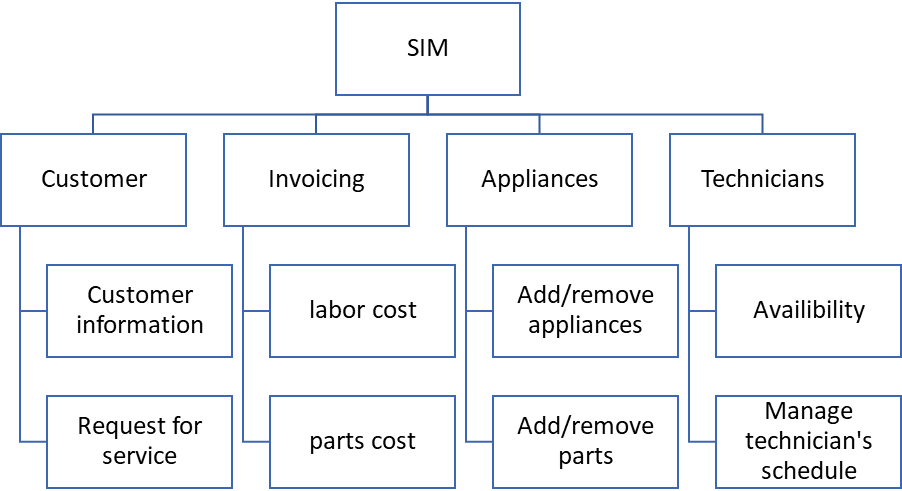
The pages hierarchy should include a menu structure, appointment setting screens, screens to input technicians availability, screens for invoicing purposes (including labor and parts costs). The system should allow for reporting requests.
Sample hierarchial structure below:
- User Experience pages-
Have fun with this! Pick a portion of the system to show good interface design. Use available drawing/modeling/design software.
Include navigation buttons on the screens, make sure the design isnt too busy, include the company logo on the menu, and allow for data validation messages for data that is incorrectly entered. Simply use the guidelines put forth in the text for User Interface Design.
Create:
- One user input screen
- Menu can be main menu, menu of reports, etc.
- Informational screen either results of a search (ie. Parts availability or schedule availability) or a static screen.
- Sample reports
Pick ONE-an exception report, summary report or detail report.
Include a sample design. Specify which type you chose and how your design is tailored for that report type.
- Questions posed:
Report delivery method?
Mobile or not?
Prototyping?
Step by Step Solution
There are 3 Steps involved in it

Get step-by-step solutions from verified subject matter experts