







Question: Changes Management and System Development Lifecycle (SDLC) Bob uses the Change Control System (CCS) to record and track changes. CCS is not integrated with any
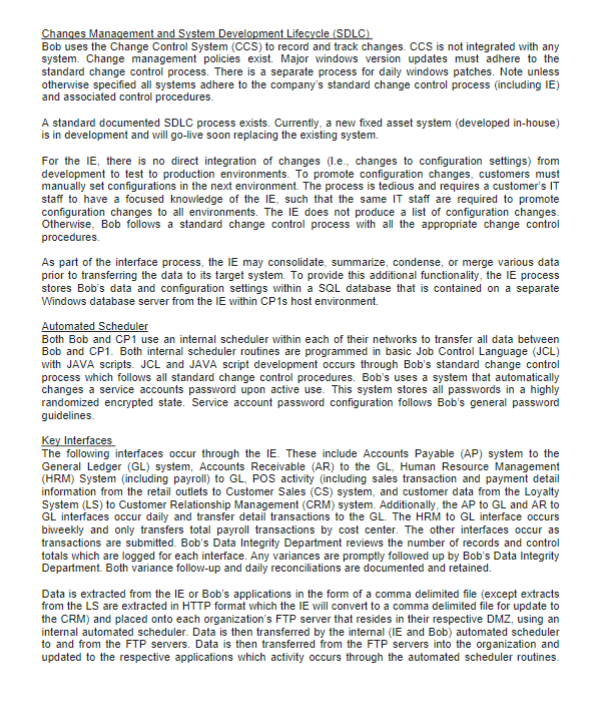
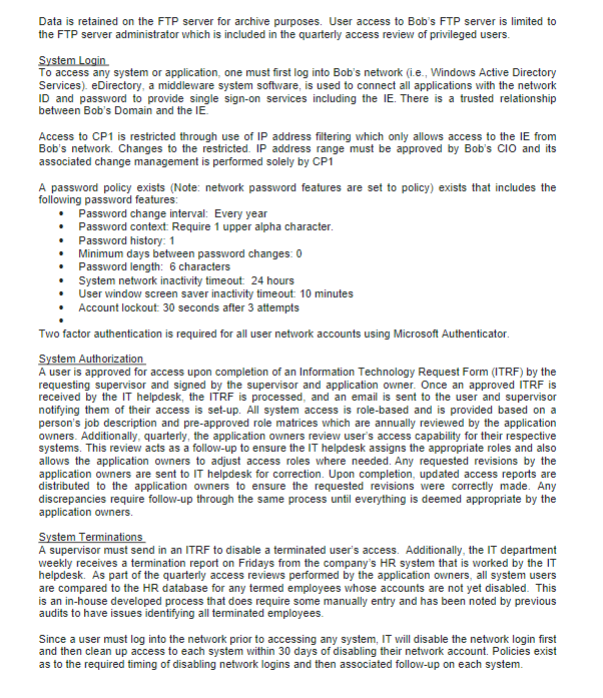
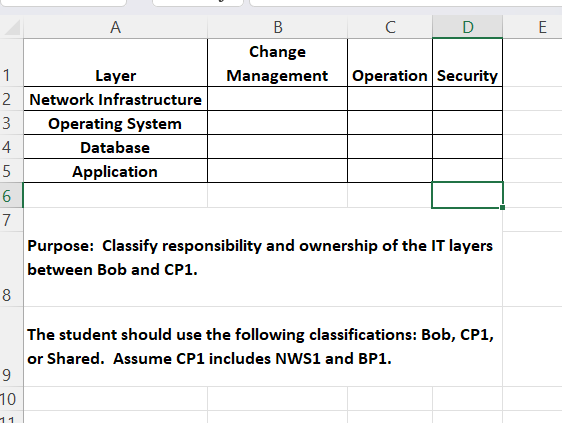
Changes Management and System Development Lifecycle (SDLC) Bob uses the Change Control System (CCS) to record and track changes. CCS is not integrated with any system. Change management policies exist. Major windows version updates must adhere to the standard change control process. There is a separate process for daily windows patches. Note unless otherwise specified all systems adhere to the company's standard change control process (including IE) and associated control procedures. A standard documented SDLC process exists. Currently, a new fixed asset system (developed in-house) is in development and will go-live soon replacing the existing system. For the IE, there is no direct integration of changes (Le., changes to configuration settings) from development to test to production environments. To promote configuration changes, customers must manually set configurations in the next environment. The process is tedious and requires a customer's IT staff to have a focused knowledge of the IE, such that the same IT staff are required to promote configuration changes to all environments. The IE does not produce a list of configuration changes. Otherwise, Bob follows a standard change control process with all the appropriate change control procedures. As part of the interface process, the IE may consolidate, summarize, condense, or merge various data prior to transferring the data to its target system. To provide this additional functionality, the IE process stores Bob's data and configuration settings within a SQL database that is contained on a separate Windows database server from the IE within CP 1s host environment. Automated Scheduler Both Bob and CP1 use an internal scheduler within each of their networks to transfer all data between Bob and CP1. Both internal scheduler routines are programmed in basic Job Control Language (JCL) with JAVA scripts. JCL and JAVA script development occurs through Bob's standard change control process which follows all standard change control procedures. Bob's uses a system that automatically changes a service accounts password upon active use. This system stores all passwords in a highly randomized encrypted state. Service account password configuration follows Bob's general password guidelines. Key Interfaces The following interfaces occur through the IE. These include Accounts Payable (AP) system to the General Ledger (GL) system, Accounts Receivable (AR) to the GL, Human Resource Management (HRM) System (including payroll) to GL, POS activity (including sales transaction and payment detail information from the retail outlets to Customer Sales (CS) system, and customer data from the Loyalty System (LS) to Customer Relationship Management (CRM) system. Additionally, the AP to GL and AR to GL interfaces occur daily and transfer detail transactions to the GL. The HRM to GL interface occurs biweekly and only transfers total payroll transactions by cost center. The other interfaces occur as transactions are submitted. Bob's Data Integrity Department reviews the number of records and control totals which are logged for each interface. Any variances are promptly followed up by Bob's Data Integrity Department. Both variance follow-up and daily reconciliations are documented and retained. Data is extracted from the IE or Bob's applications in the form of a comma delimited file (except extracts from the LS are extracted in HTTP format which the IE will convert to a comma delimited file for update to the CRM) and placed onto each organization's FTP server that resides in their respective DMZ, using an internal automated scheduler. Data is then transferred by the internal (IE and Bob) automated scheduler to and from the FTP servers. Data is then transferred from the FTP servers into the organization and updated to the respective applications which activity occurs through the automated scheduler routines.Data is retained on the FTP server for archive purposes. User access to Bob's FTP server is limited to the FTP server administrator which is included in the quarterly access review of privileged users. System Login To access any system or application, one must first log into Bob's network (ie., Windows Active Directory Services). eDirectory, a middleware system software, is used to connect all applications with the network ID and password to provide single sign-on services including the IE. There is a trusted relationship between Bob's Domain and the IE. Access to CP1 is restricted through use of IP address filtering which only allows access to the IE from Bob's network. Changes to the restricted. IP address range must be approved by Bob's CIO and its associated change management is performed solely by CP1 A password policy exists (Note: network password features are set to policy) exists that includes the following password features: Password change interval: Every year Password context: Require 1 upper alpha character. Password history: 1 . . . Minimum days between password changes: 0 Password length: 6 characters System network inactivity timeout: 24 hours User window screen saver inactivity timeout: 10 minutes Account lockout: 30 seconds after 3 attempts Two factor authentication is required for all user network accounts using Microsoft Authenticator. System Authorization A user is approved for access upon completion of an Information Technology Request Form (ITRF) by the requesting supervisor and signed by the supervisor and application owner. Once an approved ITRF is received by the IT helpdesk, the ITRF is processed, and an email is sent to the user and supervisor notifying them of their access is set-up. All system access is role-based and is provided based on a person's job description and pre-approved role matrices which are annually reviewed by the application owners. Additionally, quarterly, the application owners review user's access capability for their respective systems. This review acts as a follow-up to ensure the IT helpdesk assigns the appropriate roles and also allows the application owners to adjust access roles where needed. Any requested revisions by the application owners are sent to IT helpdesk for correction. Upon completion, updated access reports are distributed to the application owners to ensure the requested revisions were correctly made. Any discrepancies require follow-up through the same process until everything is deemed appropriate by the application owners. System Terminations A supervisor must send in an ITRF to disable a terminated user's access. Additionally, the IT department weekly receives a termination report on Fridays from the company's HR system that is worked by the IT helpdesk. As part of the quarterly access reviews performed by the application owners, all system users are compared to the HR database for any termed employees whose accounts are not yet disabled. This is an in-house developed process that does require some manually entry and has been noted by previous audits to have issues identifying all terminated employees. Since a user must log into the network prior to accessing any system, IT will disable the network login first and then clean up access to each system within 30 days of disabling their network account. Policies exist as to the required timing of disabling network logins and then associated follow-up on each system.A B C D E Change Layer Management Operation Security 2 Network Infrastructure Operating System 4 Database 5 Application 6 7 Purpose: Classify responsibility and ownership of the IT layers between Bob and CP1. 8 The student should use the following classifications: Bob, CP1, or Shared. Assume CP1 includes NWS1 and BP1. 9 10
Step by Step Solution
There are 3 Steps involved in it

Get step-by-step solutions from verified subject matter experts
 Study Help