







Question: Chapter 1 8 Preferences Create a GUI program that stores a user's preferences for a program. Think of the file ( preferences . txt
Chapter Preferences
Create a GUI program that stores a user's preferences for a program. Think of the file preferencestxt where the preferences are stored as a configuration file. Include a module file for the data IO functions and another module file for the presentation layer Frame class.
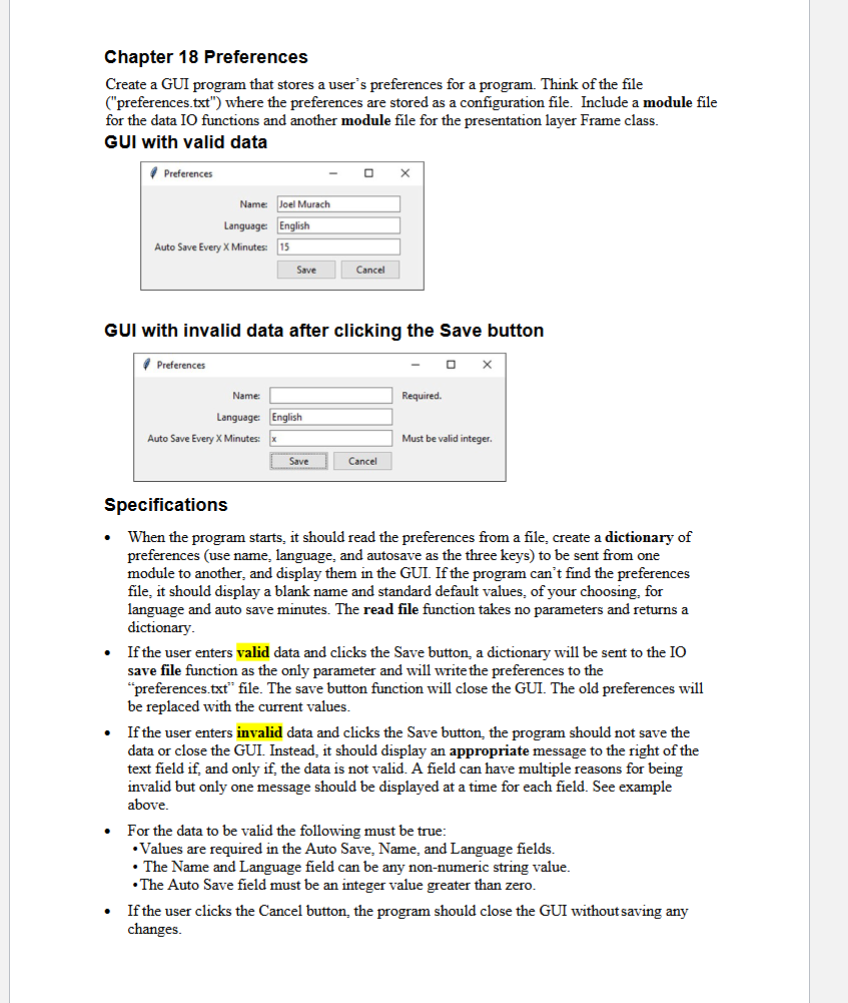
GUI with valid data
GUI with invalid data after clicking the Save button
Specifications
When the program starts, it should read the preferences from a file, create a dictionary of preferences use name, language, and autosave as the three keys to be sent from one module to another, and display them in the GUI. If the program can't find the preferences file, it should display a blank name and standard default values, of your choosing, for language and auto save minutes. The read file function takes no parameters and returns a dictionary.
If the user enters valid data and clicks the Save button, a dictionary will be sent to the IO save file function as the only parameter and will write the preferences to the "preferences.txt file. The save button function will close the GUI. The old preferences will be replaced with the current values.
If the user enters invalid data and clicks the Save button, the program should not save the data or close the GUI. Instead, it should display an appropriate message to the right of the text field if and only if the data is not valid. A field can have multiple reasons for being invalid but only one message should be displayed at a time for each field. See example above.
For the data to be valid the following must be true:
Values are required in the Auto Save, Name, and Language fields.
The Name and Language field can be any nonnumeric string value.
The Auto Save field must be an integer value greater than zero.
If the user clicks the Cancel button, the program should close the GUI without saving any changes.
Note
To display the validation messages, add a label to the third column after each text entry
field. Then, use the same technique for setting text in this label as you do for text entry
fields, and set the text to an empty string if there's no message for the field.
When the program starts the presentation layer module should create a root window, set
the title of the root window, create a "preferencesFrame" object by calling the class
constructor, and display the frame.
The preferencesFrame class constructor will have code to define string variables for the
three input text fields and three output error labels, get the preferences from the file, and
set the input text field variable values. It should also call an 'initComponents' method
that sets up the GUI components.
The GUI will have four rows. The first three rows will have a label, entry field, and label.
The last row will have two buttons. The initComponents method will have code to
populate the first three rows of components and will call a makeButtons method that will
populate the two buttons. The Save button will be set to call a 'save' method.
The save method will hold the business logic that checks for valid data and calls the
method that saves the preferences if the data is valid.
Create a Word document for the output be copying the images of the program windows
to the output document. Use AltPrint Screen to capture the active window or crop the
image in Word to show only the GUI window created by the program.
nameJoel Murach
languageEnglish
autosave
Step by Step Solution
There are 3 Steps involved in it
1 Expert Approved Answer
Step: 1 Unlock

Question Has Been Solved by an Expert!
Get step-by-step solutions from verified subject matter experts
Step: 2 Unlock
Step: 3 Unlock
 Study Help