







Question: Chapter 12 Web Case Study Path of light Yoga Please Help The text book leaves no examples This is my schedule page that will be
Chapter 12 Web Case Study Path of light Yoga
Please Help The text book leaves no examples
This is my schedule page that will be updated to the new Store page:
# # #
#Path of Light Yoga Studio
#
This is my CSS:
* { box-sizing: border-box; } header, nav, main, footer { display: block; } body { background-color: #3F2860; color: #3F2860; font-family: Verdana, Arial, sans-serif; } #wrapper { width: 80%; margin-left: auto; margin-right: auto; background-color: #F5F5F5; min-width: 1200px; max-width: 1480px;} header { background-color: #9BC1C2; background-image: url(lilyheader.jpg); background-position: right; background-repeat: no-repeat; height: 150px; } h1 { padding-top: 50px; padding-left: 2em; } nav { float: left; width: 160px; font-weight: bold; padding: 1em; } nav a { display: block; text-decoration: none; text-align: center; font-weight: bold; border: outset 3px #CCCCCC; margin-bottom: 1em; padding: 1em; } nav a:link { color: #3F2860; } nav a:visited { color: #497777; } nav a:hover { color: #A26100; border: 3px inset #333333; } nav ul { list-style-type: none; padding-left: 0; } main { padding-left: 2em;
padding-right: 2em; margin-left: 170px; padding-top: 1em; } .studio { font-style: italic; } .floatleft { float: left; margin-right: 4em; } .clear { clear: both;} footer { background-color: #9BC1C2; font-size: small; font-style: italic; text-align: center; padding: 1em; } #mobile { display: none; } #desktop { display: inline; } table { width: 60%; border: 1px solid #3F2860; border-collapse: collapse; margin-bottom: 1em; } td, th { padding: 5px; border: 1px solid #3F2860; } tr:nth-of-type(even) { background-color: #9BC1C2; } caption { margin: 1em; font-weight: bold; font-size: 120%; } label { float: left; display: block; text-align: right; font-weight: bold; width: 10em; padding-right: 1em; } input, textarea { display: block; margin-bottom: 2em; } #mySubmit { margin-left: 12em; } form { padding: 3em; } @media only screen and (max-width: 1024px) { body { margin: 0; padding: 0; } #wrapper { width: 100%; min-width: 0; margin: 0; padding: 0; } header { padding-top: 1px; } nav { float: none; padding-left: 2em; width: auto; } nav a { padding: 0.2em; margin-left: 0.3em; float: left; width: 23%; } main { padding: 2.5em 1em; margin: 0; font-size: 90%; clear: both; } #hero img { width: 100%; height: auto; } h2, h3, p, dl { padding-left: 2em; padding-right: 2em; } main ul { margin-left: 2em; } .floatleft { margin-left: 2em; margin-bottom: 1em; } .clear { padding-left: 2em; } } @media only all and (max-width: 768px) { h1 { font-size: 2em; padding-top: 0.25em; padding-left: 1.5em; width: 85%; } nav a { padding: 0.5em; width: 45%; float: left; min-width: 6em; margin-left: 0.5em; } main { padding-top: 0; } .floatleft { float: none; display: none; } #hero { display: none; }
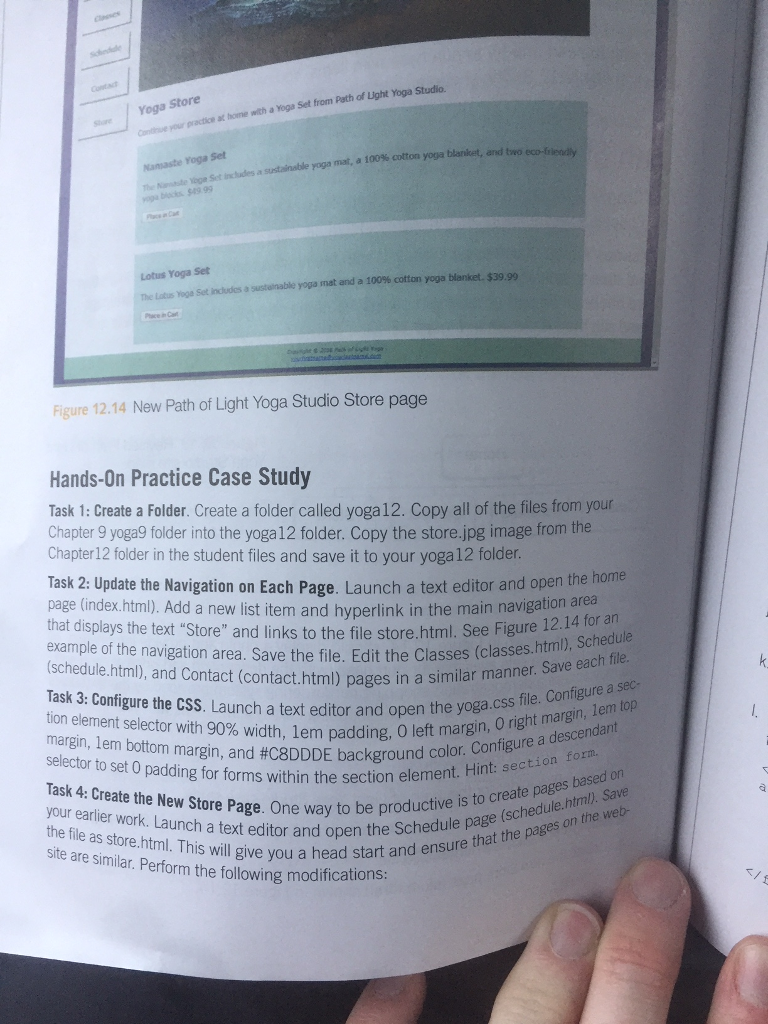
Set from Path of Light Yoga Studio. e Yoga Store Conthiue your practice at hoime with a Yoga Namaste Yoga Set The Nantte Yoge Set agist inchales a sustainable yoga mat, a 100% cotton yoga blanket, and two 949 99 Lotus Yoga Set set includes asstenable yoga mat and a 100% cotton yoga blanket $39.99 Figure 12.14 New Path of Light Yoga Studio Store page Hands-On Practice Case Study Task 1: Create a Folder. Create a folder called yoga 12. Copy all of the files from your Chapter 9 yoga9 folder into the yoga 12 folder. Copy the store.jpg image from the Chapter12 folder in the student files and save it to your yoga12 folder. Task 2: Update the Navigation on Each Page. Launch a text editor and open the home page (index.html). Add a new list item and hyperlink in the main navigation are that displays the text "Store" and links to the file store.html. See Figure 12.14 example of the navigation area. Save the file. Edit the Classes (classes.html, (schedule.html), and Contact (contact.html) pages in a similar n Task 3: Configure the CSS. Launch a text editor and open the yo tion element selector with 90% width, lem padding, 0 left ma margin, em bottom margin, and #C8DDDE background c selector to set 0 padding for forms within the section eleme margin, 0 right margin, lem top color. Configure a descendant Task 4: Create the New Store Page. One way to be pro your earlier work. Launch a text editor and open the file as store. html. This will give head sta Schedule page (schedule.html. Save on the web productive is to create pages based on are similar. Perform the following modifications Perform th eyou a head start and ensure that the pages
Step by Step Solution
There are 3 Steps involved in it

Get step-by-step solutions from verified subject matter experts
 Study Help