





Question: CHAPTER 3 . Capstone Exercise Capstone Exercise MyITLab Th hot a in de lgourmet food is over the pasto r Review beled to inquire about
CHAPTER 3 . Capstone Exercise Capstone Exercise
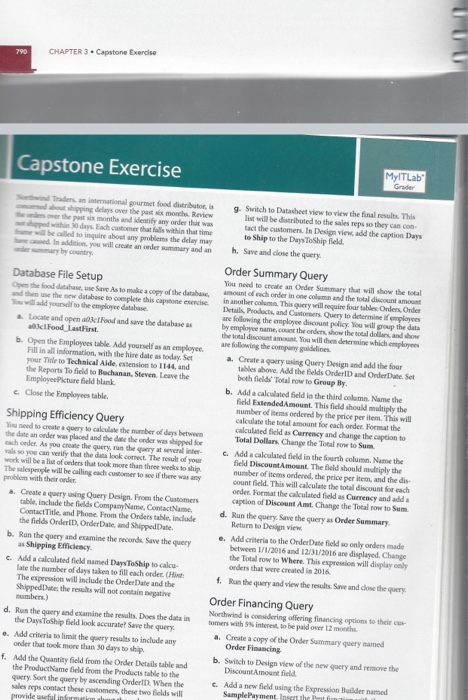
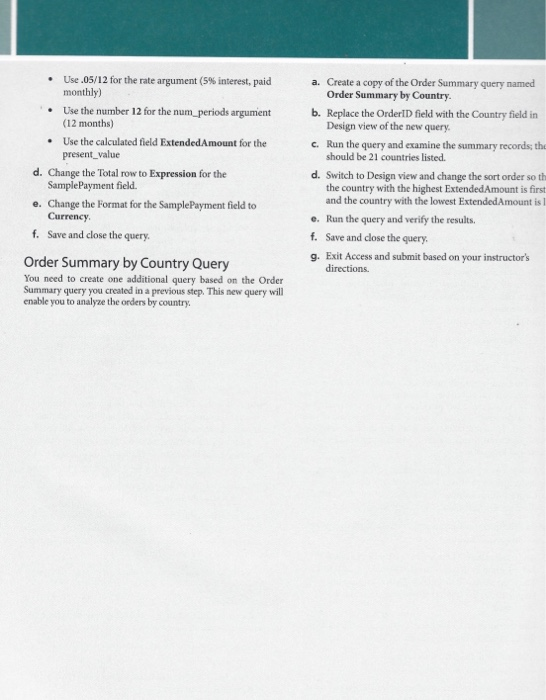
CHAPTER 3 . Capstone Exercise Capstone Exercise MyITLab Th hot a in de lgourmet food is over the pasto r Review beled to inquire about any problems the day 9 Switch to Datasheet view to view the final results. This list will be distributed to the sales reps so they can con tact the customers. In Design View add the caption Duys to Ship to the DaysToShip field h. Save and dose the query Database File Setup the food d e Save As to make a copy of the database dhe the database to complete this conce o d to the employee database Locate and open and save the databases Food Last First b. Open the Employees table Add yourself as an employee Fill in all information with the line date as today, Set your Tinteto Technical Aldextension to 114 and the Reports To fled to Buchanan, Steven Leave the Employee Picture field blank Close the Employees table Order Summary Query You need to create an Order Sommary that will show the local amount of each ander in one column the total de in another column. This will require four table Onde Onder Details Products and Customers. Query to determinedeployees are following the employee discount policy. You will pop the data by employment the onder how the total doll how Shipping Efficiency Query Womend to create a query to calculate the umber of days between the date an order was placed and the date the oder a pped cachonder. As you create the theory als so you can verify that the look comect. The to you work will be a list of orders that took more than the west The salespeople will be calling each one o f the problem with their order a. Create a r ing Query Design. From the Customers table include the fields Company Name Contact Name Contact Title and Phone From the Orders table indade the fields Order Order Date and shipped Date b. Run the query and examine the records Save the query as Shipping Efficiency Ada calculated field med Dans Toship to calco Late the number of days taken to fill each oder Hot The expression will include the Order Date and the Shipped Date the results will not give number) d. Run the query and comine the results. Does the data in the DaysToShield look accur ? Save the query . Add criteria to limit the results to indade onder that took more than 30 days to ship f. Add the Quantity field from the Order Details table and the Product Name field from the Products t o the Gry Sort the query by ascending Order When the sales reps contact these customers, these two fields will provide wwful information ab are following the company guidelines a. Create a query using Query Design and add the four talles above. Add the fields Onderland Ondere Set both fields Total row to Group By b. Aded a calated field is the third olum. Name the field Extended Amount. This field should multiply the number of items ordered by the price per item. This will calculate the total amount for each ander Format the calculated field as Currency and change the caption to Total Dollars. Change the Total row to Sum c. Add a calculated field in the fourth column. Name the field Discount Amount. The field should p ly the number of items ordered the price per item, and the dis countfield. This will calculate the total discount for each onde. For the calculated Beld as Currency and caption of Discount At Change the Totalrow to Sum d. Run the query Save the curya Order Summary Return to Design View e. Add criteria to the Order Date fields only ones made between 1/1/2016 and 12/31/2016 are displayed Change the Total row to Where. This expression will display only orders that were created in 2016. f. Run the query and view the results Sime and done the query Order Financing Query Northwind is considering offering facing a s to their tomers with interest to be paid over 12 months a. Create a copy of the Order Summary query named Order Financing b. Switch to Design view of the new query and remove the Discount Amountfield c. Add a new field using the expression Builder med Sample Payment Instthet Use .05/12 for the rate argument (5% interest, paid monthly) Use the number 12 for the num periods argument (12 months) Use the calculated field Extended Amount for the present_value d. Change the Total row to Expression for the Sample Payment field. e. Change the Format for the Sample Payment field to Currency f. Save and close the query. a. Create a copy of the Order Summary query named Order Summary by Country. b. Replace the OrderID field with the Country field in Design view of the new query. c. Run the query and examine the summary records, the should be 21 countries listed. d. Switch to Design view and change the sort order so th the country with the highest Extended Amount is first and the country with the lowest Extended Amount is e. Run the query and verify the results, f. Save and close the query. g. Exit Access and submit based on your instructor's directions. Order Summary by Country Query You need to create one additional query based on the Order Summary query you created in a previous step. This new query will enable you to analyze the orders by country. CHAPTER 3 . Capstone Exercise Capstone Exercise MyITLab Th hot a in de lgourmet food is over the pasto r Review beled to inquire about any problems the day 9 Switch to Datasheet view to view the final results. This list will be distributed to the sales reps so they can con tact the customers. In Design View add the caption Duys to Ship to the DaysToShip field h. Save and dose the query Database File Setup the food d e Save As to make a copy of the database dhe the database to complete this conce o d to the employee database Locate and open and save the databases Food Last First b. Open the Employees table Add yourself as an employee Fill in all information with the line date as today, Set your Tinteto Technical Aldextension to 114 and the Reports To fled to Buchanan, Steven Leave the Employee Picture field blank Close the Employees table Order Summary Query You need to create an Order Sommary that will show the local amount of each ander in one column the total de in another column. This will require four table Onde Onder Details Products and Customers. Query to determinedeployees are following the employee discount policy. You will pop the data by employment the onder how the total doll how Shipping Efficiency Query Womend to create a query to calculate the umber of days between the date an order was placed and the date the oder a pped cachonder. As you create the theory als so you can verify that the look comect. The to you work will be a list of orders that took more than the west The salespeople will be calling each one o f the problem with their order a. Create a r ing Query Design. From the Customers table include the fields Company Name Contact Name Contact Title and Phone From the Orders table indade the fields Order Order Date and shipped Date b. Run the query and examine the records Save the query as Shipping Efficiency Ada calculated field med Dans Toship to calco Late the number of days taken to fill each oder Hot The expression will include the Order Date and the Shipped Date the results will not give number) d. Run the query and comine the results. Does the data in the DaysToShield look accur ? Save the query . Add criteria to limit the results to indade onder that took more than 30 days to ship f. Add the Quantity field from the Order Details table and the Product Name field from the Products t o the Gry Sort the query by ascending Order When the sales reps contact these customers, these two fields will provide wwful information ab are following the company guidelines a. Create a query using Query Design and add the four talles above. Add the fields Onderland Ondere Set both fields Total row to Group By b. Aded a calated field is the third olum. Name the field Extended Amount. This field should multiply the number of items ordered by the price per item. This will calculate the total amount for each ander Format the calculated field as Currency and change the caption to Total Dollars. Change the Total row to Sum c. Add a calculated field in the fourth column. Name the field Discount Amount. The field should p ly the number of items ordered the price per item, and the dis countfield. This will calculate the total discount for each onde. For the calculated Beld as Currency and caption of Discount At Change the Totalrow to Sum d. Run the query Save the curya Order Summary Return to Design View e. Add criteria to the Order Date fields only ones made between 1/1/2016 and 12/31/2016 are displayed Change the Total row to Where. This expression will display only orders that were created in 2016. f. Run the query and view the results Sime and done the query Order Financing Query Northwind is considering offering facing a s to their tomers with interest to be paid over 12 months a. Create a copy of the Order Summary query named Order Financing b. Switch to Design view of the new query and remove the Discount Amountfield c. Add a new field using the expression Builder med Sample Payment Instthet Use .05/12 for the rate argument (5% interest, paid monthly) Use the number 12 for the num periods argument (12 months) Use the calculated field Extended Amount for the present_value d. Change the Total row to Expression for the Sample Payment field. e. Change the Format for the Sample Payment field to Currency f. Save and close the query. a. Create a copy of the Order Summary query named Order Summary by Country. b. Replace the OrderID field with the Country field in Design view of the new query. c. Run the query and examine the summary records, the should be 21 countries listed. d. Switch to Design view and change the sort order so th the country with the highest Extended Amount is first and the country with the lowest Extended Amount is e. Run the query and verify the results, f. Save and close the query. g. Exit Access and submit based on your instructor's directions. Order Summary by Country Query You need to create one additional query based on the Order Summary query you created in a previous step. This new query will enable you to analyze the orders by country

Step by Step Solution

There are 3 Steps involved in it

1 Expert Approved Answer
Step: 1 Unlock blur-text-image

Question Has Been Solved by an Expert!

Get step-by-step solutions from verified subject matter experts

Step: 2 Unlock
Step: 3 Unlock

Students Have Also Explored These Related General Management Questions!