





Question: Chapter 4: Implementation of stored procedure and trigger Create a new schema called Sampleaccounts. Follow the following steps: 1. Create Sampleaccounts database (or schema) 2.
Chapter 4: Implementation of stored procedure and
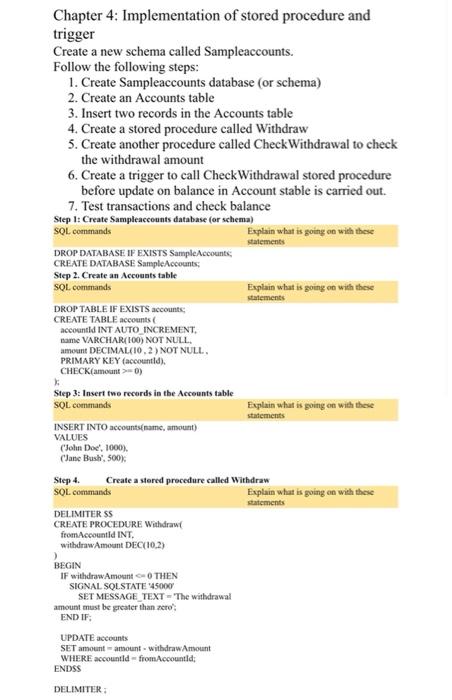
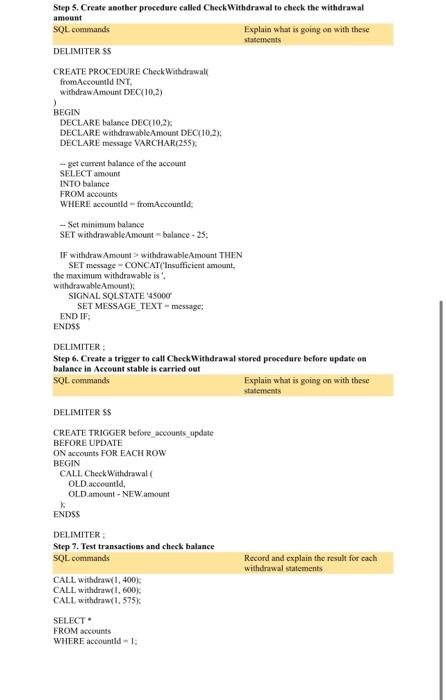
Chapter 4: Implementation of stored procedure and trigger Create a new schema called Sampleaccounts. Follow the following steps: 1. Create Sampleaccounts database (or schema) 2. Create an Accounts table 3. Insert two records in the Accounts table 4. Create a stored procedure called Withdraw 5. Create another procedure called Check Withdrawal to check the withdrawal amount 6. Create a trigger to call Check Withdrawal stored procedure before update on balance in Account stable is carried out. 7. Test transactions and check balance Step 1: Create Sampleaccounts database for schema) SOL commands Explain what is going on with these statements DROP DATABASE IF EXISTS Sample Account CREATE DATABASE SampleAccounts: Step 2. Create an Accounts table SOL commands Explain what is going on with these statements DROP TABLE IF EXISTS accounts: CREATE TABLE accounts accountld INT AUTO INCREMENT name VARCHAR(100) NOT NULL amount DECIMAL(10,2) NOT NULL, PRIMARY KEY (accountld). CHECK(amount > 0) Step 3: Insert two records in the Accounts table SOL commands Explain what is going on with these statements INSERT INTO accounts(name, amount) VALUES ('John Doe', 1000). Jane Bush, 500) Step 4. Create a stered procedure called Withdraw SOL commands Explain what is going on with these statements DELIMITER SS CREATE PROCEDURE Withdraw from Accountld INT. withdrawAmount DEC(10.2) BEGIN IF withdrawAmount 0 THEN SIGNAL SOLSTATE 45000 SET MESSAGE_TEXT='The withidrawal amount must be greater than zero END IF UPDATE accounts SET amount amount withdraw Amount WHERE accountld-fromAccountld: ENDSS DELIMITER: Step 5. Create another procedure called Check Withdrawal to check the withdrawal amount SOL commands Explain what is going on with these statements DELIMITER SS CREATE PROCEDURE Check Withdrawal from Accountld INT, withdraw Amount DEC(10.2) > BEGIN DECLARE balance DEC(10,2% DECLARE withdrawable Amount DEC 10.2): DECLARE message VARCHAR(255) -- get current balance of the account SELECT amount INTO balance FROM accounts WHERE accountld - from Accountld: - Set minimum balance SET withdrawable Amount balance - 25: IF withdraw Amount withdrawable Amount THEN SET message - CONCAT('insufficient amount the maximum withdrawable is'. withdrawable Amount) SIGNAL SOLSTATE 45000 SET MESSAGE TEXT-message: END IF ENDSS DELIMITER Step 6. Create a trigger to call Check withdrawal stored procedure before update on balance in Account stable is carried out SQL commands Explain what is going on with these statements DELIMITER SS CREATE TRIGGER before accounts update BEFORE UPDATE ON accounts FOR EACH ROW BEGIN CALL Check Withdrawal OLD.account, OLD.amount - NEW amount ENDSS DELIMITER Step 7. Test transactions and check balance SOL commands Record and explain the result for cach withdrawal statements CALL withdraw I, 400% CALL withdraw 1.600), CALL withdraw 1.575) SELECT FROM accounts WHERE accountld-1

Step by Step Solution

There are 3 Steps involved in it

1 Expert Approved Answer
Step: 1 Unlock blur-text-image

Question Has Been Solved by an Expert!

Get step-by-step solutions from verified subject matter experts

Step: 2 Unlock
Step: 3 Unlock

Students Have Also Explored These Related General Management Questions!