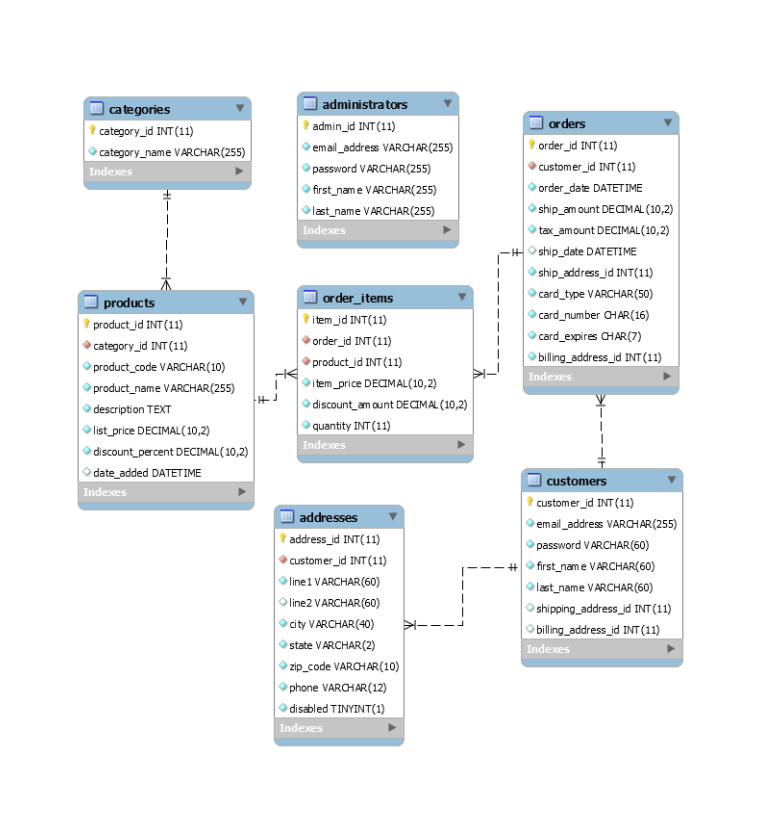
Question: -- Chapter 5 Homework Insert, update, and delete data Use your copy of the my_guitar_shop database: _mgs If you need to restore the database
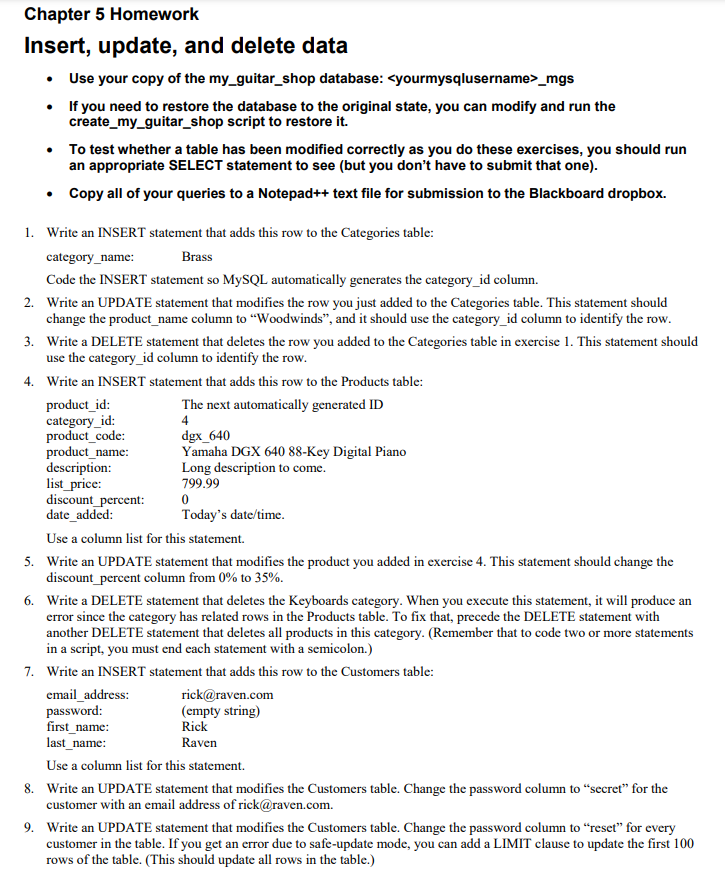
\ -- Chapter 5 Homework Insert, update, and delete data Use your\ -- copy of the my_guitar_shop database: _mgs If you need to restore the

Chapter 5 Homework Insert, update, and delete data Use your copy of the my_guitar_shop database: _mgs If you need to restore the database to the original state, you can modify and run the create_my_guitar_shop script to restore it. To test whether a table has been modified correctly as you do these exercises, you should run an appropriate SELECT statement to see (but you don't have to submit that one). Copy all of your queries to a Notepad++ text file for submission to the Blackboard dropbox. 1. Write an INSERT statement that adds this row to the Categories table: category_name: Brass Code the INSERT statement so MySQL automatically generates the category_id column. 2. Write an UPDATE statement that modifies the row you just added to the Categories table. This statement should change the product_name column to "Woodwinds", and it should use the category_id column to identify the row. 3. Write a DELETE statement that deletes the row you added to the Categories table in exercise 1. This statement should use the category_id column to identify the row. 4. Write an INSERT statement that adds this row to the Products table: product_id: The next automatically generated ID category_id: 4 product_code: dgx_640 product_name: Yamaha DGX 640 88-key Digital Piano description: Long description to come. list_price: 799.99 discount_percent: 0 date_added: Today's date/time. Use a column list for this statement 5. Write an UPDATE statement that modifies the product you added in exercise 4. This statement should change the discount_percent column from 0% to 35%. 6. Write a DELETE statement that deletes the Keyboards category. When you execute this statement, it will produce an error since the category has related rows in the Products table. To fix that, precede the DELETE statement with another DELETE statement that deletes all products in this category. (Remember that to code two or more statements in a script, you must end each statement with a semicolon.) 7. Write an INSERT statement that adds this row to the Customers table: email_address: rick@raven.com password: (empty string) first_name: Rick last_name: Raven Use a column list for this statement. 8. Write an UPDATE statement that modifies the Customers table. Change the password column to secret for the customer with an email address of rick@raven.com. 9. Write an UPDATE statement that modifies the Customers table. Change the password column to reset for every customer in the table. If you get an error due to safe-update mode, you can add a LIMIT clause to update the first 100 rows of the table. (This should update all rows in the table.) categories category_id INT(11) category_name VARCHAR(255) Indexes administrators admin_id INT (11) email_address VARCHAR(255) password VARCHAR(255) first_name VARCHAR(255) last_name VARCHAR(255) Indexes orders order_id INT (11) customer_id INT (11) order_date DATETIME ship_amount DECIMAL (10,2) tax_amount DECIMAL (10,2) -Hship_date DATETIME ship_address_id INT(11) card_type VARCHAR(50) card_number CHAR(16) card_expires CHAR(7) billing_address_id INT (11) Indexes 1 products product_id INT (11) category_id INT (11) product_code VARCHAR(10) product_name VARCHAR(255) description TEXT list_price DECIMAL (10,2) discount_percent DECIMAL (10,2) date_added DATETIME Indexes order_items item_id INT(11) order_id INT(11) product_id INT(11) item_price DECIMAL (10,2) discount_amount DECIMAL (10,2) quantity INT(11) Indexes addresses address_id INT(11) customer_id INT (11) line 1 VARCHAR(60) line VARCHAR(60) city VARCHAR(40) state VARCHAR(2) zip_code VARCHAR(10) phone VARCHAR(12) disabled TINYINT(1) Indexes customers customer_id INT (11) email_address VARCHAR(255) password VARCHAR(60) #first_name VARCHAR(60) last_name VARCHAR(60) shipping_address_id INT(11) billing_address_id INT (11) Indexes

Step by Step Solution

There are 3 Steps involved in it

1 Expert Approved Answer
Step: 1 Unlock blur-text-image
Question Has Been Solved by an Expert!

Get step-by-step solutions from verified subject matter experts

Step: 2 Unlock
Step: 3 Unlock

Students Have Also Explored These Related Databases Questions!