





Question: Insert, update, and delete data Use your copy of the ap database: _ap If you need to restore the database to the original state, you
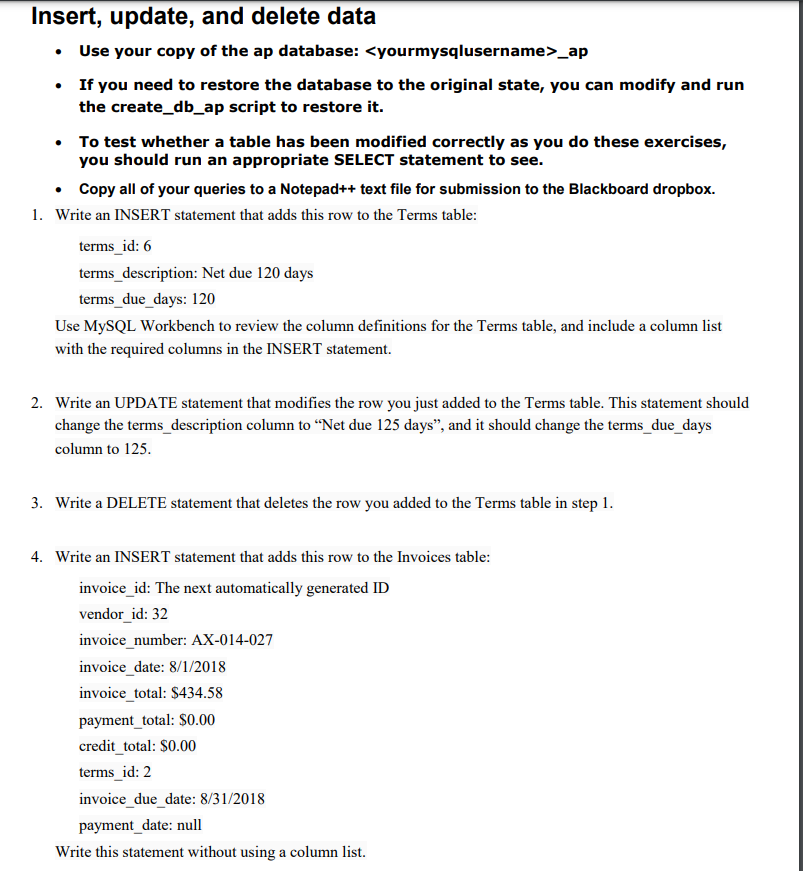
 Insert, update, and delete data Use your copy of the apdatabase: _ap If you need to restore the database to the originalstate, you can modify and run the create_db_ap script to restore it.

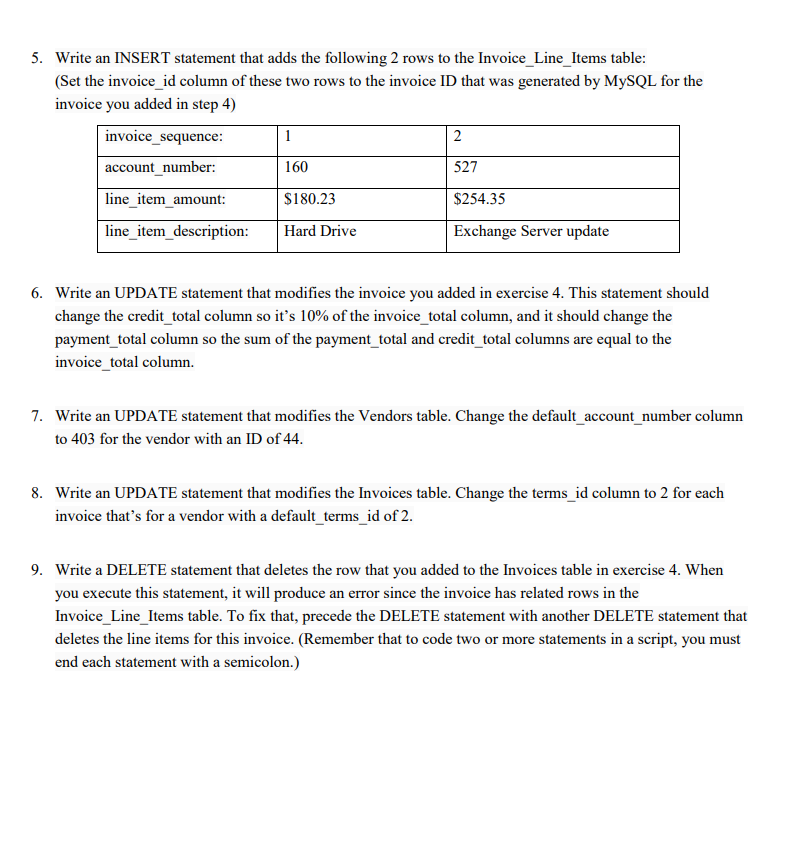
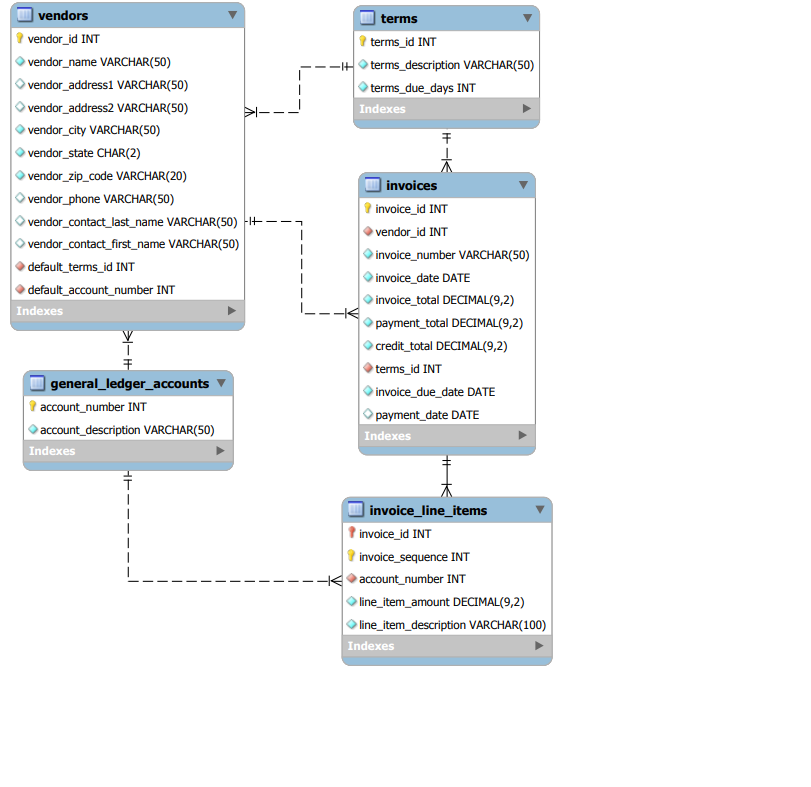
Insert, update, and delete data Use your copy of the ap database: _ap If you need to restore the database to the original state, you can modify and run the create_db_ap script to restore it. To test whether a table has been modified correctly as you do these exercises, you should run an appropriate SELECT statement to see. Copy all of your queries to a Notepad++ text file for submission to the Blackboard dropbox. 1. Write an INSERT statement that adds this row to the Terms table: terms_id: 6 terms_description: Net due 120 days terms_due_days: 120 Use MySQL Workbench to review the column definitions for the Terms table, and include a column list with the required columns in the INSERT statement. 2. Write an UPDATE statement that modifies the row you just added to the Terms table. This statement should change the terms_description column to Net due 125 days, and it should change the terms_due_days column to 125. 3. Write a DELETE statement that deletes the row you added to the Terms table in step 1. 4. Write an INSERT statement that adds this row to the Invoices table: invoice_id: The next automatically generated ID vendor_id: 32 invoice_number: AX-014-027 invoice_date: 8/1/2018 invoice_total: $434.58 payment_total: $0.00 credit_total: $0.00 terms_id: 2 invoice_due_date: 8/31/2018 payment_date: null Write this statement without using a column list. 5. Write an INSERT statement that adds the following 2 rows to the Invoice_Line_Items table: (Set the invoice_id column of these two rows to the invoice ID that was generated by MySQL for the invoice you added in step 4) invoice_sequence: 1 2 account_number: 160 527 line_item_amount: $180.23 $254.35 line_item_description: Hard Drive Exchange Server update 6. Write an UPDATE statement that modifies the invoice you added in exercise 4. This statement should change the credit_total column so it's 10% of the invoice_total column, and it should change the payment_total column so the sum of the payment_total and credit_total columns are equal to the invoice_total column. 7. Write an UPDATE statement that modifies the Vendors table. Change the default_account_number column to 403 for the vendor with an ID of 44. 8. Write an UPDATE statement that modifies the Invoices table. Change the terms_id column to 2 for each invoice that's for a vendor with a default_terms_id of 2. 9. Write a DELETE statement that deletes the row that you added to the Invoices table in exercise 4. When you execute this statement, it will produce an error since the invoice has related rows in the Invoice_Line_Items table. To fix that, precede the DELETE statement with another DELETE statement that deletes the line items for this invoice. (Remember that to code two or more statements in a script, you must end each statement with a semicolon.) terms terms_id INT -It terms_description VARCHAR(50) terms_due_days INT Indexes vendors vendor_id INT vendor_name VARCHAR(50) vendor_address1 VARCHAR(50) vendor_address2 VARCHAR(50) vendor_city VARCHAR(50) vendor_state CHAR(2) vendor_zip_code VARCHAR(20) vendor_phone VARCHAR(50) vendor_contact_last_name VARCHAR(50) +--- vendor_contact_first_name VARCHAR(50) default_terms_id INT default_account_number INT Indexes V F general_ledger_accounts account_number INT account_description VARCHAR(50) Indexes invoices invoice_id INT vendor_id INT invoice_number VARCHAR(50) invoice_date DATE invoice_total DECIMAL(9,2) payment_total DECIMAL(9,2) credit_total DECIMAL(9,2) terms_id INT invoice_due_date DATE payment_date DATE Indexes invoice_line_items invoice_id INT invoice_sequence INT account_number INT line_item_amount DECIMAL(9,2) line_item_description VARCHAR(100) Indexes 1
Step by Step Solution

There are 3 Steps involved in it

1 Expert Approved Answer
Step: 1 Unlock blur-text-image
Question Has Been Solved by an Expert!

Get step-by-step solutions from verified subject matter experts

Step: 2 Unlock
Step: 3 Unlock

Students Have Also Explored These Related Databases Questions!