







Question: Chapter 5: Multiplication Table 2 Multiplication Table O X Number: 13 Multiplication Table: Display Table 13.00*1= 13.00 13.00*2= 26.00 13.00 *3 = 39.00 13.00 *
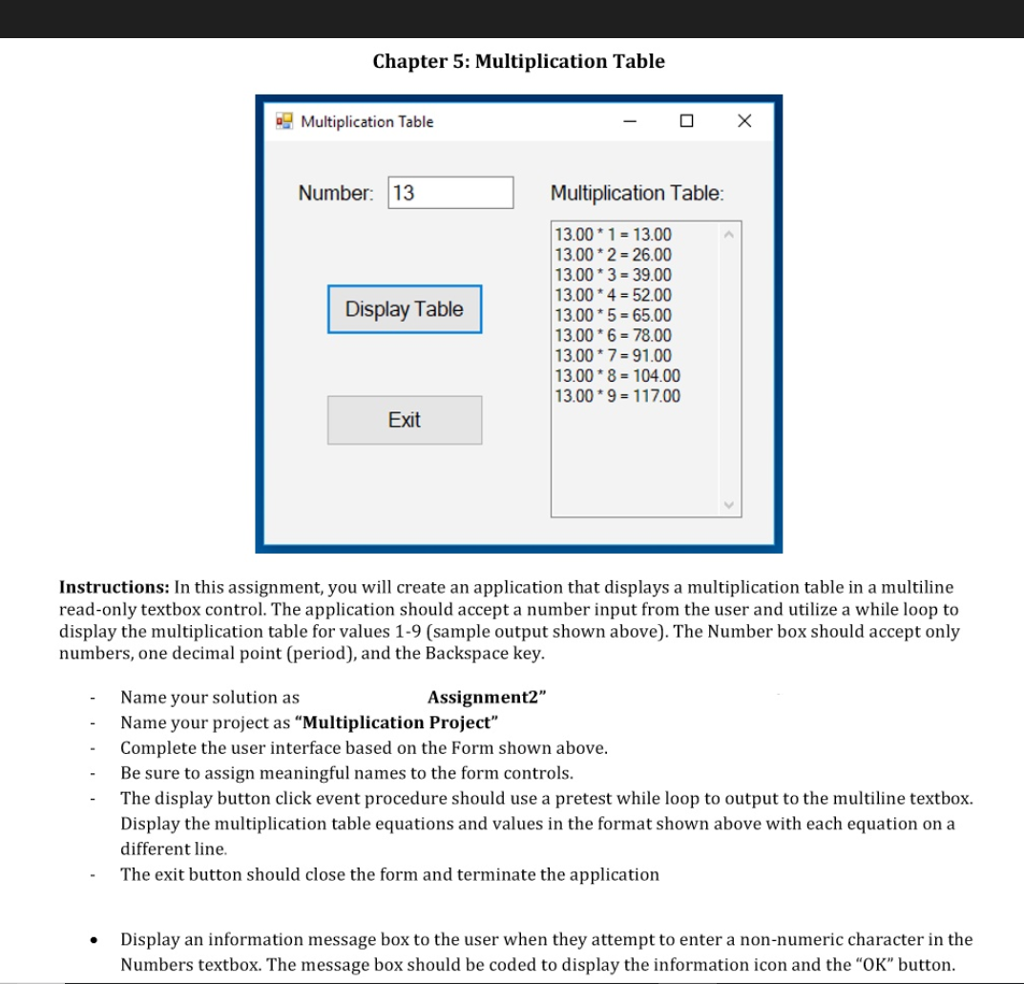
Chapter 5: Multiplication Table 2 Multiplication Table O X Number: 13 Multiplication Table: Display Table 13.00*1= 13.00 13.00*2= 26.00 13.00 *3 = 39.00 13.00 * 4 = 52.00 13.00 * 5 = 65.00 13.00 *6 = 78.00 13.00*7 = 91.00 13.00*8 = 104.00 13.00 * 9 = 117.00 Exit Instructions: In this assignment, you will create an application that displays a multiplication table in a multiline read-only textbox control. The application should accept a number input from the user and utilize a while loop to display the multiplication table for values 1-9 (sample output shown above). The Number box should accept only numbers, one decimal point (period), and the Backspace key. Name your solution as Assignment2" Name your project as "Multiplication Project" Complete the user interface based on the Form shown above. Be sure to assign meaningful names to the form controls. The display button click event procedure should use a pretest while loop to output to the multiline textbox. Display the multiplication table equations and values in the format shown above with each equation on a different line. The exit button should close the form and terminate the application Display an information message box to the user when they attempt to enter a non-numeric character in the Numbers textbox. The message box should be coded to display the information icon and the "OK" button. Chapter 5: Multiplication Table 2 Multiplication Table O X Number: 13 Multiplication Table: Display Table 13.00*1= 13.00 13.00*2= 26.00 13.00 *3 = 39.00 13.00 * 4 = 52.00 13.00 * 5 = 65.00 13.00 *6 = 78.00 13.00*7 = 91.00 13.00*8 = 104.00 13.00 * 9 = 117.00 Exit Instructions: In this assignment, you will create an application that displays a multiplication table in a multiline read-only textbox control. The application should accept a number input from the user and utilize a while loop to display the multiplication table for values 1-9 (sample output shown above). The Number box should accept only numbers, one decimal point (period), and the Backspace key. Name your solution as Assignment2" Name your project as "Multiplication Project" Complete the user interface based on the Form shown above. Be sure to assign meaningful names to the form controls. The display button click event procedure should use a pretest while loop to output to the multiline textbox. Display the multiplication table equations and values in the format shown above with each equation on a different line. The exit button should close the form and terminate the application Display an information message box to the user when they attempt to enter a non-numeric character in the Numbers textbox. The message box should be coded to display the information icon and the "OK" button
Step by Step Solution
There are 3 Steps involved in it

Get step-by-step solutions from verified subject matter experts
 Study Help