







Question: Chapter 5 Write Student Grades from Input Text File Present the OpenFileDialog box to allow the user to select the name of a text file.
Chapter 5 Write Student Grades from Input Text File
Present the OpenFileDialog box to allow the user to select the name of a text file. The file contains a list of student names and four (random) scores. Your program should read the names, one record at a time, and the next four records to get the scores. Compute the average score and determine the letter grade (90 and above is A; below 90 is B). Write the name, all four scores, average score, and letter grade to an output file (comma separated values). Use the output filename StudentGrades.txt. Count the number of names in the file and display this value on the form to inform the user of the progress.
Steps:
- Rename Form1.cs to frmGrades.cs
- Create:
- Appropriate Lables
- ListBox for output:
- Student Names
- Number of Students in the File
- Include appropriate comments in your program
Submit two files:
Remember you will need to convert the /bin/debug/Hw6.exe file to Hw6.zip (using 7-zip).
- frmGrades.cs
- Hw6.zip
CIS215-HW6-Dataset.txt Hw6.jpg
here is what is in CIS215-HW6-Dataset.txt and jpg is posted below
Devan Bell 100 100 81 100 Timothy Fields 97 94 88 92 Leoul Kebede 85 95 86 95 Molly Michalak 95 99 97 95 Abraham Mikels 83 94 87 92 Rebecca Newman 97 82 87 99 William Nicholson 90 99 93 85 Brandi Pennet 100 98 84 93 Trevor Ripberger 89 80 90 87 Sarah Ritter 100 87 87 93 Ryan Sheets 87 95 98 83 Anna Tabler 91 87 82 94 Charles Waggoner 88 95 93 91
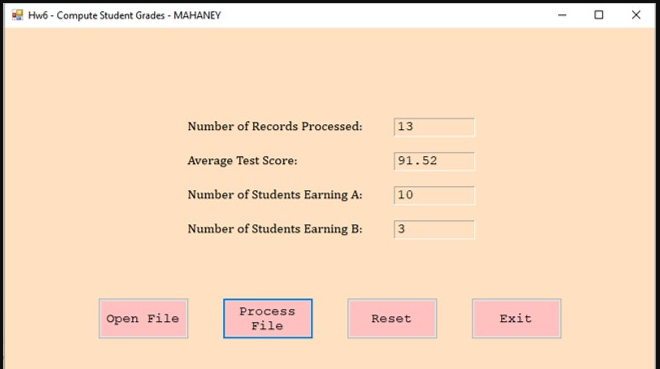
Hw6 - Compute Student Grades - MAHANEY - Number of Records Processed: 13 Average Test Score: 91.52 10 Number of Students Earning A: Number of Students Earning B: 3 Open File Process File Reset Exit Hw6 - Compute Student Grades - MAHANEY - Number of Records Processed: 13 Average Test Score: 91.52 10 Number of Students Earning A: Number of Students Earning B: 3 Open File Process File Reset Exit
Step by Step Solution
There are 3 Steps involved in it

Get step-by-step solutions from verified subject matter experts
 Study Help