







Question: Chapter 7 ( A Guide to SQL ) Use the KimTay Pet Supplies database only. You must use Oracle. Case Exercises: Odd numbers, pg .
Chapter A Guide to SQL Use the KimTay Pet Supplies database only. You must use Oracle.
Case Exercises: Odd numbers, pg
KimTay Pet Supplies
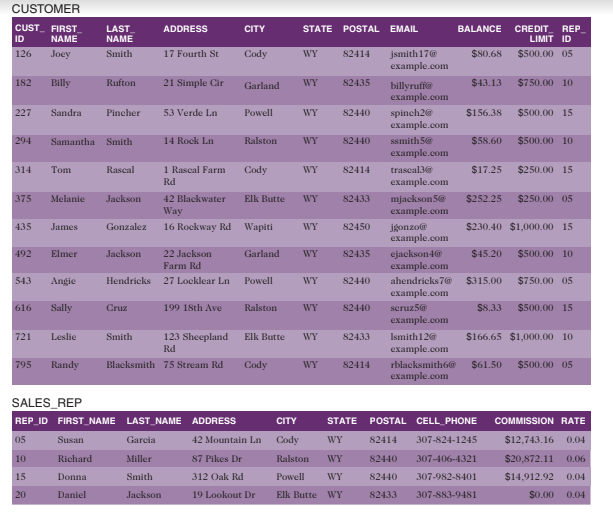
Use SQL to make the following changes to the KimTay Pet Supplies database see Figure in
Module After each change, execute an appropriate query to show that the change was made
correctly. If directed to do so by your instructor, use the information provided with the Module
Exercises to print your output or save it to a document. For any exercises that use commands
not supported by your version of SQL write the command to accomplish the task.
Create a view named MAJORCUSTOMER. It consists of the customer ID first name,
last name, balance, credit limit and rep ID for every customer whose credit limit is $ or
less.
a Write and execute the CREATE VIEW command to create the MAJORCUSTOMER
view.
b Write and execute the command to retrieve the customer ID first name, and last name
of each customer in the MAJORCUSTOMER view with a balance that exceeds the
credit limit
c Write and execute the query that the DBMS actually executes.
d Does updating the database through this view create any problems? If so what are
they? If not, why not?
Create a view named ITEMINVOICE. It consists of the item ID description, price, invoice
number, invoice date, number ordered, and quoted price for all invoice lines currently on
file.
a Write and execute the CREATE VIEW command to create the ITEMINVOICE view.
b Write and execute the command to retrieve the item ID description, invoice number,
and quoted price for all invoices in the ITEMINVOICE view for items with quoted
prices that exceed $
c Write and execute the query that the DBMS actually executes.
d Does updating the database through this view create any problems? If so what are
they? If not, why not?
Create a view named INVOICETOTAL. It consists of the invoice number and invoice
total for each invoice currently on file. The invoice total is the sum of the number of units
ordered multiplied by the quoted price on each invoice line for each invoice. Sort the rows
by invoice number. Use TOTALAMOUNT as the name for the invoice total.
a Write and execute the CREATE VIEW command to create the INVOICETOTAL view.
b Write and execute the command to retrieve the invoice number and invoice total for
only those orders totaling more than $
c Write and execute the query that the DBMS actually executes.
d Does updating the database through this view create any problems? If so what are
they? If not, why not?
Write, but do not execute, the commands to do the following with the system catalog:
a List all the tables contained within the system catalog.
b List all the columns contained within the system catalog.
c List all the views contained within the system catalog.
Write, but do not execute, the command to display only tables within the system catalog
that are of the type BASE TABLE.
Perform the following tasks:
a Create an index named ITEMINDEX on the ITEMID column in the INVOICELINE
table.
b Create an index named ITEMINDEX on the CATEGORY column in the ITEM table.
c Create an index named ITEMINDEX on the CATEGORY and LOCATION columns
in the ITEM table.
d Create an index named ITEMINDEX on the CATEGORY and LOCATION columns
in the ITEM table. List categories in descending order.
Delete the index named ITEMINDEX
Write the commands to obtain the following information from the system catalog. Do not
execute these commands unless your instructor asks you to do so
a List every table that you have created thus far.
b List every column in the ITEM table and its associated data type.
Add the INVOICENUM column as a foreign key in the INVOICELINE table.
Ensure that the only legal values for the CREDITLIMIT column are
and
Step by Step Solution
There are 3 Steps involved in it
1 Expert Approved Answer
Step: 1 Unlock

Question Has Been Solved by an Expert!
Get step-by-step solutions from verified subject matter experts
Step: 2 Unlock
Step: 3 Unlock
 Study Help