







Question: Chapter & Tables style the table. imenu.html You have three tasks in this case study to display information in an HTML table. You will use
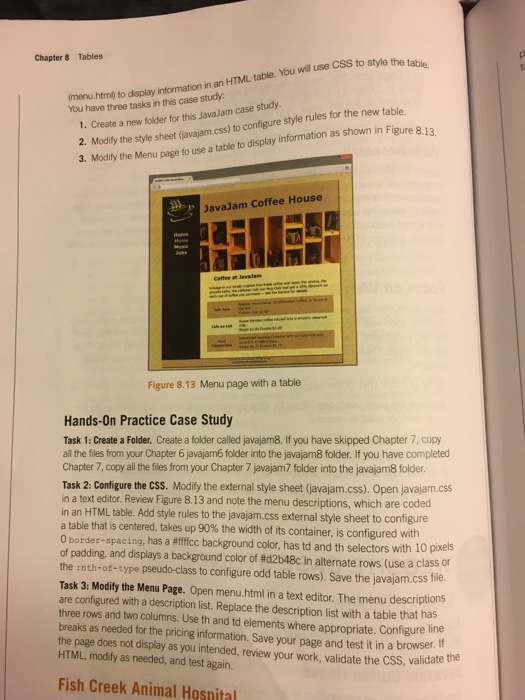
Chapter & Tables style the table. imenu.html You have three tasks in this case study to display information in an HTML table. You will use CSS t 1. Create a new folder for this JavaJam case study 2. Modity the style sheet (javajam.css) to configure style rul 3. Modily the Menu page to use a table to display information as shown in Figure 8.13 JavaJam Coffee House Figure 8.13 Menu page with a table Hands-On Practice Case Study Task 1: Create a Folder. Create a folder called java am8.f you have skipped Chapter 7, copy al the files from your Chapter 6 javajam6 folder into the javajam8 folder. If you have completed Chapter 7, copy all the files from your Chapter 7 javajam7 folder into the javajam8 folder. Task 2: Configure the CSS. Modify the external style sheet (javajam.css). Open javajam.css in a text editor. Review Figure 8.13 and note the menu descriptions, which are coded in an HTML table. Add style rules to the javajam.css external style sheet to configure a table that is centered, takes up 90% the width of its container, is configured with border-spacing, has a #ffffcc background color, has td and th selectors with 10 pixels of padding, and displays a background color of #d2b48c in alternate rows (use a class or the :nth-of-type pseudo-class to configure odd table rows). Save the javajam.css ie Task 3: Modify the Menu Page. Open menu.html in a text editor. The menu descriptions are configured with a description list. Replace the description list with a table that has three rows and two columns. Use th and td elements where appropriate. Configure line breaks as needed for the pricing information. Save your page and test it in a browser. the page does not display as you intended, review your work, validate the CSS, val HTML, modify as needed, and test again. file. validate the Fish Creek Animal Hosnital Chapter & Tables style the table. imenu.html You have three tasks in this case study to display information in an HTML table. You will use CSS t 1. Create a new folder for this JavaJam case study 2. Modity the style sheet (javajam.css) to configure style rul 3. Modily the Menu page to use a table to display information as shown in Figure 8.13 JavaJam Coffee House Figure 8.13 Menu page with a table Hands-On Practice Case Study Task 1: Create a Folder. Create a folder called java am8.f you have skipped Chapter 7, copy al the files from your Chapter 6 javajam6 folder into the javajam8 folder. If you have completed Chapter 7, copy all the files from your Chapter 7 javajam7 folder into the javajam8 folder. Task 2: Configure the CSS. Modify the external style sheet (javajam.css). Open javajam.css in a text editor. Review Figure 8.13 and note the menu descriptions, which are coded in an HTML table. Add style rules to the javajam.css external style sheet to configure a table that is centered, takes up 90% the width of its container, is configured with border-spacing, has a #ffffcc background color, has td and th selectors with 10 pixels of padding, and displays a background color of #d2b48c in alternate rows (use a class or the :nth-of-type pseudo-class to configure odd table rows). Save the javajam.css ie Task 3: Modify the Menu Page. Open menu.html in a text editor. The menu descriptions are configured with a description list. Replace the description list with a table that has three rows and two columns. Use th and td elements where appropriate. Configure line breaks as needed for the pricing information. Save your page and test it in a browser. the page does not display as you intended, review your work, validate the CSS, val HTML, modify as needed, and test again. file. validate the Fish Creek Animal Hosnital
Step by Step Solution
There are 3 Steps involved in it

Get step-by-step solutions from verified subject matter experts
 Study Help