







Question: PLZ HELP SOLVE You have three tasks in this case study: Create a folder for the JavaJam website. Create the Home page: index.html. Create the
PLZ HELP SOLVE You have three tasks in this case study:
-
Create a folder for the JavaJam website.
-
Create the Home page: index.html.
-
Create the Menu page: menu.html.
Hands-On Practice Case Study
and
-
TASK 1:THE WEBSITE FOLDER.Create a folder on your hard drive or portable storage device (thumb drive or SD card) called javajam to contain your JavaJam website files.
-
TASK 2:THE HOME PAGE.You will use a text editor to create the Home page for the JavaJam Coffee House website. The Home page is shown in Figure 2.33.
Figure 2.33
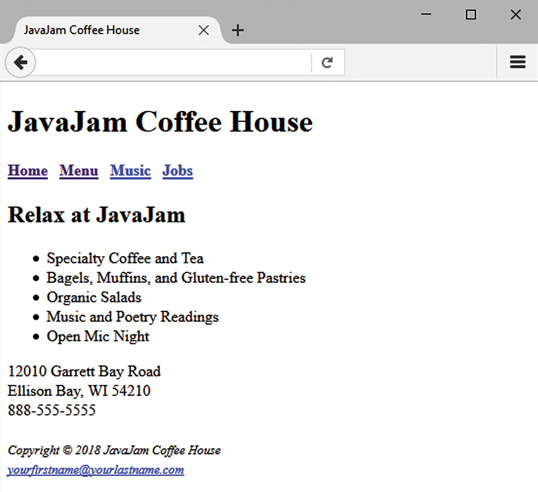
JavaJam index.html
Figure 2.33 Full Alternative Text
Launch a text editor, and create a web page with the following specifications:
-
Web Page Title.Use a descriptive page title. The company name is a good choice for the home page of a business website. On pages other than the home page, the title typically contains both the company name and a word or a phrase that describes the purpose of the page.
-
Wireframe Header.Code the header element with the text, JavaJam Coffee House contained within a heading 1 element.
-
Wireframe Navigation.Place the following text within a nav element with bold text (use the element):
Home Menu Music Jobs
Code anchor tags so that Home links to index.html, Menu links to menu.html, Music links to music.html, and Jobs links to jobs.html. Add extra blank spaces between the hyperlinks with the special character as needed.
-
Wireframe Main Content.Code the main page content within a main element. Use Hands-On Practice 2.10 as a guide.
-
Code the following text within an h2 element:
Relax at JavaJam
-
Configure the following content in an unordered list:
Specialty Coffee and Tea
Bagels, Muffins, and Gluten-free Pastries
Organic Salads
Music and Poetry Readings
Open Mic Night
-
Code the following address and phone number contact information within a div element. Use line break tags to help you configure this area and add extra space between the phone number and the footer area.
12010 Garrett Bay Road
Ellison Bay, WI 54210
888-555-5555
-
-
Wireframe Footer.Configure the following copyright and e-mail link information within a footer element. Format it with small text size (use the tag) and italics font style (use the tag).
-
Copyright 2018 JavaJam Coffee House
-
Place your name in an e-mail link on the line under the copyright.
The page in Figure 2.33 may seem a little sparse, but dont worry; as you gain experience and learn to use more advanced techniques, your pages will look more professional. White space (blank space) on the page can be added with tags where needed. Your page does not need to look exactly the same as the sample. Your goal at this point should be to practice and get comfortable using HTML.
Save your page in the javajam folder, and name it index.html.
-
-
-
TASK 3: THE MENU PAGE.Create the Menu page shown in Figure 2.34. A technique that improves productivity is to create new pages based on existing pages so that you can benefit from your previous work. Your new Menu page will use the index.html page as a starting point.
Figure 2.34

JavaJam menu.html
Figure 2.34 Full Alternative Text
Open the index.html page for the JavaJam website in a text editor. Select File > Save As, and save the file with the new name of menu.html in the javajam folder. Now you are ready to edit the page.
-
Web Page Title.Modify the page title. Change the text contained between the
tags to the following:JavaJam Coffee House Menu
-
Wireframe Main Content.
-
Delete the Home page content unordered list and contact information.
-
Replace the text in the h2 element with the following:
Coffee at JavaJam
-
Use a description list to add the menu content to the page. Use the
tag to contain each menu item name. Configure the menu item name to have strong importance and display in bold font weight with the tag. Use the
tag to contain the menu item description. Configure line break tags as needed to display two lines of information within each dd element. The menu item names and descriptions are as follows:-
Just Java
-
Regular house blend, decaffeinated coffee, or flavor of the day.
-
Endless Cup $3.00
-
Cafe au Lait
-
House blended coffee infused into a smooth, steamed milk.
-
Single $2.00 Double $4.00
-
Iced Cappuccino
-
Sweetened espresso blended with icy-cold milk and served in a chilled glass.
-
Single $4.75 Double $6.00
-
-
-
Javalam Coffee House JavaJam Coffee House Home Menu Music Jobs Relax at JavaJam Specialty Coffee and Tea Bagels, Muffins, and Gluten-free Pastries Organic Salads Music and Poetry Readings Open Mic Night 12010 Garrett Bay Road Ellison Bay, WI 54210 888-555-5555 Copyright 2018 JavaJam Coffee House yowrfirstname@yourlastname.com
Step by Step Solution
There are 3 Steps involved in it

Get step-by-step solutions from verified subject matter experts
 Study Help