







Question: Check below all the correct statements about the COMPANY database (schema and state) insert into DEPENDENT values ('453453453', 'John', 'M', '12-DEC-60', 'Spouce') violates a foreign
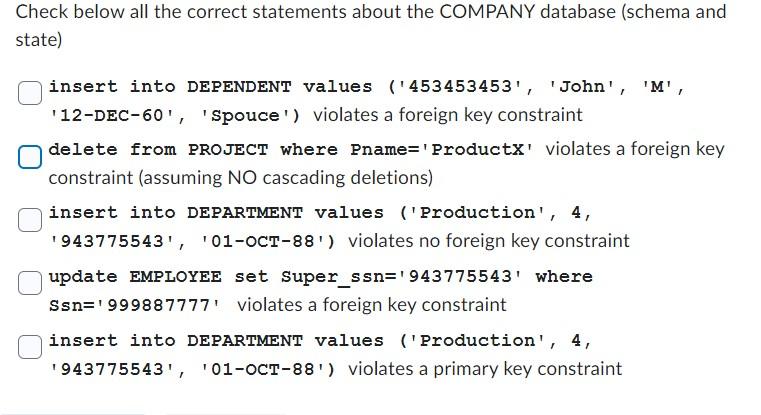
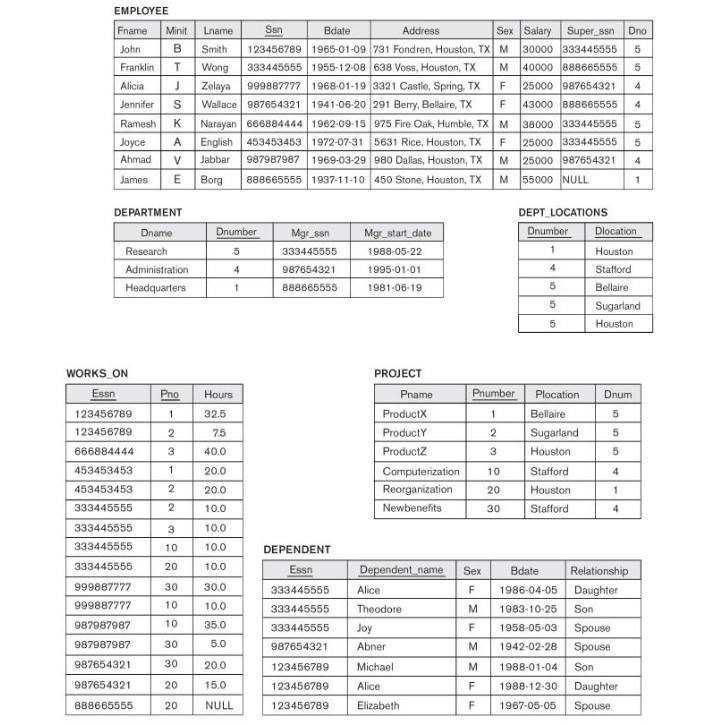
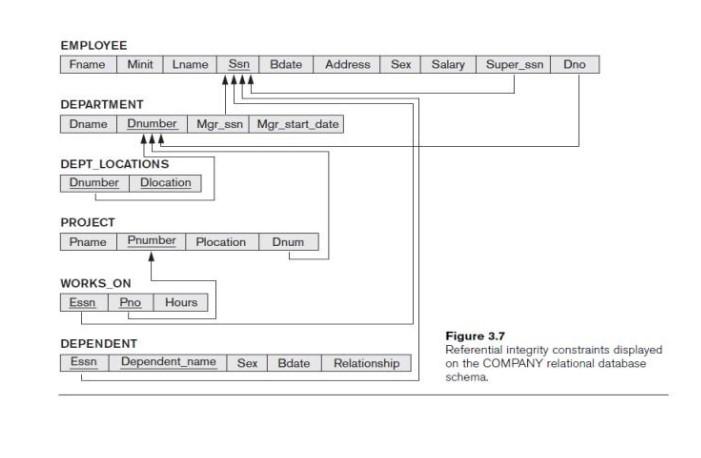
Check below all the correct statements about the COMPANY database (schema and state) insert into DEPENDENT values ('453453453', 'John', 'M', '12-DEC-60', 'Spouce') violates a foreign key constraint delete from PROJECT where Pname='ProductX' violates a foreign key constraint (assuming NO cascading deletions) insert into DEPARTMENT values ('Production', 4, '943775543', '01-OCT-88') violates no foreign key constraint update EMPLOYEE set Super_ssn='943775543' where Ssn= 999887777 violates a foreign key constraint insert into DEPARTMENT values ('Production', 4, ' 943775543, ' '01-OCT-88'' violates a primary key constraint EMPLOYEE \begin{tabular}{|l|c|l|c|c|c|c|c|c|c|} \hline Fname & Minit & Lname & Ssn & Bdate & Address & Sex & Salary & Super,_ssn & Dno \\ \hline John & B & Smith & 123456789 & 19650109 & 731 Fondren, Houston, TX & M & 30000 & 333445555 & 5 \\ \hline Franklin & T & Wong & 333445555 & 19551208 & 638 Voss, Houston, TX & M & 40000 & 888665555 & 5 \\ \hline Alicia & J & Zelaya & 999887777 & 19680119 & 3321 Castle, Spring, TX & F & 25000 & 987654321 & 4 \\ \hline Jennifer & S & Wallace & 987654321 & 19410620 & 291 Berry, Bollaire, TX & F & 43000 & 888665555 & 4 \\ \hline Ramesh & K & Narayan & 666884444 & 19620915 & 975 Fire Oak, Humble, TX & M & 38000 & 333445555 & 5 \\ \hline Joyce & A & English & 453453453 & 19720731 & 5631 Rice, Houston, TX & F & 25000 & 333445555 & 5 \\ \hline Ahmad & V & Jabbar & 987987987 & 19690329 & 980 Dallas, Houston, TX & M & 25000 & 987654321 & 4 \\ \hline James & E & Borg & 888665555 & 19371110 & 450 Stone, Houston, TX & M & 55000 & NULL & 1 \\ \hline \end{tabular} DEPARTMENT DEPT_LOCATIONS \begin{tabular}{|l|c|c|c|} \hline \multicolumn{1}{|c|}{ Dname } & Dnumber & Mgr_ssn & Mgr_star_date \\ \hline Research & 5 & 333445555 & 19880522 \\ \hline Administration & 4 & 987654321 & 19950101 \\ \hline Headquarters & 1 & 888665555 & 19810619 \\ \hline \end{tabular} \begin{tabular}{|c|l|} \hline Dnumber & Dlocation \\ \hline 1 & Houston \\ \hline 4 & Stafford \\ \hline 5 & Bellaire \\ \hline 5 & Sugarland \\ \hline 5 & Houston \\ \hline \end{tabular} WORKS_ON PROJECT \begin{tabular}{|c|c|c|} \hline Essn & Pno & Hours \\ \hline 123456789 & 1 & 32.5 \\ \hline 123456789 & 2 & 7.5 \\ \hline 666884444 & 3 & 40.0 \\ \hline 453453453 & 1 & 20.0 \\ \hline 453453453 & 2 & 20.0 \\ \hline 333445555 & 2 & 10.0 \\ \hline 333445555 & 3 & 10.0 \\ \hline 333445555 & 10 & 10.0 \\ \hline 333445555 & 20 & 10.0 \\ \hline 999887777 & 30 & 30.0 \\ \hline 999887777 & 10 & 10.0 \\ \hline 987987987 & 10 & 35.0 \\ \hline 987987987 & 30 & 5.0 \\ \hline 987654321 & 30 & 20.0 \\ \hline 987654321 & 20 & 15.0 \\ \hline 888665555 & 20 & NULL \\ \hline \end{tabular} \begin{tabular}{|l|c|l|c|} \hline \multicolumn{1}{|c|}{ Pname } & Pnumber & Plocation & Dnum \\ \hline ProductX & 1 & Bellaire & 5 \\ \hline ProductY & 2 & Sugarland & 5 \\ \hline ProductZ & 3 & Houston & 5 \\ \hline Computerization & 10 & Stafford & 4 \\ \hline Reorganization & 20 & Houston & 1 \\ \hline Newbenefits & 30 & Stafford & 4 \\ \hline \end{tabular} DEPENDENT \begin{tabular}{|c|l|c|c|l|} \hline Essn & Dependent name & Sex & Bdate & Relationship \\ \hline 333445555 & Alice & F & 19860405 & Daughter \\ \hline 333445555 & Theodore & M & 19831025 & Son \\ \hline 333445555 & Joy & F & 19580503 & Spouse \\ \hline 987654321 & Abner & M & 19420228 & Spouse \\ \hline 123456789 & Michael & M & 19880104 & Son \\ \hline 123456789 & Alice & F & 19881230 & Daughter \\ \hline 123456789 & Elizabeth & F & 19670505 & Spouse \\ \hline \end{tabular} 1
Step by Step Solution
There are 3 Steps involved in it

Get step-by-step solutions from verified subject matter experts
 Study Help