







Question: Check bounds Assign in Range with 1 if user Weight is greater than 100 and less than or equal to 200. Function Save C Reset
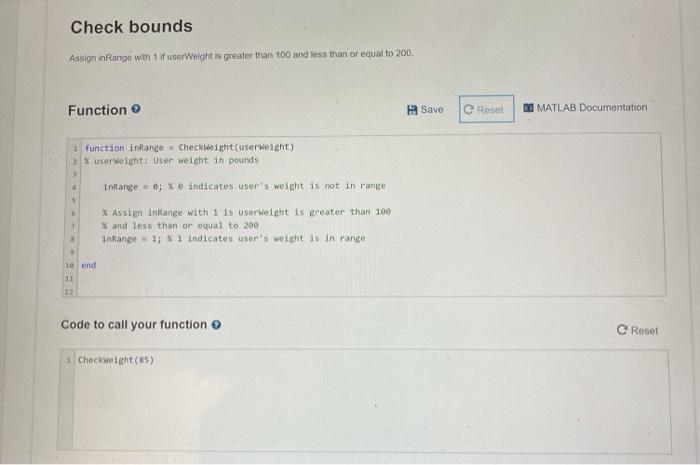
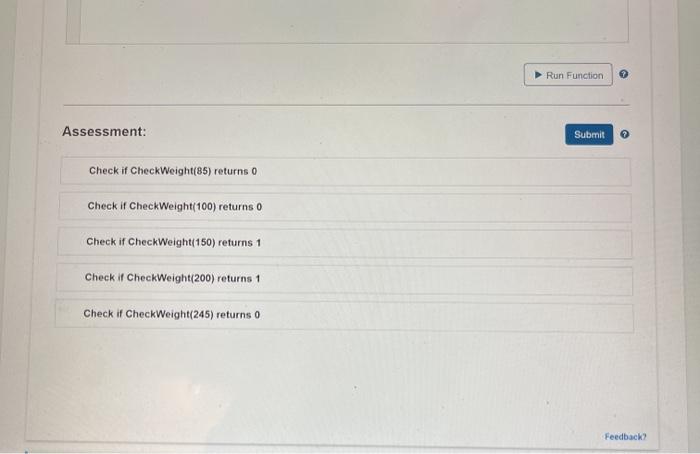
Check bounds Assign in Range with 1 if user Weight is greater than 100 and less than or equal to 200. Function Save C Reset PO MATLAB Documentation 1 function inRange - Checkweight(user weight) 2 X userweight: User weight in pounds inRange = 0; indicates user's weight is not in range * Assign InRange with 1 is user weight is greater than 100 and less than or equal to 200 inRange = 1; * 1 indicates user's weight is in range 9 10 end 11 22 Code to call your function Roset Checkweight(85) Run Function Assessment: Submit Check if CheckWeight(85) returns 0 Check if Check Weight(100) returns 0 Check if CheckWeight(150) returns 1 Check if CheckWeight(200) returns 1 Check if CheckWeight(245) returns o Feedback
Step by Step Solution
There are 3 Steps involved in it

Get step-by-step solutions from verified subject matter experts
 Study Help