







Question: Choose one answer for each question: How many columns in an excel worksheet? a) 26 b) 1024 c)16384 d) infinite $B3 is an example of
Choose one answer for each question:
- How many columns in an excel worksheet? a) 26 b) 1024 c)16384 d) infinite
- $B3 is an example of a) absolute cell reference b) relative cell reference c) mixed cell reference d) structured cell reference
- The first contact dates have been chnaged to centre align, by default they would align: a) bottom right b) bottom left c) top right d) top left
- which formula correctly calculated the averafe initial estimate K17? a) =K6:K15/10 b) =AVG(K6:K15) c) AVERAGEIFS(K6:K15) d) =AVERAGE(K6:K15)
- Which of the following would calculate the first follow-up date in the prospects list? a)=FIND(D6:D15) b) =DATE(D6:D15,0) c) VLOOKUP($D$6:$D15,FALSE) d) =MIN(D6:D15)
- Which formula returns the number of prospects in the list? a) =COUNTIFS(B6:B15) b) COUNTIF(B6:B15,TRUE) c) =COUNTIFA (B6:B15) d) =COUNT(B6:B15)
- We have 3 kitchen sizes. Which formula calculates the total estimated sum for small and medium kitchens? a) =SUMIFS(K6:K15,16:115, OR ("Small","Medium") b) =SUMIFS(K6:K15,16:115,"Large") c) =SUMIFS (K6:K15,16:115,"Small" AND Medium) d) =SUMIFS (16:18,110:111,113:115)
- Using the formula=VLOOKUP (3055,F6:K15,6) to return the initial estimate for postcode 3055 is incorrect a) because 3055 shpuld be in qoutation marks i.e 3055 b) because the look up range should be B6:K15 c) because it should be an exact match d) because it should use relative cell referencing
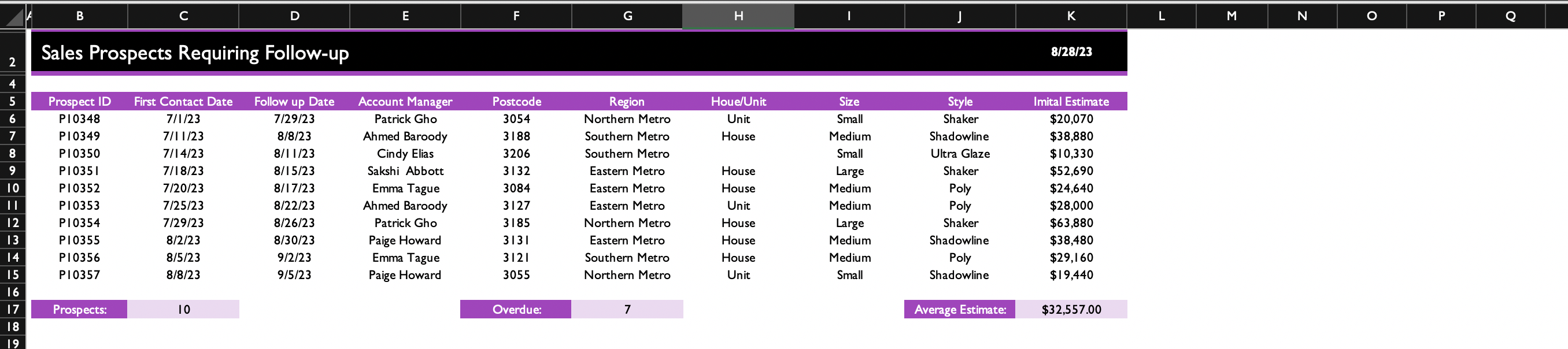
Sales Prospects Requiring Follow-up
Step by Step Solution
There are 3 Steps involved in it
1 Expert Approved Answer
Step: 1 Unlock

Question Has Been Solved by an Expert!
Get step-by-step solutions from verified subject matter experts
Step: 2 Unlock
Step: 3 Unlock
 Study Help