







Question: CIS 3 1 4 5 Project # 4 Team Management Program: Version 4 Use a database to store the data for the Baseball Team
CIS Project #
Team Management Program: Version
Use a database to store the data for the Baseball Team Manager program. The user interface and objects class will change very little. This is an exercise in changing the data layer tier with minimal changes to the interface and business logic tiers.
Player table sql script
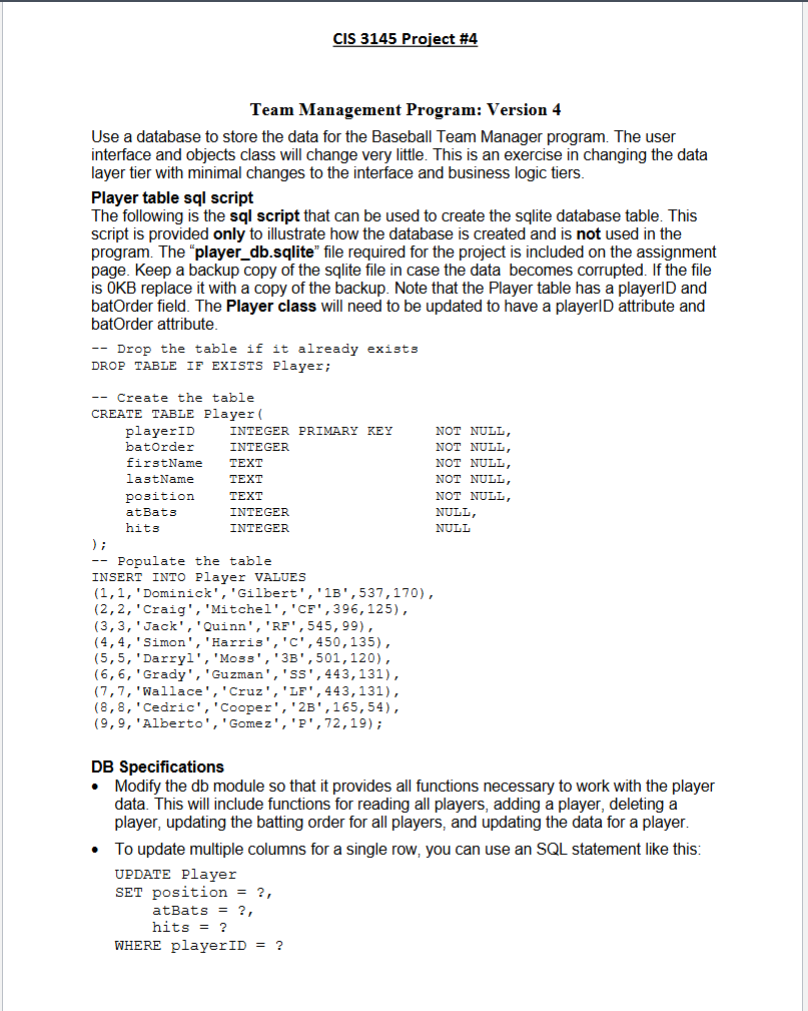
The following is the sql script that can be used to create the sqlite database table. This script is provided only to illustrate how the database is created and is not used in the program. The "playerdbsqlite" file required for the project is included on the assignment page. Keep a backup copy of the sqlite file in case the data becomes corrupted. If the file is OKB replace it with a copy of the backup. Note that the Player table has a playerID and batOrder field. The Player class will need to be updated to have a playerID attribute and batOrder attribute.
Drop the table if it already exists
DROP TABLE IF EXISTS Player;
Create the table
CREATE TABLE Player
playerID INTEGER PRIMARY KEY NOT NULL,
batOrder INTEGER NOT NULL,
firstName TEXT NOT NULL,
lastName TEXT NOT NULL,
position TEXT NOT NULL,
atBats INTEGER NULL,
hits INTEGER NULL
;
Populate the table
INSERT INTO Player VALUES
'Dominick','Gilbert',B
'Craig','Mitchel',CF
'Jack','Quinn', RF
'Simon','Harris',C
'Darryl','Moss', B
'Grady','Guzman',sS
'Wallace','Cruz',LF
'Cedric','Cooper',B
'Alberto','Gomez',P;
DB Specifications
Modify the db module so that it provides all functions necessary to work with the player data. This will include functions for reading all players, adding a player, deleting a player, updating the batting order for all players, and updating the data for a player.
To update multiple columns for a single row, you can use an SQL statement like this:
UPDATE Player
SET position
atBats
hits
WHERE playerID
CIS Project #
Submission details
Projects can require the use of material from any of the previous chapters covered in the textbook.
Create a Team Management Python program that satisfies the specifications above.
Put General Comments at the beginning of the project that includes your name, the project name, the date, and a description of the project.
Turn in a ZIP file of the final version of the program. Include a Word document which contains output of the testing done on the program. The Word document must be inside the ZIP file.
In the Comments section on the Assignment webpage, report A an estimate of the time it took to complete the project. Report a single value in minutes, and B a single rating of the project, on an ordinal scale, as either Easy, Moderate, Hard, OR Challenging.
import sqlite
from contextlib import closing
from Objects import Player, Lineup
conn None
def connect:
global conn
if not conn:
DBFILE "playerdbsqlite"
conn sqliteconnectDBFILE
conn.rowfactory sqliteRow
def close:
if conn:
conn.close
def getplayers:
return None #remove this line when code is added.
# SQL statement to select all fields for all players
# Use a with statement to execute the query
# Create a lineup object
# use a loop to populate the lineup object with player objects
# return the lineup object
def getplayerplayerID:
return None #remove this line when code is added.
# SQL statement to select all fields for a player
# Use a with statement to execute the query & return a player object if the
player exists
def addplayerplayer:
return None #remove this line when code is added.
# SQL statement to insert fields for a player added to the table
# Use a with statement to execute the query
def deleteplayerplayer:
return None #remove this line when code is added.
# SQL statement to delete a single player
# Use a with statement to execute the query
def updatebatorderlineup:
return None #remove this line when code is added.
# Use a loop to call a SQL statement that updates
# the batOrder for each player based on their playerID
# Use a with statement to execute the query
def updateplayerplayer:
return None #remove this line when code is added.
# SQL statement to update fields of a player based on the playerID
# Use a with statement to execute the query
def main:
# code to test the getplayers function
connect
players getplayers
if players None:
for player in players:
printplayerbatOrder, player.firstName, player.lastName,
player.position, player.atBats, player.hits,
player.getBattingAvg
else:
printCode is needed for the getplayers function."
if mamemain:
for i player in enumeratelineup:
printfi:playergetfullname:playerposition:playeratbats:playerhits:playergetbattingaverage
print
def addplayerlineup:
firstname inputEnter player's first name:
lastname inputEnter player's last name:
position inputEnter
Step by Step Solution
There are 3 Steps involved in it
1 Expert Approved Answer
Step: 1 Unlock

Question Has Been Solved by an Expert!
Get step-by-step solutions from verified subject matter experts
Step: 2 Unlock
Step: 3 Unlock
 Study Help