







Question: clear disp(computer) Part (a) % Create a new folder, name it @Assignment 3@, and make it the current % MATLAB folder. Identify and display the
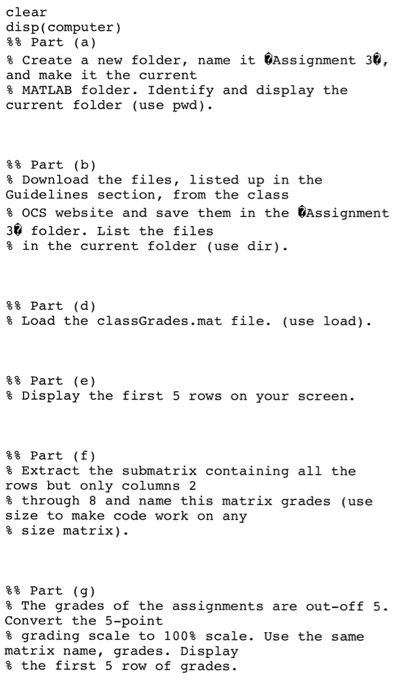
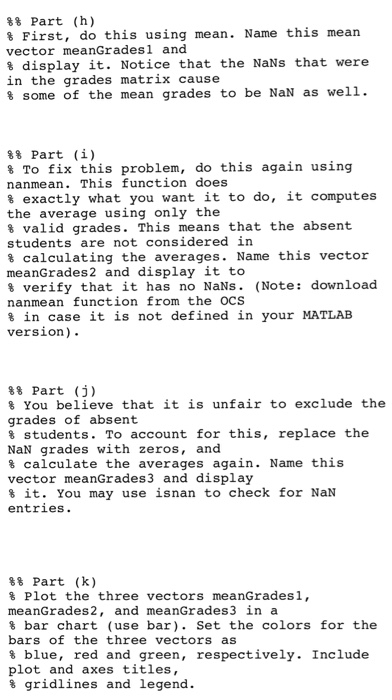
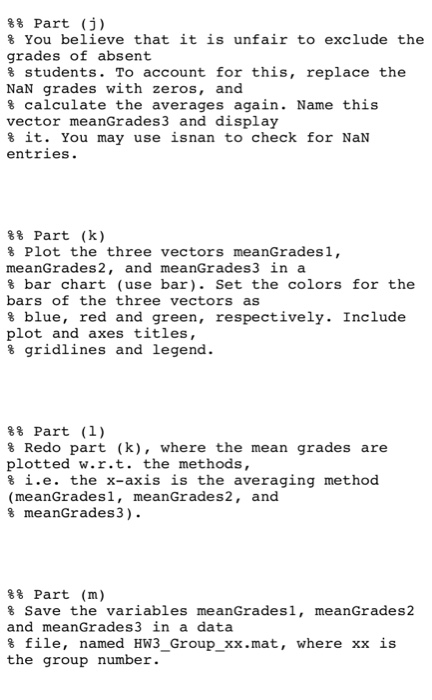
clear disp(computer) Part (a) % Create a new folder, name it @Assignment 3@, and make it the current % MATLAB folder. Identify and display the current folder (use pwd). 88 Part (b) % Download the files, listed up in the Guidelines section, from the class % ocs website and save them in the Assignment 30 folder. List the files % in the current folder (use dir). %% Part (d) % Load the classGrades.mat file. (use load). %% Part (e) % Display the first 5 rows on your screen. Part (f) % Extract the submatrix containing all the rows but only columns 2 % through 8 and name this matrix grades (use size to make code work on any % size matrix). Part (g) The grades of the assignments are out-off 5. Convert the 5-point % grading scale to 100% scale. Use the same matrix name, grades. Display % the first 5 row of grades. clear disp(computer) Part (a) % Create a new folder, name it @Assignment 3@, and make it the current % MATLAB folder. Identify and display the current folder (use pwd). 88 Part (b) % Download the files, listed up in the Guidelines section, from the class % ocs website and save them in the Assignment 30 folder. List the files % in the current folder (use dir). %% Part (d) % Load the classGrades.mat file. (use load). %% Part (e) % Display the first 5 rows on your screen. Part (f) % Extract the submatrix containing all the rows but only columns 2 % through 8 and name this matrix grades (use size to make code work on any % size matrix). Part (g) The grades of the assignments are out-off 5. Convert the 5-point % grading scale to 100% scale. Use the same matrix name, grades. Display % the first 5 row of grades
Step by Step Solution
There are 3 Steps involved in it

Get step-by-step solutions from verified subject matter experts
 Study Help