







Question: CMPE 3437/ELEE 3435 Lab 1: DOS Debug A. Objectives: Get familiar with the debug program and use debug to examine registers and memory contents. B.
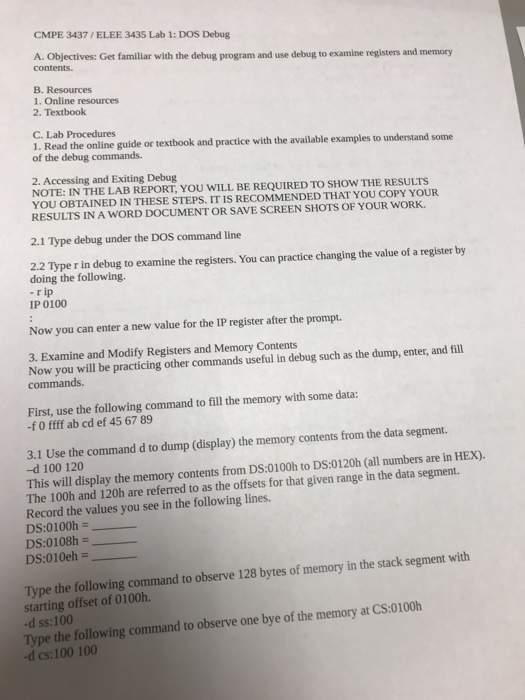
CMPE 3437/ELEE 3435 Lab 1: DOS Debug A. Objectives: Get familiar with the debug program and use debug to examine registers and memory contents. B. Resources 1. Online resources 2. Textbook C. Lab Procedures 1. Read the online guide or textbook and practice with the available examples to understand some of the debug commands. 2. Accessing and Exiting Debug NOTE: IN THE LAB REPORT, YOU WILL BE REQUIRED TO SHOW THE RESULTS YOU OBTAINED IN THESE STEPS. IT IS RECOMMENDED THAT YOU COPY YOUR RESULTS IN A WORD DOCUMENT OR SAVE SCREEN SHOTS OF YOUR WORK. 2.1 Type debug under the DOS command line 2.2 Type r in debug to examine the registers. You can practice changing the value of a register by doing the following. - rip IP 0100 Now you can enter a new value for the IP register after the prompt. 3. Examine and Modify Registers and Memory Contents Now you will be practicing other commands useful in debug such as the dump. enter, and fill commands. First, use the following command to fill the memory with some data: - fffff ab cd ef 45 67 89 3.1 Use the command d to dump (display) the memory contents from the data segment. -d 100 120 This will display the memory contents from DS:0100h to DS:0120h (all numbers are in HEX). The 100h and 120h are referred to as the offsets for that given range in the data segment. Record the values you see in the following lines. DS:0100h = DS:0108h = DS:010eh = Type the following command to observe 128 bytes of memory in the stack segment with starting offset of 0100h. -d ss:100 Type the following command to observe one bye of the memory at CS:0100h -d cs:100 100 CMPE 3437/ELEE 3435 Lab 1: DOS Debug A. Objectives: Get familiar with the debug program and use debug to examine registers and memory contents. B. Resources 1. Online resources 2. Textbook C. Lab Procedures 1. Read the online guide or textbook and practice with the available examples to understand some of the debug commands. 2. Accessing and Exiting Debug NOTE: IN THE LAB REPORT, YOU WILL BE REQUIRED TO SHOW THE RESULTS YOU OBTAINED IN THESE STEPS. IT IS RECOMMENDED THAT YOU COPY YOUR RESULTS IN A WORD DOCUMENT OR SAVE SCREEN SHOTS OF YOUR WORK. 2.1 Type debug under the DOS command line 2.2 Type r in debug to examine the registers. You can practice changing the value of a register by doing the following. - rip IP 0100 Now you can enter a new value for the IP register after the prompt. 3. Examine and Modify Registers and Memory Contents Now you will be practicing other commands useful in debug such as the dump. enter, and fill commands. First, use the following command to fill the memory with some data: - fffff ab cd ef 45 67 89 3.1 Use the command d to dump (display) the memory contents from the data segment. -d 100 120 This will display the memory contents from DS:0100h to DS:0120h (all numbers are in HEX). The 100h and 120h are referred to as the offsets for that given range in the data segment. Record the values you see in the following lines. DS:0100h = DS:0108h = DS:010eh = Type the following command to observe 128 bytes of memory in the stack segment with starting offset of 0100h. -d ss:100 Type the following command to observe one bye of the memory at CS:0100h -d cs:100 100
Step by Step Solution
There are 3 Steps involved in it

Get step-by-step solutions from verified subject matter experts
 Study Help