







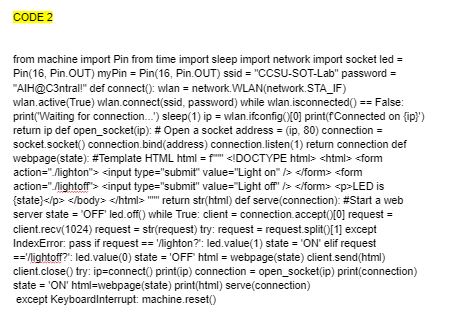
Question: CODE 2 from machine import Pin from time import sleep import network import socket led = Pin ( 1 6 , Pin.OUT ) m y
CODE
from machine import Pin from time import sleep import network import socket led
Pin Pin.OUT Pin Pin Pin.OUT ssid "CCSUSOTLab" password
"AlH@Cntral!" def connect: wlan network.WLANnetworkSTAIF
wlan.activeTrue wlan.connectssid password while wlan.isconnected False:
printWaiting for connection... sleep ip wlan.ifconfig print fConnected on :
return ip def opensocketip: # Open a socket address ip connection
socket.socket connection. bindaddress connection. listen return connection def
webpagestate: #Template HTML html f
actionightonLED is
state p bodys html return strhtml def serveconnection: #Start a web
server state 'OFF' led.off while True: client connection.accept request
client.recv request strrequest try: request request.split except
IndexError: pass if request 'lighton?: led.value state ON elif request
'hightoff?: led.value state 'OFF' html webpagestate client.sendhtml
client.close try: ipconnect printip connection opensocketip printconnection
state ON htmlwebpagestate print html serveconnection
except KeyboardInterrupt: machine.reset
Step by Step Solution
There are 3 Steps involved in it
1 Expert Approved Answer
Step: 1 Unlock

Question Has Been Solved by an Expert!
Get step-by-step solutions from verified subject matter experts
Step: 2 Unlock
Step: 3 Unlock
 Study Help