







Question: Code in c# .NET please. Programming Transactions Management System A high-level view of the application is shown below. You will build a system by precisely
Code in c# .NET please.
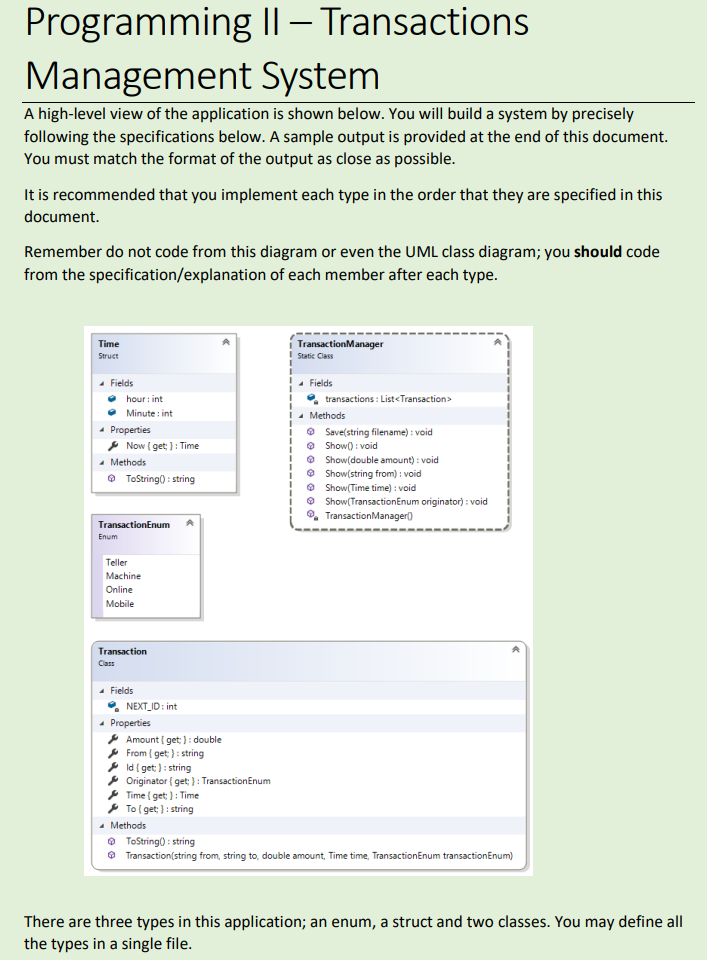
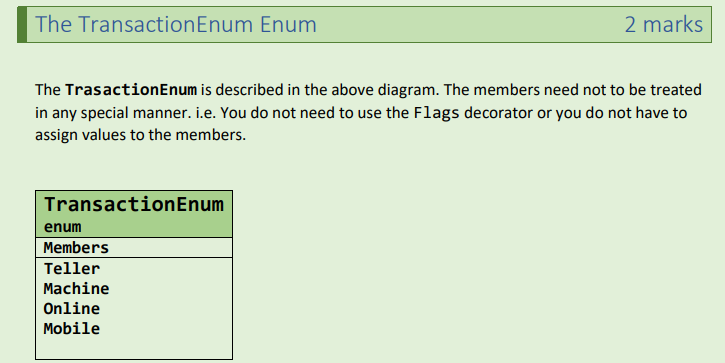
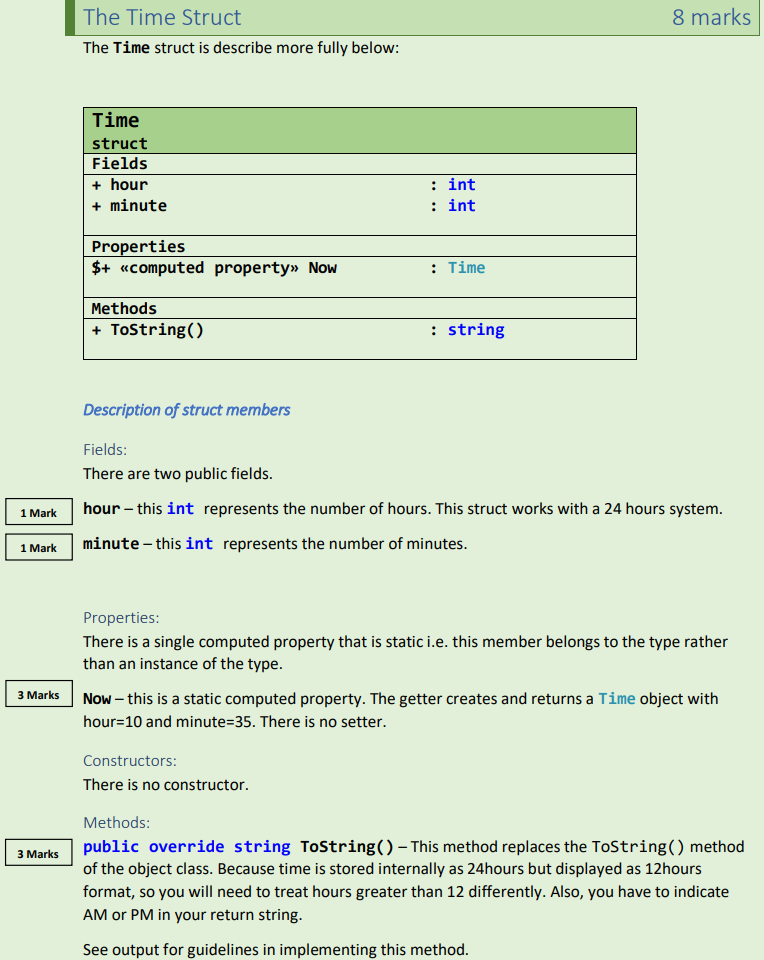
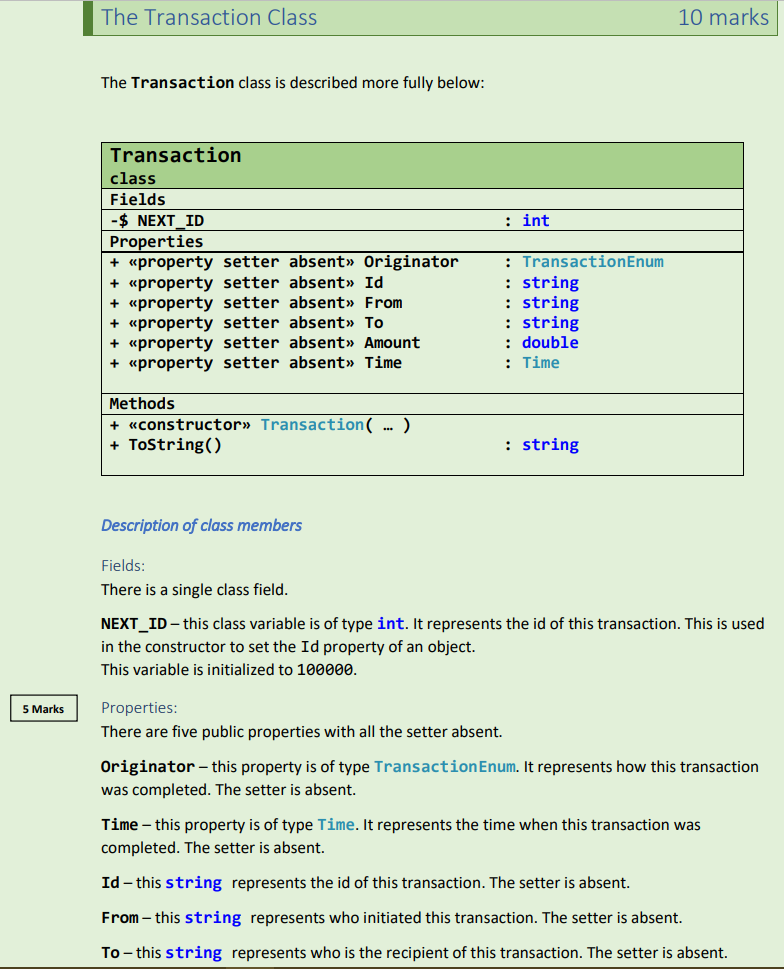
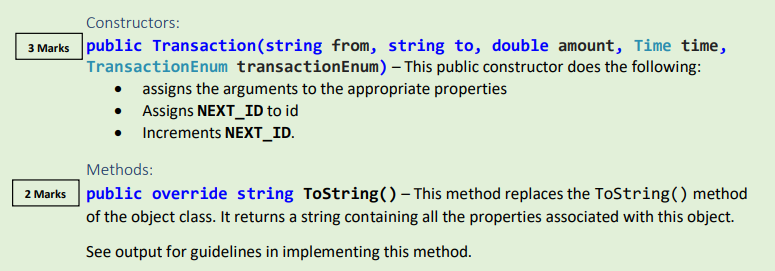
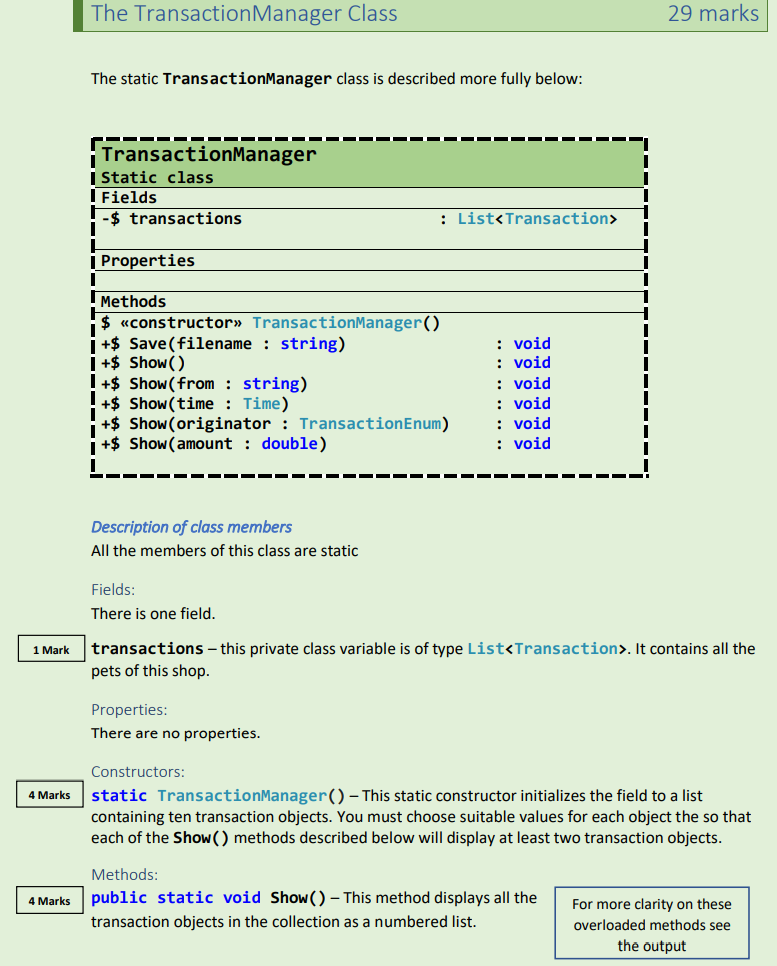
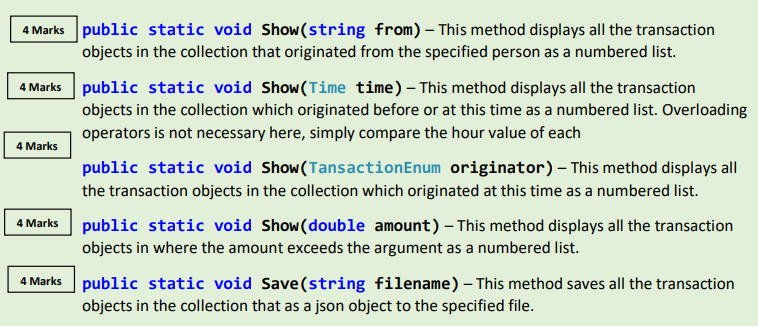
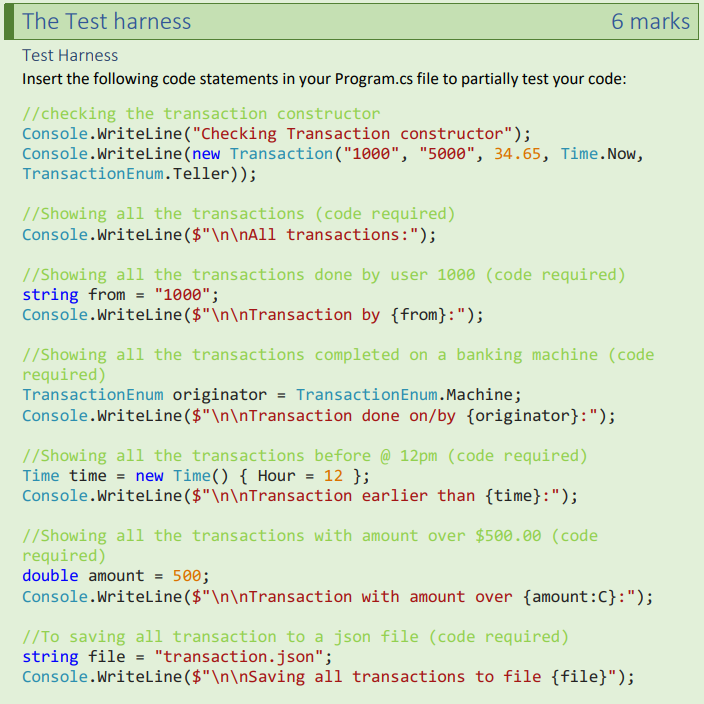
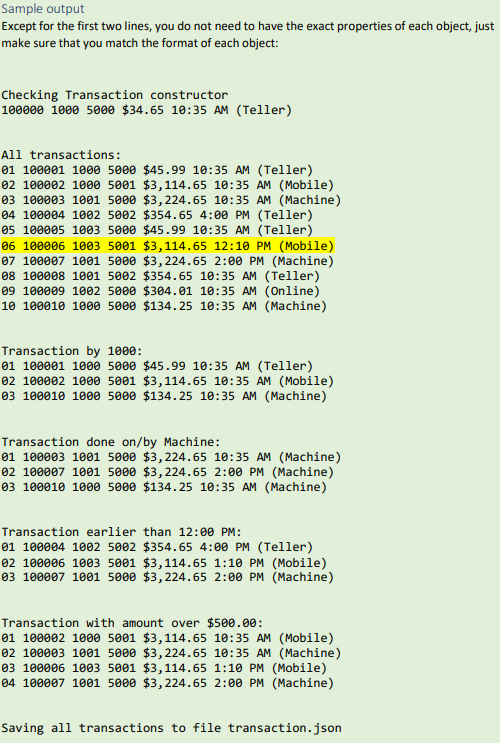
Programming Transactions Management System A high-level view of the application is shown below. You will build a system by precisely following the specifications below. A sample output is provided at the end of this document. You must match the format of the output as close as possible. It is recommended that you implement each type in the order that they are specified in this document. Remember do not code from this diagram or even the UML class diagram; you should code from the specification/explanation of each member after each type. Transaction Cass 4 Fields NEXT_ID: int 4 Properties c Amount [ get ) : double 4 From [ get } :string q id ( get): string c Originator [ get ) : Transaction Enum 8 Time (get) : Time To { get, ) : string 4 Methoods - Tostring 0: string Q Transaction(string from, string to, double amount, Time time, TransactionEnum transactionEnum) There are three types in this application; an enum, a struct and two classes. You may define all the types in a single file. The TrasactionEnum is described in the above diagram. The members need not to be treated in any special manner. i.e. You do not need to use the Flags decorator or you do not have to assign values to the members. The Time struct is describe more fully below: Description of struct members Fields: There are two public fields. hour - this int represents the number of hours. This struct works with a 24 hours system. minute - this int represents the number of minutes. Properties: There is a single computed property that is static i.e. this member belongs to the type rather than an instance of the type. Now - this is a static computed property. The getter creates and returns a Time object with hour =10 and minute =35. There is no setter. Constructors: There is no constructor. Methods: public override string ToString( ) - This method replaces the ToString( ) method of the object class. Because time is stored internally as 24 hours but displayed as 12 hours format, so you will need to treat hours greater than 12 differently. Also, you have to indicate AM or PM in your return string. The Transaction class is described more fully below: Description of class members Fields: There is a single class field. NEXT_ID - this class variable is of type int. It represents the id of this transaction. This is used in the constructor to set the Id property of an object. This variable is initialized to 100000 . Properties: There are five public properties with all the setter absent. Originator - this property is of type TransactionEnum. It represents how this transaction was completed. The setter is absent. Time - this property is of type Time. It represents the time when this transaction was completed. The setter is absent. Id - this string represents the id of this transaction. The setter is absent. From - this string represents who initiated this transaction. The setter is absent. To - this string represents who is the recipient of this transaction. The setter is absent. Constructors: 3 Marks public Transaction(string from, string to, double amount, Time time, TransactionEnum transactionEnum) - This public constructor does the following: - assigns the arguments to the appropriate properties - Assigns NEXT_ID to id - Increments NEXT_ID. Methods: public override string Tostring() - This method replaces the ToString() method of the object class. It returns a string containing all the properties associated with this object. See output for guidelines in implementing this method. The static TransactionManager class is described more fully below: Description of class members All the members of this class are static Fields: There is one field. transactions - this private class variable is of type List. It contains all the pets of this shop. Properties: There are no properties. Constructors: static TransactionManager( ) - This static constructor initializes the field to a list containing ten transaction objects. You must choose suitable values for each object the so that each of the Show ( ) methods described below will display at least two transaction objects. Methods: public static void Show() - This method displays all the transaction objects in the collection as a numbered list. public static void Show(string from) - This method displays all the transaction objects in the collection that originated from the specified person as a numbered list. public static void Show(Time time) - This method displays all the transaction objects in the collection which originated before or at this time as a numbered list. Overloading operators is not necessary here, simply compare the hour value of each public static void Show(TansactionEnum originator) - This method displays all the transaction objects in the collection which originated at this time as a numbered list. public static void Show(double amount) - This method displays all the transaction objects in where the amount exceeds the argument as a numbered list. public static void Save(string filename) - This method saves all the transaction objects in the collection that as a json object to the specified file. Test Harness Insert the following code statements in your Program.cs file to partially test your code: //checking the transaction constructor Console.WriteLine( "Checking Transaction constructor"); Console.WriteLine(new Transaction("1000", "5000", 34.65, Time.Now, TransactionEnum. Teller)); //Showing all the transactions (code required) //Showing all the transactions done by user 1000 (code required) string from = "1000"; Console.WriteLine( \( \$ " \backslash n \backslash n \)quot; quot; quot; Transaction by { from }:"); //Showing all the transactions completed on a banking machine (code required) TransactionEnum originator = TransactionEnum. Machine; Console.WriteLine( \( \$ " \backslash n \backslash n \) Transaction done on/by \{originator\}:"); //Showing all the transactions before@12pm (code required) Time time = new Time(){ Hour =12}; Console.WriteLine( \( \$ " \backslash n \backslash n \) Transaction earlier than { time }:"); //Showing all the transactions with amount over $500.00 (code required) double amount =500; //To saving all transaction to a json file (code required) string file = "transaction.json"; Console.WriteLine( \( \$ " \backslash n \backslash n S a v i n g \)quot; Saving all transactions to file {file}); Sample output Except for the first two lines, you do not need to have the exact properties of each object, just make sure that you match the format of each object: Checking Transaction constructor 10000010005000$34.6510:35 AM (Teller) All transactions: 0110000110005000$45.9910:35 AM (Teller) 0210000210005001$3,114.65 10:35 AM (Mobile) 0310000310015000$3,224.65 10:35 AM (Machine) 0410000410025002$354.65 4:00 PM (Teller) 0510000510035000$45.9910:35 AM (Teller) 0610000610035001$3,114.65 12:10 PM (Mobile) 0710000710015000$3,224.65 2:00 PM (Machine) 0810000810015002$354.65 10:35 AM (Teller) 0910000910025000$304.0110:35 AM (Online) 1010001010005000$134.2510:35 AM (Machine) Transaction by 1000 : 0110000110005000$45.9910:35 AM (Teller) 0210000210005001$3,114.65 10:35 AM (Mobile) 0310001010005000$134.2510:35 AM (Machine) Transaction done on/by Machine: 0110000310015000$3,224.65 10:35 AM (Machine) 0210000710015000$3,224.65 2:00 PM (Machine) 0310001010005000$134.2510:35 AM (Machine) Transaction earlier than 12:00 PM: 0110000410025002$354.65 4:00 PM (Teller) 0210000610035001$3,114.65 1:10 PM (Mobile) 0310000710015000$3,224.65 2:00 PM (Machine) Transaction with amount over $500.00 : 0110000210005001$3,114.65 10:35 AM (Mobile) 0210000310015000$3,224.65 10:35 AM (Machine) 0310000610035001$3,114.651:10PM (Mobile) 0410000710015000$3,224.65 2:00 PM (Machine) Saving all transactions to file transaction.json
Step by Step Solution
There are 3 Steps involved in it

Get step-by-step solutions from verified subject matter experts
 Study Help