







Question: CODE IN JAVA This project will serve you in developing your OOP skills through developing an Address Book Console Application that requires assembling a solution
CODE IN JAVA
This project will serve you in developing your OOP skills through developing an Address Book Console Application that requires assembling a solution out of modular classes, giving each class a good API for its client(s) and testing. This requires:
- you to do "Divide and Conquer" a strength of OOP design that lets you use modularity and encapsulation to divide a problem into more than one smaller problem.
- you to develop Unit Testing Code - taking in part advantage of some Test Driven (maybe we should call it Test Assisted) Design/Implementation.
- use of Collections in Java to implement Data Structures need.
- you to efficiently solve some of the problem using algorithms you learned about in Data Structures and Algorithms class. You want to write classes (methods) that run quickly.
- you to create a single, static AddressBook instance that all other classes and the client code will access. In OOP, this is sometimes called a "singleton" pattern, since there is only one instance of the object and the other classes are always given a point to that one instance.
- learn how to use Git, eGit with IntelliJ and GitHub
Classes
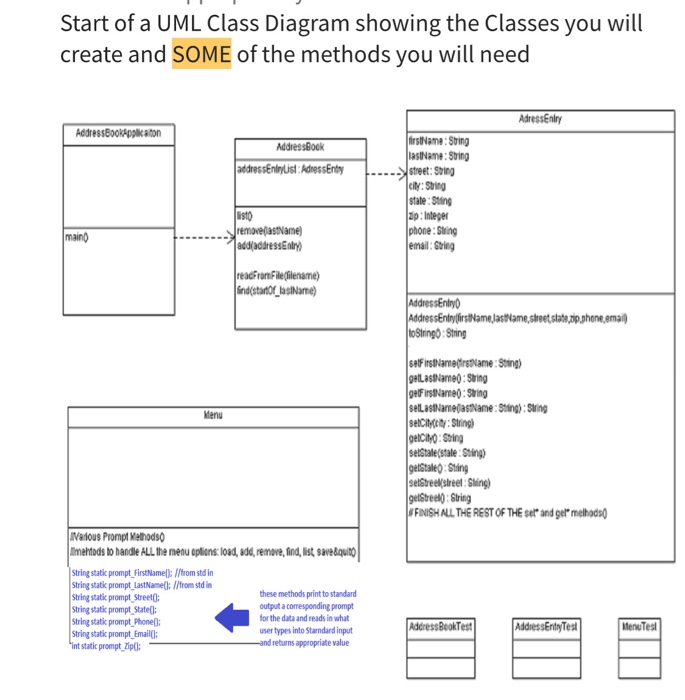
I am going to help you out by paritally specifying some of the OOP design you MUST adhere to. Here is a list of classes that you must implement and their meanings:
- AddressBook - this class represents and contains a possibly every growing and/or shrinking "list" of AddressEntries. It allows for various operations such as search/find, addition and removal of AddressEntries.
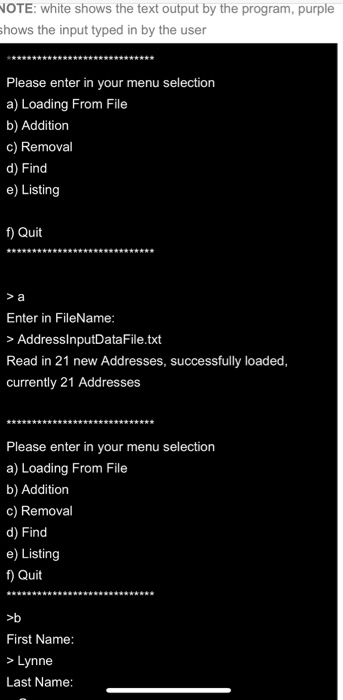
- you need to think about the efficiency of operations needed --see below example session --list alphabetic order (sorted), add, remove, find (search), read in from file
- AddressEntry - this class represents a single Address/Contact information entry in the AddressBook
- It should contain contructors, at least one constructorone that accepts a first, last name, street, city, state, zip, email, phone.
- contain separate class varaibles representing all the information in an AddressEntry contact.
- It should cotain a toString() method that returns a nicely formats a string containing all contact information for printing to console
- It should contain setX() and getX() methods where X are the class variables. (for example, setName(***) and getName() where *** are appropriate parameter(s) )
- AddressBookApplication - this contains the main application class.
- Uses Menu classes and AddressBook as described in this document.
- Menu- this class is used to display menu options to the user. This includes
- a) Loading of entries from a file.
- b) Addition - prompting user for information to be used to create a new AddressEntry
- c) Removal - removing of an AddressEntry from the AddressBook. First a find is done (see below example session) and then the user selects from the find results what entry to remove.
- d) Find - prompts users for the begining of the users last name (they can enter a complete last name or just the start....all entries with that as the first part of their last name will be displayed). Note in the case when more then one entry is found a set will be returned.
- e) Listing - listing (a "dump") of the addresses in alphabetic order by the person's last name.
- f) Quit -note we are NOT saving any newly created AddressEntry objects (or removing objects either are not updated to the file) to the file, this data is lost, we will handle this issue in Project 2 when we store data more apporpriately in a database.
Start of a UML Class Diagram showing the Classes you will create and SOME of the methods you will need.
Unit Testing
Work on your unit-tests before getting in too deep writing your Address Book Application code. You must create a test class for every class you create. For example, for the AddressBook class create a JUnit unti testing class called AddressBookTest. Writing the tests at the start (or almost) helps you get started thinking about methods and and use cases are before you write the code. Then, having the tests in place makes it easy to see if your code is working as you build out the code for the various cases.
I will look at the unit testing code as follows:
- A baseline of having a decent looking unit-test: For a particular test class you should test its corresponding class's methods at least 2 times for each method (this is a minimum). For example, the AddressBookTest unit test should look at 2 or more different istantiations of an AddressBook using its constructor, it should call and check the output of each of its methods --addAddress,getAddress, equals, find, lessThan, greaterThan at least 2 times for each method. Note in this case the AddressBookTest will have methods of testAddressBook, testAddAddress, testGetAddress, testEquals, testFind, testLessThank, testgreaterThan, etc.
- When run against a correct class, each unit test class's methods should not report any problems.
- If someone (meaning me or you) were to intruduce some error in a class then the corresponding testing Class should show the failure. Your unit test must show that there is a problem but, does not need to tell exactly what the problem is....that is what you do with debugging using the unit testing failure information/indication.
- SPECIAL NOTE: I always get at least one question and welcome all questions from a student(s) saying they don't feel comfortable or understand how to write testing code. You have to start somewhere and frankly there is OFTEN not ONE set of lines that make up the best testing code. But, I am looking for something decent not perfect. Comein and see me about this during office hours if you want help.
Start of a UML Class Diagram showing the Classes you will create and SOME of the methods you will need Adresseniny Address BookApplikaton Address Book address Entrylist: Adress Entry firstName: Sting lastName: String street: String city: String state: Sting zip: Integer phone : String email: String 1910 removeastName) and address Entry) main reacFromFile(filename) lind(startOf_lasiName) Address Entry Address EntryfirstName lastName, street state,pip.phone email) toStringo: String setFirstName (frstName: Sting) getLastName: Suring gelFirstName: String setLastNarelastName: Sting): String selciety: String) gelCity: String setState(stale Sting) gelStale Sling setSteelsreel: Sling) getSteel): String FINISH ALL THE REST OF THE sel and gel melhods Various Prompt Methods melods to handle ALL the menu options: load, add, remove, find, ist save&quito String stati prompt FirstNamell://from std in String stati prompt_LastName(: //from stdin String static prompt Street: these methods print to standard String static prompt Statell: output a corresponding prompt String static prompt_Phone: for the data and reads in what String stati prompt_Email(); user types into Stardard input Sint static prompt_ZipC: and returns appropriate value Address BookTest Address Enly Test Menu Test WOTE: white shows the text output by the program, purple shows the input typed in by the user Please enter in your menu selection a) Loading From File b) Addition c) Removal d) Find e) Listing f) Quit Enter in FileName: > AddressInputDataFile.txt Read in 21 new Addresses, successfully loaded, currently 21 Addresses Please enter in your menu selection a) Loading From File b) Addition c) Removal d) Find e) Listing f) Quit >b First Name: > Lynne Last Name: Start of a UML Class Diagram showing the Classes you will create and SOME of the methods you will need Adresseniny Address BookApplikaton Address Book address Entrylist: Adress Entry firstName: Sting lastName: String street: String city: String state: Sting zip: Integer phone : String email: String 1910 removeastName) and address Entry) main reacFromFile(filename) lind(startOf_lasiName) Address Entry Address EntryfirstName lastName, street state,pip.phone email) toStringo: String setFirstName (frstName: Sting) getLastName: Suring gelFirstName: String setLastNarelastName: Sting): String selciety: String) gelCity: String setState(stale Sting) gelStale Sling setSteelsreel: Sling) getSteel): String FINISH ALL THE REST OF THE sel and gel melhods Various Prompt Methods melods to handle ALL the menu options: load, add, remove, find, ist save&quito String stati prompt FirstNamell://from std in String stati prompt_LastName(: //from stdin String static prompt Street: these methods print to standard String static prompt Statell: output a corresponding prompt String static prompt_Phone: for the data and reads in what String stati prompt_Email(); user types into Stardard input Sint static prompt_ZipC: and returns appropriate value Address BookTest Address Enly Test Menu Test WOTE: white shows the text output by the program, purple shows the input typed in by the user Please enter in your menu selection a) Loading From File b) Addition c) Removal d) Find e) Listing f) Quit Enter in FileName: > AddressInputDataFile.txt Read in 21 new Addresses, successfully loaded, currently 21 Addresses Please enter in your menu selection a) Loading From File b) Addition c) Removal d) Find e) Listing f) Quit >b First Name: > Lynne Last Name
Step by Step Solution
There are 3 Steps involved in it

Get step-by-step solutions from verified subject matter experts
 Study Help