







Question: ***CODE IN JAVA*** Tips to start with: 1. First, you should start by creating the classes. 2. Second, you need to add properties (fields). 3.
***CODE IN JAVA***
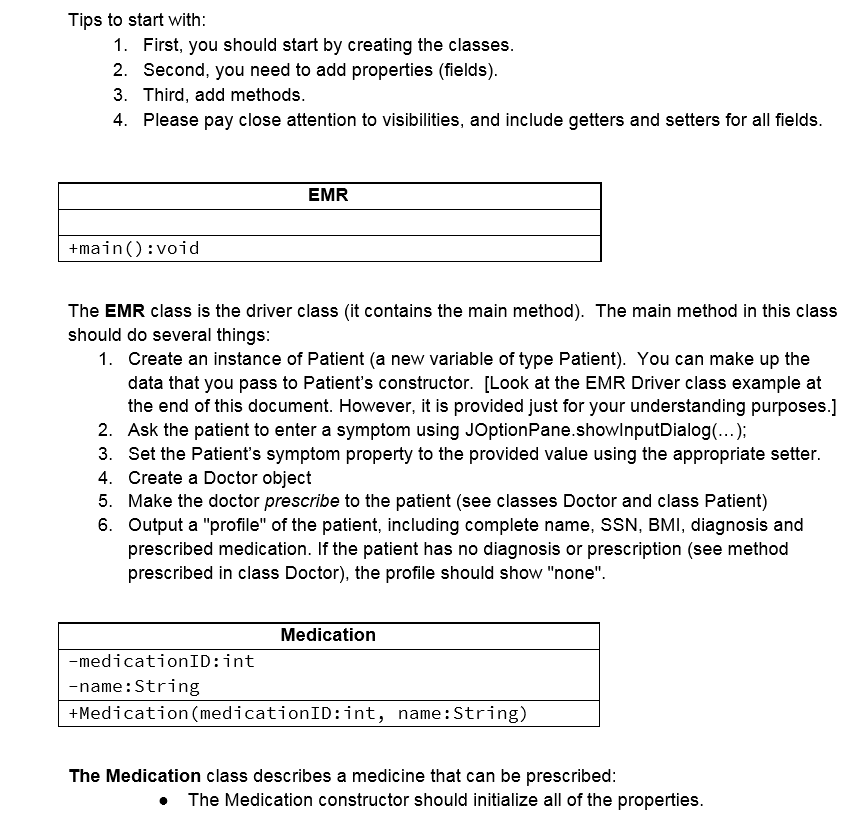
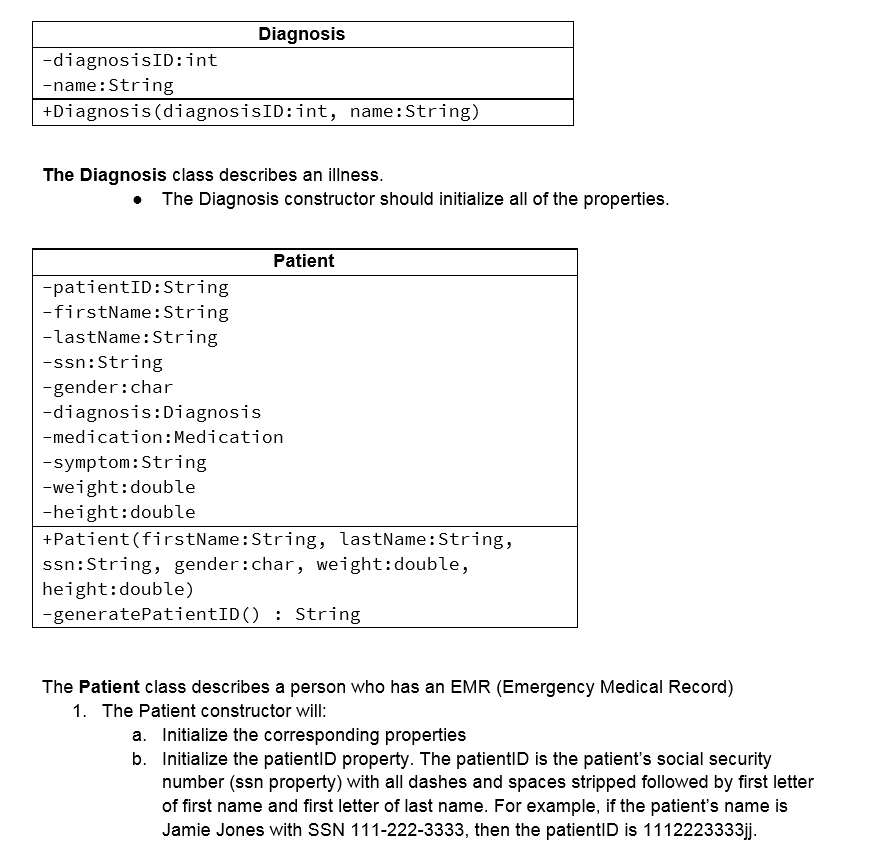
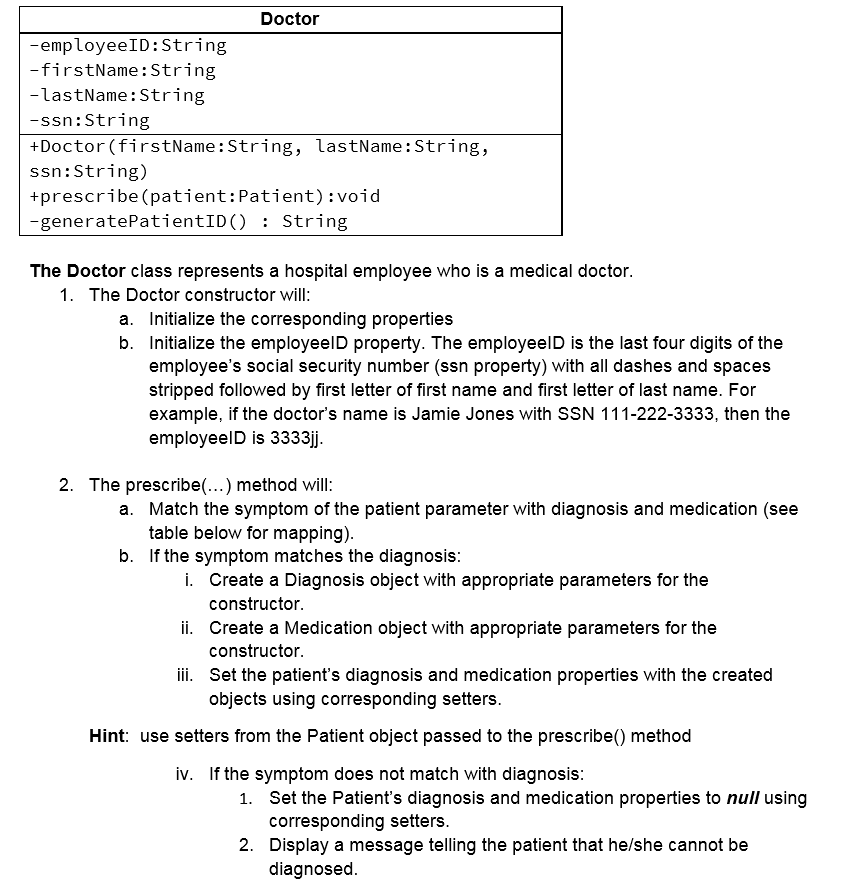
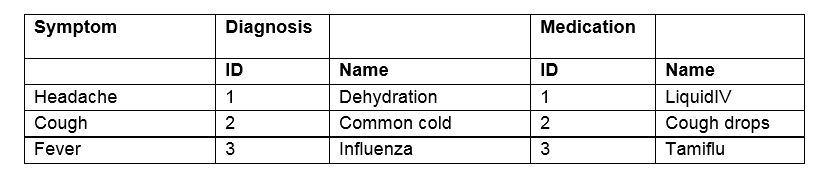
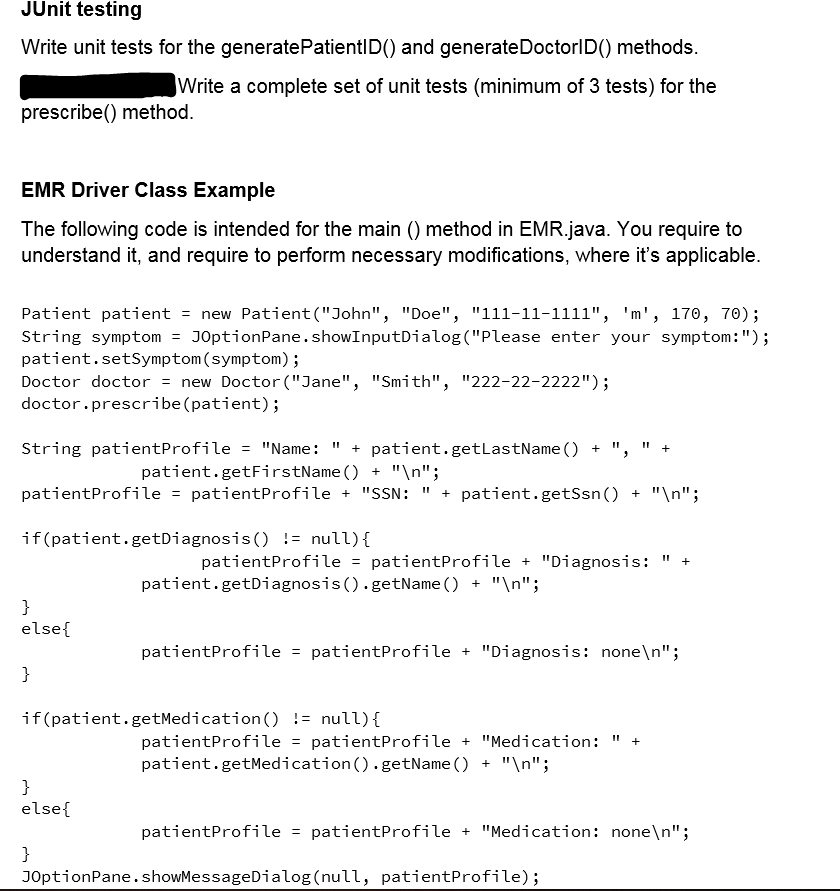
Tips to start with: 1. First, you should start by creating the classes. 2. Second, you need to add properties (fields). 3. Third, add methods. 4. Please pay close attention to visibilities, and include getters and setters for all fields. EMR +main():void The EMR class is the driver class (it contains the main method). The main method in this class should do several things: 1. Create an instance of Patient (a new variable of type Patient). You can make up the data that you pass to patient's constructor. [Look at the EMR Driver class example at the end of this document. However, it is provided just for your understanding purposes.] Ask the patient to enter a symptom using JOptionPane.showinputDialog(...); 3. Set the patient's symptom property to the provided value using the appropriate setter. 4. Create a Doctor object 5. Make the doctor prescribe to the patient (see classes Doctor and class Patient) 6. Output a "profile" of the patient, including complete name, SSN, BMI, diagnosis and prescribed medication. If the patient has no diagnosis or prescription (see method prescribed in class Doctor), the profile should show "none". Medication -medicationID:int -name: String | +Medication (medicationID:int, name: String) The Medication class describes a medicine that can be prescribed: The Medication constructor should initialize all of the properties. Diagnosis -diagnosisID:int -name: String +Diagnosis (diagnosisID:int, name: String) The Diagnosis class describes an illness. The Diagnosis constructor should initialize all of the properties. Patient -patientID:String -firstName: String -lastName: String -ssn:String -gender:char -diagnosis:Diagnosis -medication: Medication -symptom: String -weight:double -height:double +Patient(firstName: String, lastName: String, ssn: String, gender:char, weight:double, height:double) -generatePatientID(): String The Patient class describes a person who has an EMR (Emergency Medical Record) 1. The Patient constructor will: a. Initialize the corresponding properties b. Initialize the patientin property. The patientID is the patient's social security number (ssn property) with all dashes and spaces stripped followed by first letter of first name and first letter of last name. For example, if the patient's name is Jamie Jones with SSN 111-222-3333, then the patientID is 1112223333jj. Doctor -employeeID: String -firstName: String -lastName: String -ssn: String +Doctor (firstName: String, lastName: String, ssn: String) +prescribe (patient:Patient):void -generatePatientID(): String The Doctor class represents a hospital employee who is a medical doctor. 1. The Doctor constructor will: a. Initialize the corresponding properties b. Initialize the employeeld property. The employeeld is the last four digits of the employee's social security number (ssn property) with all dashes and spaces stripped followed by first letter of first name and first letter of last name. For example, if the doctor's name is Jamie Jones with SSN 111-222-3333, then the employeeld is 3333jj. tar 2. The prescribe(...) method will: a. Match the symptom of the patient parameter with diagnosis and medication (see table below for mapping). b. If the symptom matches the diagnosis: . Create a Diagnosis object with appropriate parameters for the constructor. ii. Create a Medication object with appropriate parameters for the constructor. iii. Set the patient's diagnosis and medication properties with the created objects using corresponding setters. Hint: use setters from the Patient object passed to the prescribe() method iv. If the symptom does not match with diagnosis: 1. Set the Patient's diagnosis and medication properties to null using corresponding setters. 2. Display a message telling the patient that he/she cannot be diagnosed. Symptom Diagnosis Medication ID 10 Headache Cough Fever Name Dehydration Common cold Influenza Name Liquidi Cough drops Tamiflu 2 3 3 JUnit testing Write unit tests for the generate PatientID() and generate DoctorID() methods. Write a complete set of unit tests (minimum of 3 tests) for the prescribe() method. EMR Driver Class Example The following code is intended for the main () method in EMR.java. You require to understand it, and require to perform necessary modifications, where it's applicable. Patient patient = new Patient("John", "Doe", "111-11-1111", 'm', 170, 70); String symptom = JOptionPane. showInputDialog("Please enter your symptom:"); patient.setSymptom (symptom); Doctor doctor = new Doctor ("Jane", "Smith", "222-22-2222"); doctor.prescribe (patient); String patientProfile = "Name: " + patient.getLastName() + ", " + patient.getFirstName() + " "; patientProfile = patientProfile + "SSN: " + patient.getSsn() + " "; if(patient.getDiagnosis) != null) { patientProfile = patientProfile + "Diagnosis: " + patient.getDiagnosis().getName() + " "; else { patientProfile = patientProfile + "Diagnosis: none "; if(patient.getMedication() != null) { patientProfile = patientProfile + "Medication: " + patient.getMedication().getName() + " "; else{ patientProfile = patientProfile + "Medication: none "; JOptionPane.showMessageDialog(null, patientProfile); Tips to start with: 1. First, you should start by creating the classes. 2. Second, you need to add properties (fields). 3. Third, add methods. 4. Please pay close attention to visibilities, and include getters and setters for all fields. EMR +main():void The EMR class is the driver class (it contains the main method). The main method in this class should do several things: 1. Create an instance of Patient (a new variable of type Patient). You can make up the data that you pass to patient's constructor. [Look at the EMR Driver class example at the end of this document. However, it is provided just for your understanding purposes.] Ask the patient to enter a symptom using JOptionPane.showinputDialog(...); 3. Set the patient's symptom property to the provided value using the appropriate setter. 4. Create a Doctor object 5. Make the doctor prescribe to the patient (see classes Doctor and class Patient) 6. Output a "profile" of the patient, including complete name, SSN, BMI, diagnosis and prescribed medication. If the patient has no diagnosis or prescription (see method prescribed in class Doctor), the profile should show "none". Medication -medicationID:int -name: String | +Medication (medicationID:int, name: String) The Medication class describes a medicine that can be prescribed: The Medication constructor should initialize all of the properties. Diagnosis -diagnosisID:int -name: String +Diagnosis (diagnosisID:int, name: String) The Diagnosis class describes an illness. The Diagnosis constructor should initialize all of the properties. Patient -patientID:String -firstName: String -lastName: String -ssn:String -gender:char -diagnosis:Diagnosis -medication: Medication -symptom: String -weight:double -height:double +Patient(firstName: String, lastName: String, ssn: String, gender:char, weight:double, height:double) -generatePatientID(): String The Patient class describes a person who has an EMR (Emergency Medical Record) 1. The Patient constructor will: a. Initialize the corresponding properties b. Initialize the patientin property. The patientID is the patient's social security number (ssn property) with all dashes and spaces stripped followed by first letter of first name and first letter of last name. For example, if the patient's name is Jamie Jones with SSN 111-222-3333, then the patientID is 1112223333jj. Doctor -employeeID: String -firstName: String -lastName: String -ssn: String +Doctor (firstName: String, lastName: String, ssn: String) +prescribe (patient:Patient):void -generatePatientID(): String The Doctor class represents a hospital employee who is a medical doctor. 1. The Doctor constructor will: a. Initialize the corresponding properties b. Initialize the employeeld property. The employeeld is the last four digits of the employee's social security number (ssn property) with all dashes and spaces stripped followed by first letter of first name and first letter of last name. For example, if the doctor's name is Jamie Jones with SSN 111-222-3333, then the employeeld is 3333jj. tar 2. The prescribe(...) method will: a. Match the symptom of the patient parameter with diagnosis and medication (see table below for mapping). b. If the symptom matches the diagnosis: . Create a Diagnosis object with appropriate parameters for the constructor. ii. Create a Medication object with appropriate parameters for the constructor. iii. Set the patient's diagnosis and medication properties with the created objects using corresponding setters. Hint: use setters from the Patient object passed to the prescribe() method iv. If the symptom does not match with diagnosis: 1. Set the Patient's diagnosis and medication properties to null using corresponding setters. 2. Display a message telling the patient that he/she cannot be diagnosed. Symptom Diagnosis Medication ID 10 Headache Cough Fever Name Dehydration Common cold Influenza Name Liquidi Cough drops Tamiflu 2 3 3 JUnit testing Write unit tests for the generate PatientID() and generate DoctorID() methods. Write a complete set of unit tests (minimum of 3 tests) for the prescribe() method. EMR Driver Class Example The following code is intended for the main () method in EMR.java. You require to understand it, and require to perform necessary modifications, where it's applicable. Patient patient = new Patient("John", "Doe", "111-11-1111", 'm', 170, 70); String symptom = JOptionPane. showInputDialog("Please enter your symptom:"); patient.setSymptom (symptom); Doctor doctor = new Doctor ("Jane", "Smith", "222-22-2222"); doctor.prescribe (patient); String patientProfile = "Name: " + patient.getLastName() + ", " + patient.getFirstName() + " "; patientProfile = patientProfile + "SSN: " + patient.getSsn() + " "; if(patient.getDiagnosis) != null) { patientProfile = patientProfile + "Diagnosis: " + patient.getDiagnosis().getName() + " "; else { patientProfile = patientProfile + "Diagnosis: none "; if(patient.getMedication() != null) { patientProfile = patientProfile + "Medication: " + patient.getMedication().getName() + " "; else{ patientProfile = patientProfile + "Medication: none "; JOptionPane.showMessageDialog(null, patientProfile)
Step by Step Solution
There are 3 Steps involved in it

Get step-by-step solutions from verified subject matter experts
 Study Help