







Question: Code should be written in C# Book Store BOOK STORE PART 3 Add Using System.IO Create Text File called book.txt to hold book objects Write
Code should be written in C#
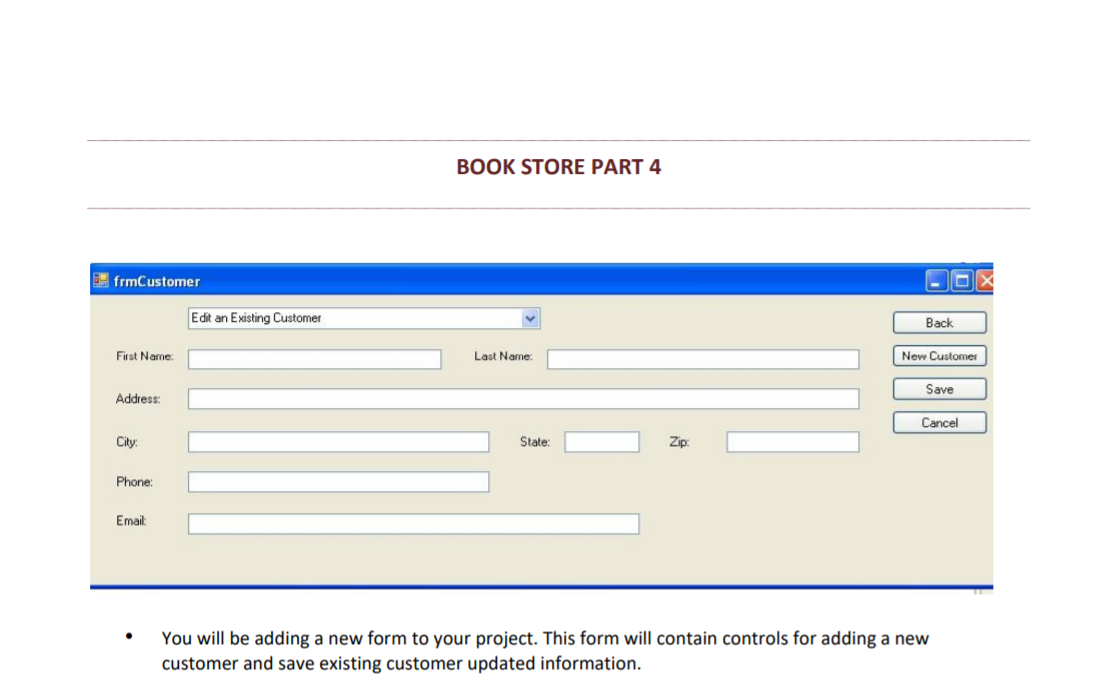
Book Store BOOK STORE PART 3 Add Using System.IO Create Text File called book.txt to hold book objects Write a loop to process all books into an ArrayList that comes from the 10. Write statements to load the Combo box with book items. Use a try/catch to handle 10 Errors. Write the order to a file called orders.txt when the complete order button is click add proper 10 error handling to ensure that no errors will be displayed when writing the information to the file. BOOK STORE PART 4 frmCustomer Edit an Existing Customer Back First Name: Last Name: New Customer Save Address: Cancel City: State: Zip Phone: Email: You will be adding a new form to your project. This form will contain controls for adding a new customer and save existing customer updated information. When the save button is pressed, the program should make sure that none of the text boxes are left blank, and should use regular expressions to ensure the first name, last name, address, city, state, zip code, phone, and email are valid. If a text box is blank or invalid a messagebox should be displayed, and the focus should be set to the invalid textbox. If all of the textboxes are valid then the information will be taken out of the textboxes and be placed into a file named customers.txt. After this the combo box should reflect any updates to existing customer's first name or last name as well as adding any new customer to that list. . When the new customer button is pressed the form will set the combo box enable property to false and then focus on the first name textbox field ensuring that tab order is correct. Book Store BOOK STORE PART 3 Add Using System.IO Create Text File called book.txt to hold book objects Write a loop to process all books into an ArrayList that comes from the 10. Write statements to load the Combo box with book items. Use a try/catch to handle 10 Errors. Write the order to a file called orders.txt when the complete order button is click add proper 10 error handling to ensure that no errors will be displayed when writing the information to the file. BOOK STORE PART 4 frmCustomer Edit an Existing Customer Back First Name: Last Name: New Customer Save Address: Cancel City: State: Zip Phone: Email: You will be adding a new form to your project. This form will contain controls for adding a new customer and save existing customer updated information. When the save button is pressed, the program should make sure that none of the text boxes are left blank, and should use regular expressions to ensure the first name, last name, address, city, state, zip code, phone, and email are valid. If a text box is blank or invalid a messagebox should be displayed, and the focus should be set to the invalid textbox. If all of the textboxes are valid then the information will be taken out of the textboxes and be placed into a file named customers.txt. After this the combo box should reflect any updates to existing customer's first name or last name as well as adding any new customer to that list. . When the new customer button is pressed the form will set the combo box enable property to false and then focus on the first name textbox field ensuring that tab order is correct
Step by Step Solution
There are 3 Steps involved in it

Get step-by-step solutions from verified subject matter experts
 Study Help