







Question: Code the following using the Arduino IDE or C. PLEASE USE MILLIS() NOT DELAY. Using the circuit shown in Figure 1, implement a Knight Rider
Code the following using the Arduino IDE or C. PLEASE USE MILLIS() NOT DELAY.
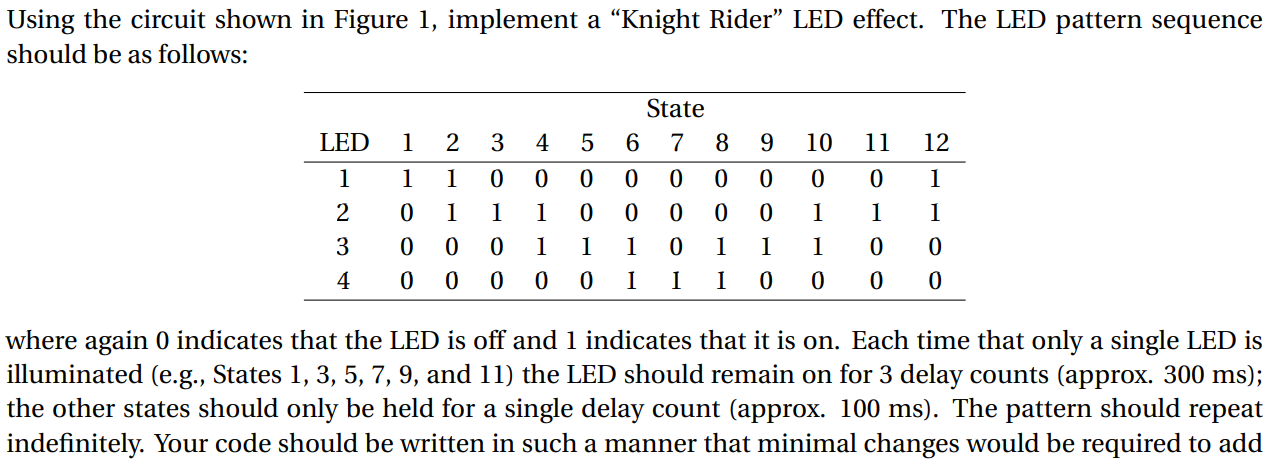
Using the circuit shown in Figure 1, implement a Knight Rider LED effect. The LED pattern sequence should be as follows: State 6 7 8 1 2 3 4 5 9 10 11 12 LED 1 1 1 0 0 0 0 0 0 0 0 1 2 1 1 1 0 0 0 1 1 1 0 0 0 1 0 0 0 1 3 0 0 1 1 1 1 1 0 0 4 0 0 0 0 0 1 I 0 0 0 0 where again 0 indicates that the LED is off and 1 indicates that it is on. Each time that only a single LED is illuminated (e.g., States 1, 3, 5, 7, 9, and 11) the LED should remain on for 3 delay counts (approx. 300 ms); the other states should only be held for a single delay count (approx. 100 ms). The pattern should repeat indefinitely. Your code should be written in such a manner that minimal changes would be required to add Using the circuit shown in Figure 1, implement a Knight Rider LED effect. The LED pattern sequence should be as follows: State 6 7 8 1 2 3 4 5 9 10 11 12 LED 1 1 1 0 0 0 0 0 0 0 0 1 2 1 1 1 0 0 0 1 1 1 0 0 0 1 0 0 0 1 3 0 0 1 1 1 1 1 0 0 4 0 0 0 0 0 1 I 0 0 0 0 where again 0 indicates that the LED is off and 1 indicates that it is on. Each time that only a single LED is illuminated (e.g., States 1, 3, 5, 7, 9, and 11) the LED should remain on for 3 delay counts (approx. 300 ms); the other states should only be held for a single delay count (approx. 100 ms). The pattern should repeat indefinitely. Your code should be written in such a manner that minimal changes would be required to add
Step by Step Solution
There are 3 Steps involved in it

Get step-by-step solutions from verified subject matter experts
 Study Help