







Question: Coding C++ on Microsoft Visual Studio I have a mac and my code doesnt execute properly so i cannot fill in the chart so im
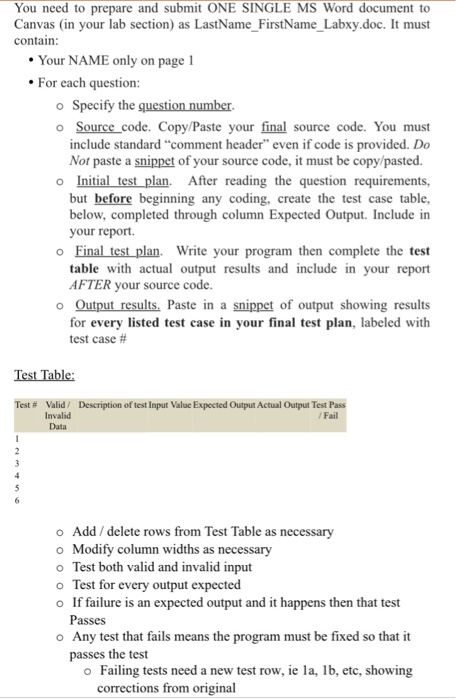
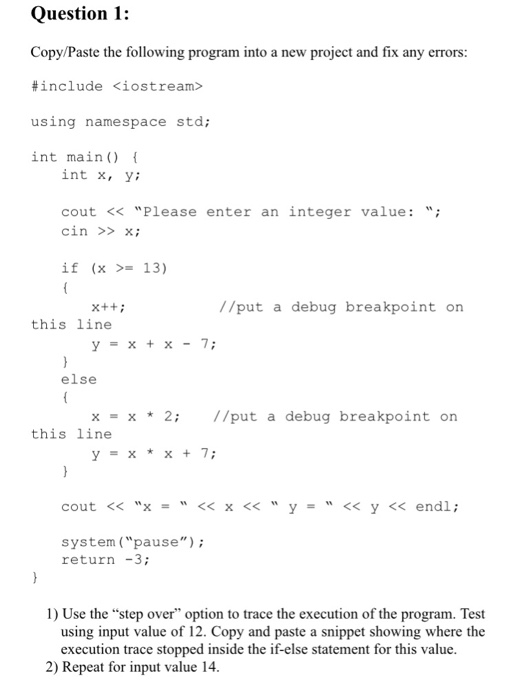
You need to prepare and submit Canvas (in your lab section as LastName FirstName Labxy.doc. It must contain: ONE SINGLE MS Word document to Your NAME only on page 1 For each question: o Specify the question number. o Source code. Copy/Paste your final source code. You must include standard "comment header" even if code is provided. Do Not paste a snippet of your source code, it must be copy/pasted. o Initial test plan. After reading the question requirements, but before beginning any coding, create the test case table, below, completed through column Expected Output. Include in your report o Final test plan. Write your program then complete the test table with actual output results and include in your report AFTER your source code o Output results Paste in a snippet of output showing results for every listed test case in your final test plan, labeled with test case # Test Table: Test # Valid / Invalid Data Description of test Input Value Expected Output Actual Output Test Pass / Fail o Add /delete rows from Test Table as necessary o Modify column widths as necessary o Test both valid and invalid input o Test for every output expected o If failure is an ex t and it happens then that test ou Passes o Any test that fails means the program must be fixed so that it passes the test o Failing tests need a new test row, ie la, 1b, etc, showing corrections from original Question 1: Copy/Paste the following program into a new project and fix any errors: #include
Step by Step Solution
There are 3 Steps involved in it

Get step-by-step solutions from verified subject matter experts
 Study Help