







Question: CODING IN C PLEASE! See the startup program diskblocks.c in ~veerasam/linux7/a5 We learned about the # of storage blocks and overhead blocks required to store
CODING IN C PLEASE!
See the startup program diskblocks.c in ~veerasam/linux7/a5
We learned about the # of storage blocks and overhead blocks required to store files using this inode structore diagram as the guidance. Now, challenge yourself and develop an algorithm and implement it to compute # of storage blocks and overhead blocks required to store a file of any size. Using this inode structore diagram as the guidance. Input will be specified in KBs. Output will have 2 numbers: # of storage blocks and # of overhead blocks.
Here are a sample run (to store a file of size 100KB, we need 13 blocks for storage and 1 overhead block). Note that the input is specified as a command line argument.
diskblocks 100
13 1
It is a good idea to use long instead of int, as shown in my startup program. When the input file size is too large to accommodate in the filesystem, output -1 for overhead blocks.
NOT USING: struct ext4_inode
^because my file does not run with it.
Startup File (to copy and paste):
#include
#include
#include
#include
#include
#include
#include
#define SIBLOCKS 2048L
#define DIBLOCKS (2048L*2048L)
#define TIBLOCKS (2048L*2048L*2048L)
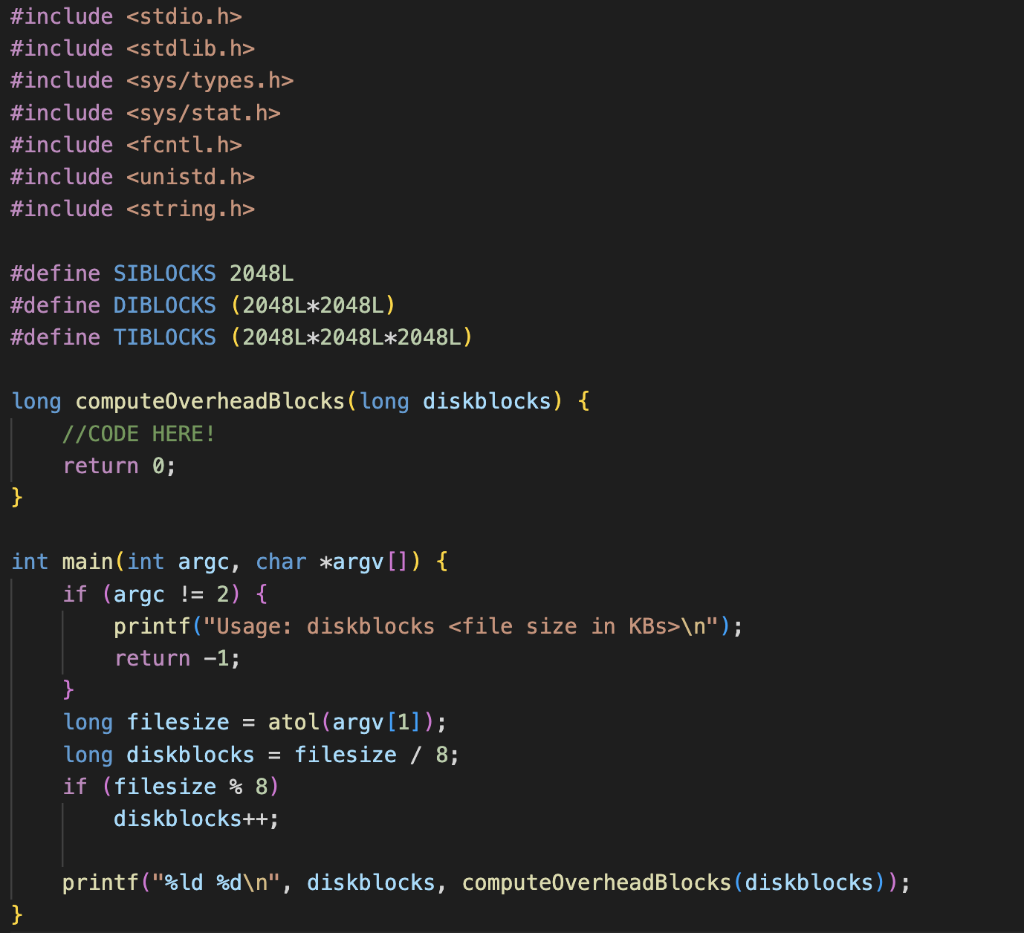
long computeOverheadBlocks(long diskblocks) {
//CODE HERE!
return 0;
}
int main(int argc, char *argv[]) {
if (argc != 2) {
printf("Usage: diskblocks
return -1;
}
long filesize = atol(argv[1]);
long diskblocks = filesize / 8;
if (filesize % 8)
diskblocks++;
printf("%ld %d ", diskblocks, computeOverheadBlocks(diskblocks));
}
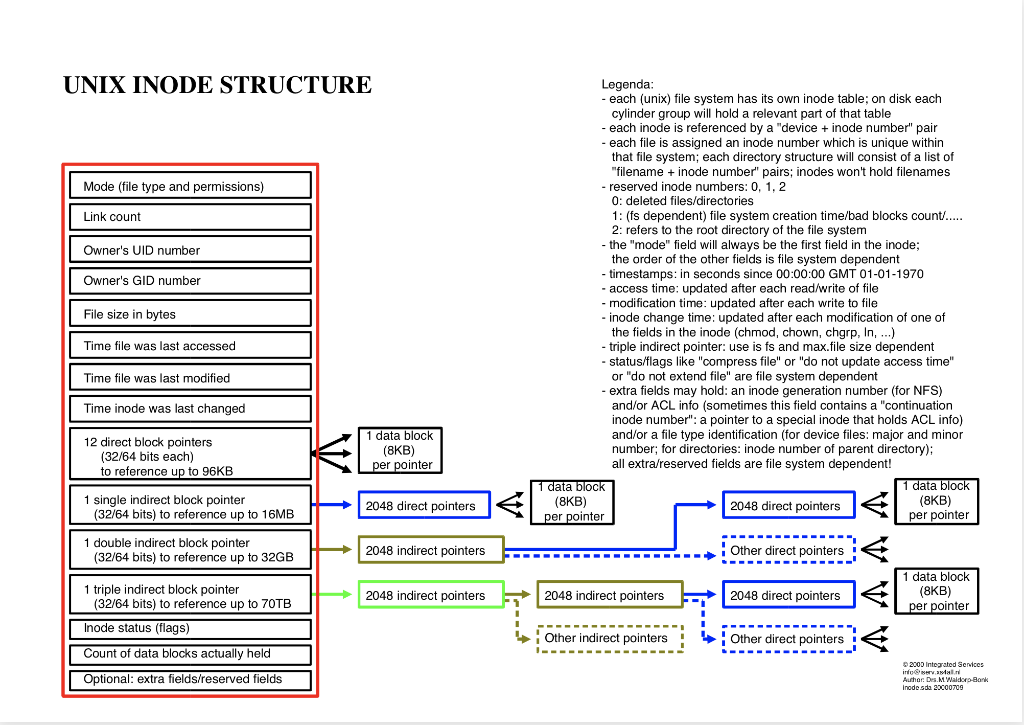
UNIX INODE STRUCTURE Legenda: - each (unix) file system has its own inode table; on disk each cylinder group will hold a relevant part of that table - each inode is referenced by a "device + inode number" pair - each file is assigned an inode number which is unique within that file system; each directory structure will consist of a list of "filename + inode number" pairs; inodes won't hold filenames - reserved inode numbers: 0,1,2 0 : deleted files/directories 1: (fs dependent) file system creation time/bad blocks count/..... 2: refers to the root directory of the file system - the "mode" field will always be the first field in the inode; the order of the other fields is file system dependent - timestamps: in seconds since 00:00:00 GMT 01-01-1970 - access time: updated after each read/write of file - modification time: updated after each write to file - inode change time: updated after each modification of one of the fields in the inode (chmod, chown, chgrp, ln, ) - triple indirect pointer: use is fs and max.file size dependent - status/flags like "compress file" or "do not update access time" or "do not extend file" are file system dependent - extra fields may hold: an inode generation number (for NFS) and/or ACL info (sometimes this field contains a "continuation inode number": a pointer to a special inode that holds ACL info) and/or a file type identification (for device files: major and minor per pointer number; for directories: inode number of parent directory); to reference up to 96KB all extra/reserved fields are file system dependent
Step by Step Solution
There are 3 Steps involved in it

Get step-by-step solutions from verified subject matter experts
 Study Help