







Question: CODING IN C PLEASE! See the startup program diskblocks.c in ~veerasam/linux7/a5 We learned about the # of storage blocks and overhead blocks required to store
CODING IN C PLEASE!
See the startup program diskblocks.c in ~veerasam/linux7/a5
We learned about the # of storage blocks and overhead blocks required to store files using this inode structore diagram as the guidance. Now, challenge yourself and develop an algorithm and implement it to compute # of storage blocks and overhead blocks required to store a file of any size. Using this inode structore diagram as the guidance. Input will be specified in KBs. Output will have 2 numbers: # of storage blocks and # of overhead blocks.
Here are a sample run (to store a file of size 100KB, we need 13 blocks for storage and 1 overhead block). Note that the input is specified as a command line argument.
diskblocks 100
13 1
It is a good idea to use long instead of int, as shown in my startup program. When the input file size is too large to accommodate in the filesystem, output -1 for overhead blocks.
Once you complete your program, you can test it with this command (make sure you have Makefile in your directory):
testfsb
Once you complete the program and test it, you can submit using turnin in cs1 server and submit the screenshot of testa5 script output in elearning and complete this assignment.
turnin a5 diskblocks.c
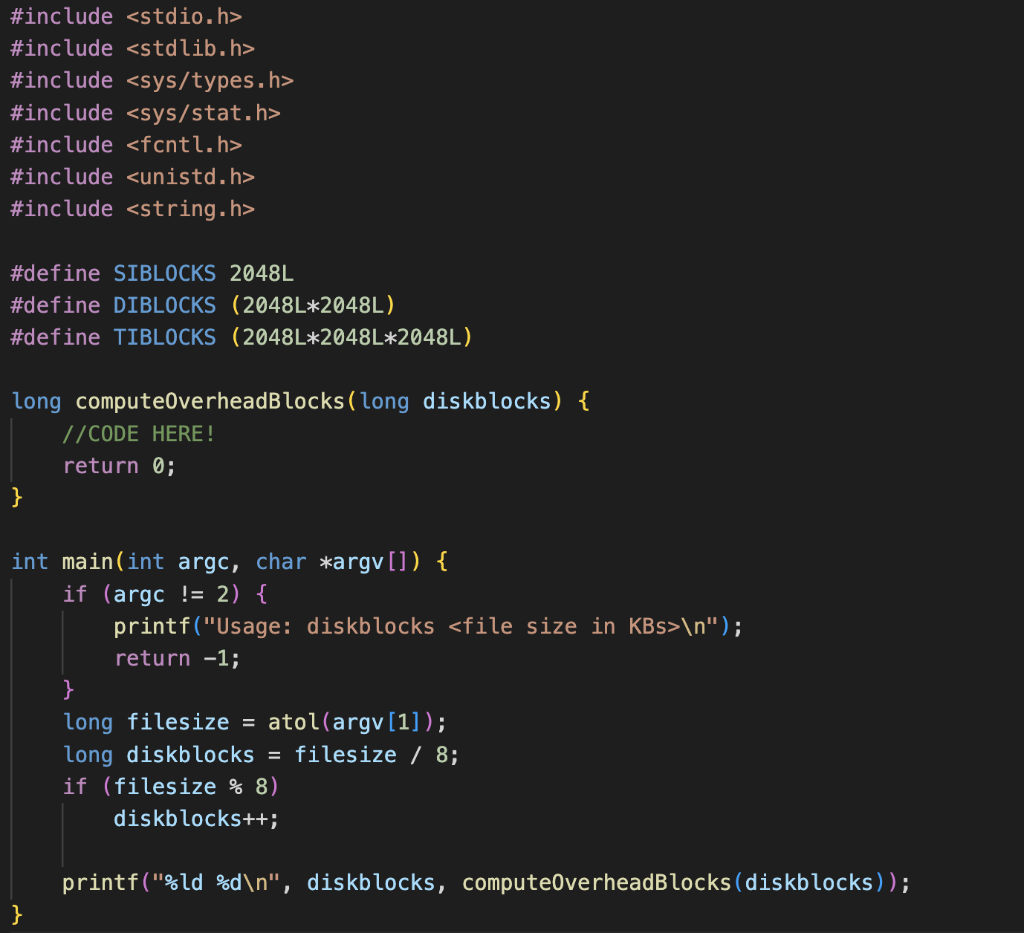
Startup File (to copy and paste):
#include
#include
#include
#include
#include
#include
#include
#define SIBLOCKS 2048L
#define DIBLOCKS (2048L*2048L)
#define TIBLOCKS (2048L*2048L*2048L)
long computeOverheadBlocks(long diskblocks) {
//CODE HERE!
return 0;
}
int main(int argc, char *argv[]) {
if (argc != 2) {
printf("Usage: diskblocks
return -1;
}
long filesize = atol(argv[1]);
long diskblocks = filesize / 8;
if (filesize % 8)
diskblocks++;
printf("%ld %d ", diskblocks, computeOverheadBlocks(diskblocks));
}
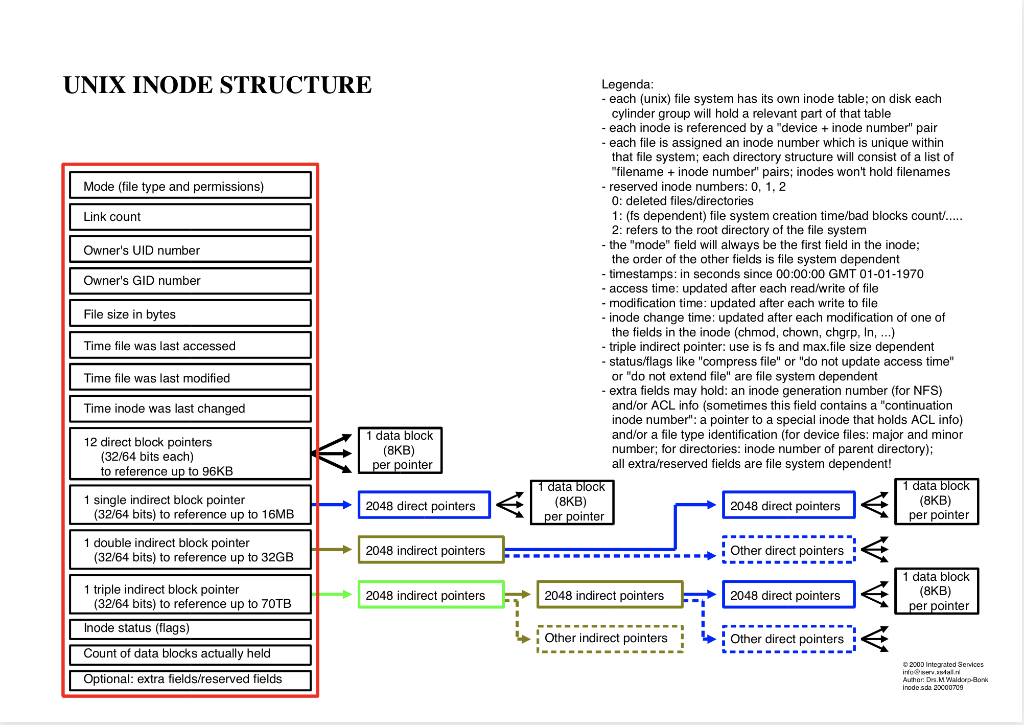
UNIX INODE STRUCTURE Legenda: - each (unix) file system has its own inode table; on disk each cylinder group will hold a relevant part of that table - each inode is referenced by a "device + inode number" pair - each file is assigned an inode number which is unique within that file system; each directory structure will consist of a list of "filename + inode number" pairs; inodes won't hold filenames - reserved inode numbers: 0,1,2 0 : deleted files/directories 1: (fs dependent) file system creation time/bad blocks count/..... 2: refers to the root directory of the file system - the "mode" field will always be the first field in the inode; the order of the other fields is file system dependent - timestamps: in seconds since 00:00:00 GMT 01-01-1970 - access time: updated after each read/write of file - modification time: updated after each write to file - inode change time: updated after each modification of one of the fields in the inode (chmod, chown, chgrp, ln, ) - triple indirect pointer: use is fs and max.file size dependent - status/flags like "compress file" or "do not update access time" or "do not extend file" are file system dependent - extra fields may hold: an inode generation number (for NFS) and/or ACL info (sometimes this field contains a "continuation inode number": a pointer to a special inode that holds ACL info) and/or a file type identification (for device files: major and minor per pointer number; for directories: inode number of parent directory); to reference up to 96KB all extra/reserved fields are file system dependent
Step by Step Solution
There are 3 Steps involved in it

Get step-by-step solutions from verified subject matter experts
 Study Help