







Question: Coding with python using Tkinter Using tkinter create a calculator application. The calculator should look similar to the image shown below: Simple Calculator 2 5
Coding with python using Tkinter
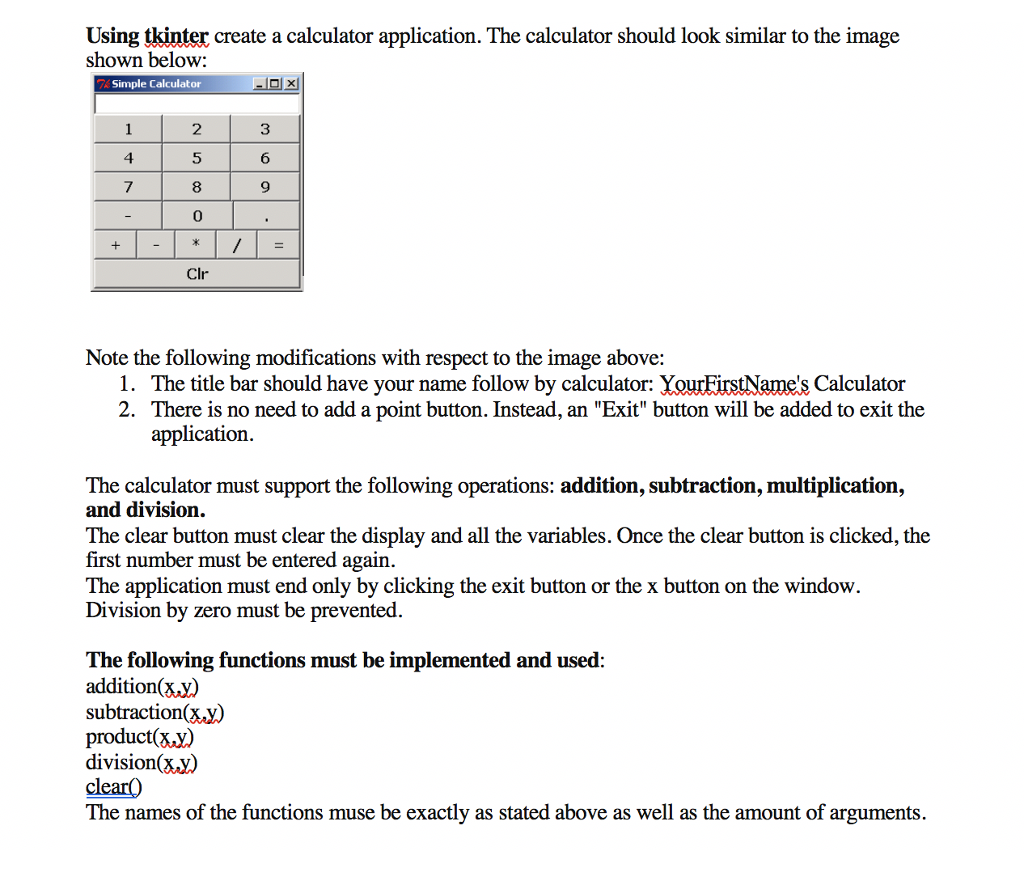
Using tkinter create a calculator application. The calculator should look similar to the image shown below: Simple Calculator 2 5 8 0 3 6 9 4 7 Clr Note the following modifications with respect to the image above: 1. 2. The title bar should have your name follow by calculator: There is no need to add a point button. Instead, an "Exit" button will be added to exit the application. Calculator The calculator must support the following operations: addition, subtraction, multiplication, and division. The clear button must clear the display and all the variables. Once the clear button is clicked, the first number must be entered again. The application must end only by clicking the exit button or the x button on the window. Division by zero must be prevented The following functions must be implemented and used: addition(x.y) subtraction(x.y) product(x.y) division(X.y) The names of the functions muse be exactly as stated above as well as the amount of arguments
Step by Step Solution
There are 3 Steps involved in it

Get step-by-step solutions from verified subject matter experts
 Study Help