



Question: Column indexing: Updating price tables using a single colon. Column array origPriceTable contains the price per pound of various deli items. Column array changePrice indicates
Column indexing: Updating price tables using a single colon.
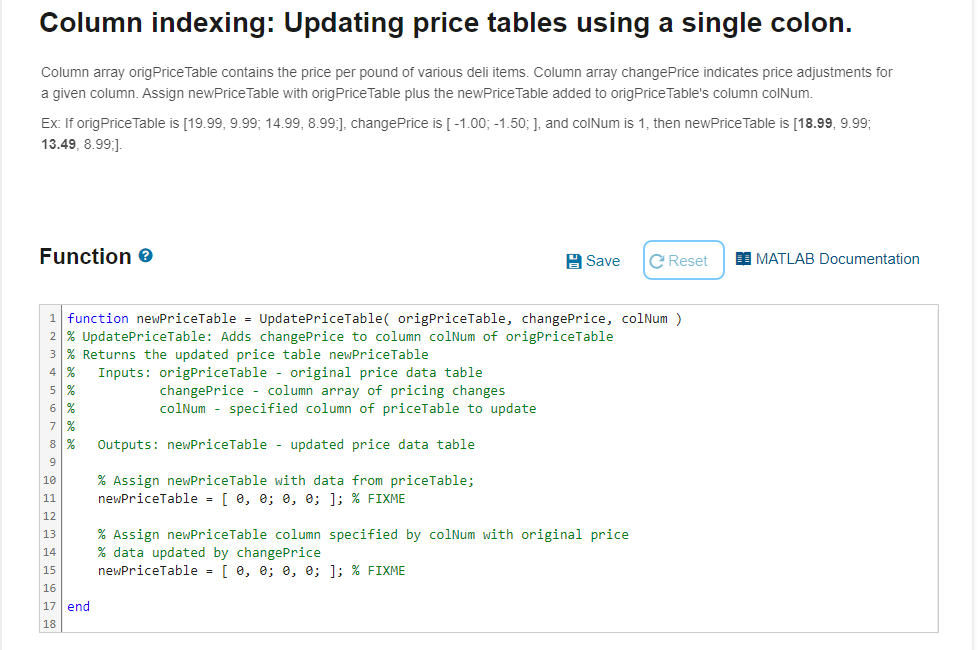
Column array origPriceTable contains the price per pound of various deli items. Column array changePrice indicates price adjustments for
a given column. Assign newPriceTable with origPriceTable plus the newPriceTable added to origPriceTable's column colNum.
Ex: If origPriceTable is ; changePrice is ; and colNum is then newPriceTable is ;
;
Function
function newPriceTable UpdatePriceTable origPriceTable changePrice, colNum
UpdatePriceTable: Adds changePrice to column colNum of origPriceTable
Returns the updated price table newPriceTable
Inputs: origPriceTable original price data table
changePrice column array of pricing changes
colNum specified column of priceTable to update
Outputs: newPriceTable updated price data table
Assign newPriceTable with data from priceTable;
newPriceTable ;;; FIXME
Assign newPriceTable column specified by colNum with original price
data updated by changePrice
newPriceTable ;;; FIXME
end
Step by Step Solution
There are 3 Steps involved in it
1 Expert Approved Answer
Step: 1 Unlock

Question Has Been Solved by an Expert!
Get step-by-step solutions from verified subject matter experts
Step: 2 Unlock
Step: 3 Unlock