


Question: COMM 1103: Editing Practice Follow these steps: 1. Identify the core data/information the reader needs. Remember that the rough notes may contain inappropriate (eg, negative,
COMM 1103: Editing Practice Follow these steps:
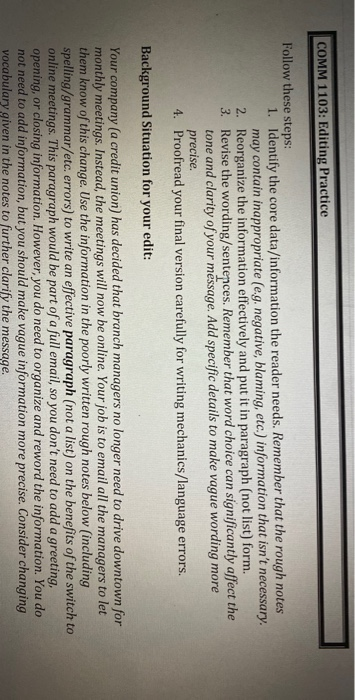
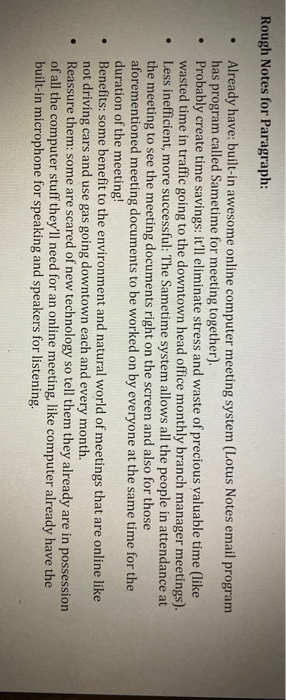
COMM 1103: Editing Practice Follow these steps: 1. Identify the core data/information the reader needs. Remember that the rough notes may contain inappropriate (eg, negative, blaming, etc.) information that isn't necessary. 2. Reorganize the information effectively and put it in paragraph (not list) form. 3. Revise the wording/sentences. Remember that word choice can significantly affect the tone and clarity of your message. Add specific details to make vague wording more precise. 4. Proofread your final version carefully for writing mechanics/language errors. Background Situation for your edit: Your company (a credit union) has decided that branch managers no longer need to drive downtown for monthly meetings. Instead, the meetings will now be online. Your job is to email all the managers to let them know of this change. Use the information in the poorly written rough notes below (including spelling/grammar/etc. errors) to write an effective paragraph (not a list) on the benefits of the switch to online meetings. This paragraph would be part of a full email, so you don't need to add a greeting, opening, or closing information. However, you do need to organize and reword the information. You do not need to add information, but you should make vague information more precise. Consider changing vocabulary given in the notes to further clarify the message. Rough Notes for Paragraph: . Already have: built-in awesome online computer meeting system (Lotus Notes email program has program called Sametime for meeting together). Probably create time savings: it'll eliminate stress and waste of precious valuable time (like wasted time in traffic going to the downtown head office monthly branch manager meetings). Less inefficient, more successful: The Sametime system allows all the people in attendance at the meeting to see the meeting documents right on the screen and also for those aforementioned meeting documents to be worked on by everyone at the same time for the duration of the meeting! Benefits: some benefit to the environment and natural world of meetings that are online like not driving cars and use gas going downtown each and every month. Reassure them: some are scared of new technology so tell them they already are in possession of all the computer stuff they'll need for an online meeting, like computer already have the built-in microphone for speaking and speakers for listening

Step by Step Solution

There are 3 Steps involved in it

1 Expert Approved Answer
Step: 1 Unlock blur-text-image

Question Has Been Solved by an Expert!

Get step-by-step solutions from verified subject matter experts

Step: 2 Unlock
Step: 3 Unlock

Students Have Also Explored These Related General Management Questions!