





Question: COMP 3063 Class activity #3 (1 point) Dr. Mary Kim In Class Exercise Creating Shared Memory and make two processes communicate through it. February 14,
 COMP 3063 Class activity #3 (1 point) Dr. Mary Kim In
Class Exercise Creating Shared Memory and make two processes communicate through it.

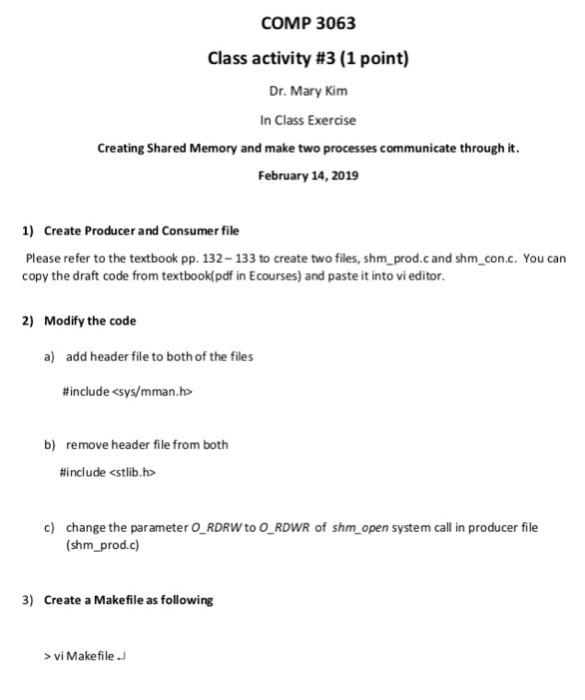
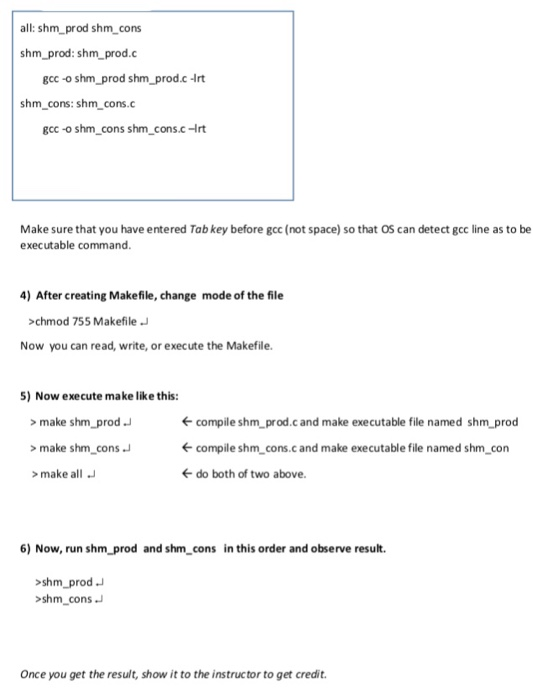
COMP 3063 Class activity #3 (1 point) Dr. Mary Kim In Class Exercise Creating Shared Memory and make two processes communicate through it. February 14, 2019 Create Producer and Consumer file 1) Please refer to the textbook pp. 132-133 to create two files, shm prod.c and shm_con.c.You can copy the draft code from textbook pdf in Ecourses) and paste it into vi editor. 2) Modify the code a) add header file to both of the files # include b) remove header file from both #include c) change the parameter O_ RDRW to O_ RDWR of shm open system call in producer file (shm_prod.c) 3) Create a Makefile as following vi Makefile all: shm_ prod shm_cons shm_prod: shm_prod.c gcc -o shm_prod shm prod.c -Irt shm_cons: shm_cons.c gcc-o shm-cons shm_cons.c rt Make sure that you have entered Tab key before gcc (not space) so that OS can detect gcc line as to be executable command. 4) After creating Makefile, change mode of the file chmod 755 Makefile Now you can read, write, or execute the Makefile. ) Now execute make like this: >make shm prod >make shm cons compile shm_prod.cand make executable file named shm prod compile shm cons.cand make executable file named shm_con do both of two above. make all 6) Now, run shm_prod and shm_cons in this order and observe result. shm_prod shm_cons Once you get the result, show it to the instructor to get credit. COMP 3063 Class activity #3 (1 point) Dr. Mary Kim In Class Exercise Creating Shared Memory and make two processes communicate through it. February 14, 2019 Create Producer and Consumer file 1) Please refer to the textbook pp. 132-133 to create two files, shm prod.c and shm_con.c.You can copy the draft code from textbook pdf in Ecourses) and paste it into vi editor. 2) Modify the code a) add header file to both of the files # include b) remove header file from both #include c) change the parameter O_ RDRW to O_ RDWR of shm open system call in producer file (shm_prod.c) 3) Create a Makefile as following vi Makefile all: shm_ prod shm_cons shm_prod: shm_prod.c gcc -o shm_prod shm prod.c -Irt shm_cons: shm_cons.c gcc-o shm-cons shm_cons.c rt Make sure that you have entered Tab key before gcc (not space) so that OS can detect gcc line as to be executable command. 4) After creating Makefile, change mode of the file chmod 755 Makefile Now you can read, write, or execute the Makefile. ) Now execute make like this: >make shm prod >make shm cons compile shm_prod.cand make executable file named shm prod compile shm cons.cand make executable file named shm_con do both of two above. make all 6) Now, run shm_prod and shm_cons in this order and observe result. shm_prod shm_cons Once you get the result, show it to the instructor to get credit

Step by Step Solution

There are 3 Steps involved in it

1 Expert Approved Answer
Step: 1 Unlock blur-text-image
Question Has Been Solved by an Expert!

Get step-by-step solutions from verified subject matter experts

Step: 2 Unlock
Step: 3 Unlock

Students Have Also Explored These Related Databases Questions!