







Question: Company Xs Business Intelligence team is developing a web application. One of the features of this application is to categorize the companys customers based on
Company Xs Business Intelligence team is developing a web application. One of the features of this application is to categorize the companys customers based on the sales volume (qty sold). The application developers reached out to you to develop a stored procedure, which the application can call upon request from the user.
Based on your discussion with the developer, the logic for categorizing customer is as follows:
IF Total Quantity Sold to a Customer
IF Total Quantity Sold to a Customer
ELSE set the Customer Tier to High-tier
Deliverable 1 (90 pts): Please develop a stored procedure with the name custtier, which generates the following information to the application:
Customername, TotalQtySold, CustTier
Please use the prj6_custanalytics_db.sql to create the mini database and insert the sample data. You will use this database to create your stored procedure.
Download prj6_custanalytics_db.sql
Deliverable 2 (10 pts): Please create a call statement to show that your procedure works.
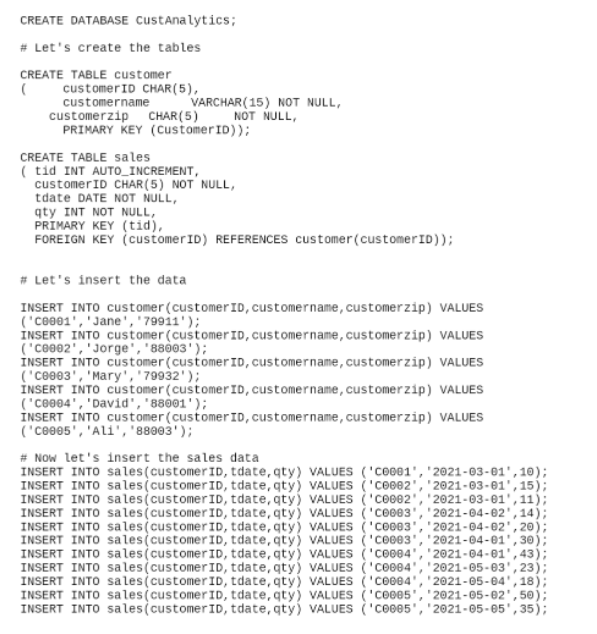
CREATE DATABASE CustAnalytics; # Let's create the tables CREATE TABLE customer ( customer ID CHAR(5), customername VARCHAR(15) NOT NULL, customerzip CHAR(5) NOT NULL, PRIMARY KEY (CustomerID)); CREATE TABLE sales ( tid INT AUTO_INCREMENT, customer ID CHAR(5) NOT NULL, tdate DATE NOT NULL, qty INT NOT NULL, PRIMARY KEY (tid), FOREIGN KEY customerID) REFERENCES customer (customerID)); # Let's insert the data INSERT INTO customer (customer ID, customername, customerzip) VALUES ('C8001','Jane', '79911'); INSERT INTO customer (customer Id, customername, customerzip) VALUES ("C6002', 'Jorge', '88003'); INSERT INTO customer customer ID, customername, customerzip) VALUES ('Ce0e3', 'Mary', '79932'); INSERT INTO customer (customer ID, customername, customerzip) VALUES ("C0004', 'David', '88001'); INSERT INTO customer (customer ID, customername, customerzip) VALUES ('Ceee5', 'Ali', '88903'); # Now let's insert the sales data INSERT INTO sales(customer ID, tdate, qty) VALUES ('C0001', '2021-03-61', 10); INSERT INTO sales(customer ID, tdate, qty) VALUES ('COBD2', '2021-03-01', 15); INSERT INTO sales(customer ID, tdate,qty) VALUES ('Cove2', '2021-03-01, 11); INSERT INTO sales(customer ID, tdate, qty) VALUES ('Cone3''2021-04-02', 14); INSERT INTO sales (customer ID, tdate, qty) VALUES ('C0003', '2021-04-02,20) INSERT INTO sales (customer ID, tdate, qty) VALUES ('C0003', '2021-04-01',30 INSERT INTO sales(customer ID, tdate,qty) VALUES ('C0004 2021-04-01', 43); INSERT INTO sales(customer ID, tdate, qty) VALUES ('Cove4', '2021-05-03,23) INSERT INTO sales(customer ID, tdate, qty) VALUES ('C0004', '2021-05-64', 18) INSERT INTO sales(customer ID, tdate, qty) VALUES ('C0005, 2021-05-02',50); INSERT INTO sales(customer ID, tdate, qty) VALUES ('C0005 2021-05-05', 35)
Step by Step Solution
There are 3 Steps involved in it

Get step-by-step solutions from verified subject matter experts
 Study Help