







Question: Complete Bank Reconciliation using the Bank Statement dated January 1 6 found on the next page Print ( or create a pdf ) the following
Complete Bank Reconciliation using the Bank Statement dated January found on the next page
Print or create a pdf the following report for the Period January :
Bank Reconciliation Detailed
Page of
QuickBooks Assignment
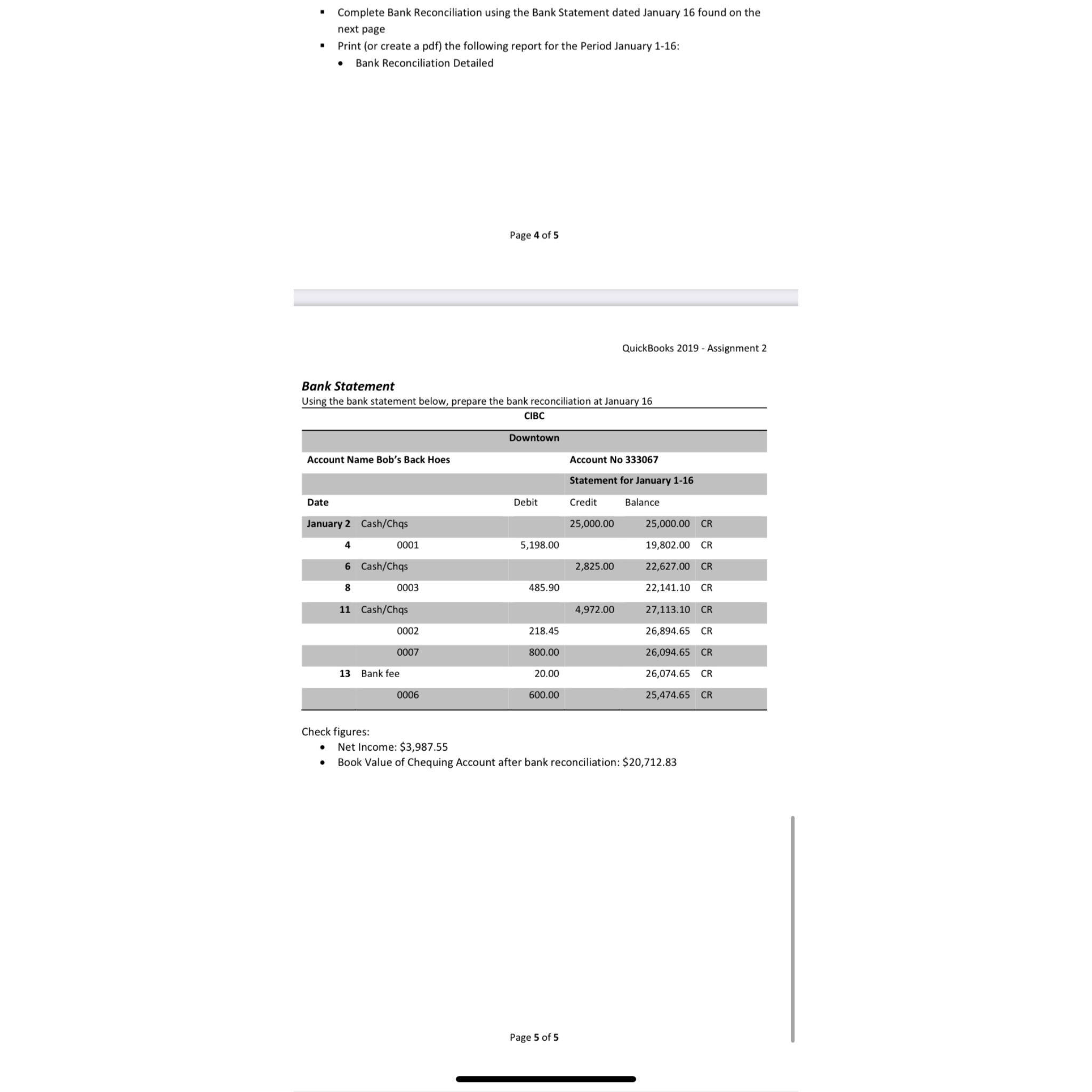
Bank Statement
Using the bank statement below, prepare the bank reconciliation at January
CIBC
tableDowntownAccount Name Bob's Back Hoes,Account No Statement for January DateDebit,Credit,Balance,January CashChqsCRCRCashChqsCRCRCashChqsCRCRCRBank fee,CRCR
Check figures:
Net Income: $
Book Value of Chequing Account after bank reconciliation: $
Page of
Step by Step Solution
There are 3 Steps involved in it
1 Expert Approved Answer
Step: 1 Unlock

Question Has Been Solved by an Expert!
Get step-by-step solutions from verified subject matter experts
Step: 2 Unlock
Step: 3 Unlock
 Study Help