







Question: complete in JAVA or use intellij and correct spacing PLEASE Accept user input from the command line and check for an integer type and handle
complete in JAVA or use intellij and correct spacing PLEASE
Accept user input from the command line and check for an integer type and handle the exception when alpha characters or float types are entered. Make sure to message the user for the proper type when handling the exception. Accept user input from the command line and check for a float type and handle the exception when alpha characters or integers types are entered. Make sure to message the user for the proper type when handling the exception. Accept another line of user input from the command line and check for string type and handle the exception when numeric characters are entered. Make sure to message the user for the proper type when handling the exception. Try using regular expressions: matches("[a-zA-Z]+") with throw new InputMismatchException(); Accept another line of user input from the command line as an array of three integers type and handle the exception when four numeric characters are entered. Make sure to message the user for the proper number of elements values when handling the exception. You will need a while loop for example - while (input.hasNextInt()){ } Accept another string of characters from the command line to be used for a file name to be saved. Handle the file writing exception when the file name is not properly formed - for example there are special characters that are restricted in Windows file names. Make sure to message the user for the proper file naming when handling the exception.
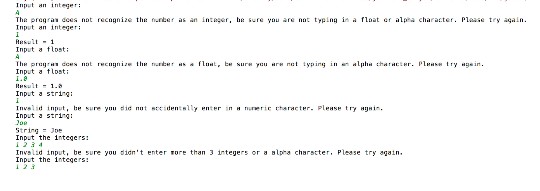
Input an integer: The pragra dces nat reize the frte as an In:aer, be sreyau are nat tpiat e apa character. Plaase tey aai Tnput an integer: 1 Input a tlost: Input a flosti Input a string Invalid input, he sure yuu die nutdenlly enter in Input a strig: neri rharacter- Plense try i tring Joe Input the integers: 23 InvsLad input, be sure you didn't enter rore than 3 integers or a alpha charscter, Plesse try aain Input the inteqers
Step by Step Solution
There are 3 Steps involved in it

Get step-by-step solutions from verified subject matter experts
 Study Help