







Question: Using the IST Linux system create the following Java command line application in your home area Lab7.java. Accept user input from the command line
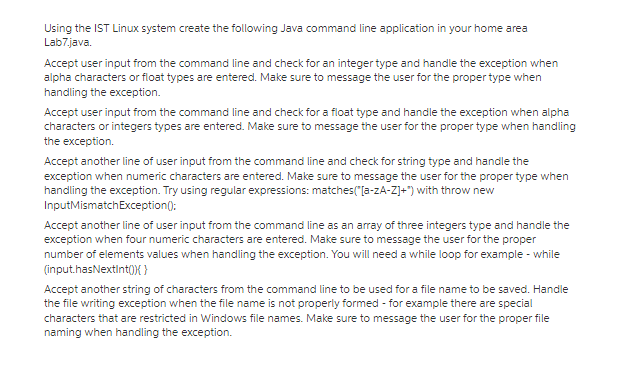
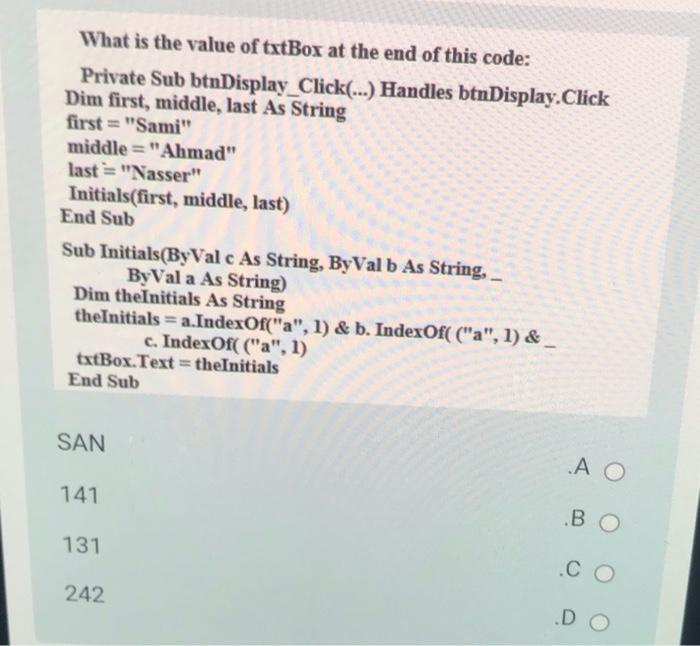
Using the IST Linux system create the following Java command line application in your home area Lab7.java. Accept user input from the command line and check for an integer type and handle the exception when alpha characters or float types are entered. Make sure to message the user for the proper type when handling the exception. Accept user input from the command line and check for a float type and handle the exception when alpha characters or integers types are entered. Make sure to message the user for the proper type when handling the exception. Accept another line of user input from the command line and check for string type and handle the exception when numeric characters are entered. Make sure to message the user for the proper type when handling the exception. Try using regular expressions: matches("[a-zA-Z]+") with throw new InputMismatch Exception(); Accept another line of user input from the command line as an array of three integers type and handle the exception when four numeric characters are entered. Make sure to message the user for the proper number of elements values when handling the exception. You will need a while loop for example - while (input.hasNextInt()){} Accept another string of characters from the command line to be used for a file name to be saved. Handle the file writing exception when the file name is not properly formed - for example there are special characters that are restricted in Windows file names. Make sure to message the user for the proper file naming when handling the exception. What is the value of txtBox at the end of this code: Private Sub btnDisplay_Click(...) Handles btnDisplay. Click Dim first, middle, last As String first = "Sami" middle="Ahmad" last="Nasser" Initials(first, middle, last) End Sub Sub Initials(ByVal c As String, ByVal b As String, ByVal a As String) Dim theInitials As String theInitials = a.IndexOf("a", 1) & b. IndexOf( ("a", 1) & c. IndexOf( ("a", 1) txtBox.Text = theInitials End Sub SAN 141 131 242 A O BO .CO .DO
Step by Step Solution
There are 3 Steps involved in it
Apologies for the confusion but the code you provided has several errors and inconsistencies There a... View full answer

Get step-by-step solutions from verified subject matter experts
 Study Help