







Question: complete the following code in order to get the output in the above figure? ///////////////////////////////////////////////////////////////////////////////////////////////////////////////////////////////////////////////////////////////////////////////////////////////////////////////// public class FractionImpl implements Fraction{ private int num; private int
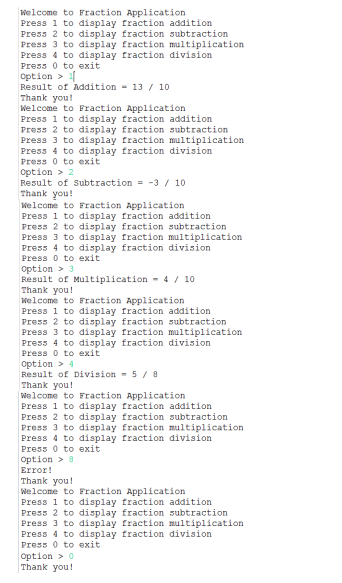
complete the following code in order to get the output in the above figure?
/////////////////////////////////////////////////////////////////////////////////////////////////////////////////////////////////////////////////////////////////////////////////////////////////////////////////
public class FractionImpl implements Fraction{ private int num; private int den; public FractionImpl(int num, int den) { this.num = num; this.den = den; } @Override public int numerator() { // TODO Auto-generated method stub return this.num; } @Override public int denominator() { // TODO Auto-generated method stub return this.den; } @Override public Fraction add(Fraction f) { // TODO Auto-generated method stub int a = this.num; int b = this.den; int c = f.numerator(); int d = f.denominator(); Fraction result = new FractionImpl((a * d + c * b), b * d); return result; } @Override public Fraction sub(Fraction f) { // TODO Auto-generated method stub return null; } @Override public Fraction mul(Fraction f) { // TODO Auto-generated method stub return null; } @Override public Fraction div(Fraction f) { // TODO Auto-generated method stub return null; } public String toString() { return String.format("%d / %d", this.num, this.den); } }
////////////////////////////////////////////////////////////////////////////////////////////////////////////////////////////////////////////////////////////////////////////////
import java.util.Scanner; public class FractionTest { public static void main(String[] args) { Scanner read = new Scanner(System.in); System.out.print("Enter first numerator = "); int num1 = read.nextInt(); System.out.print("Enter first denominator = "); int den1 = read.nextInt(); System.out.print("Enter second numerator = "); int num2 = read.nextInt(); System.out.print("Enter second denominator = "); int den2 = read.nextInt(); // TODO Auto-generated method stub /* Create two objects of FractionImpl and Just the follow the code * of Complex Number, Write the menu operations */ Fraction f1 = new FractionImpl(num1, den1); Fraction f2 = new FractionImpl(num2, den2);
} }
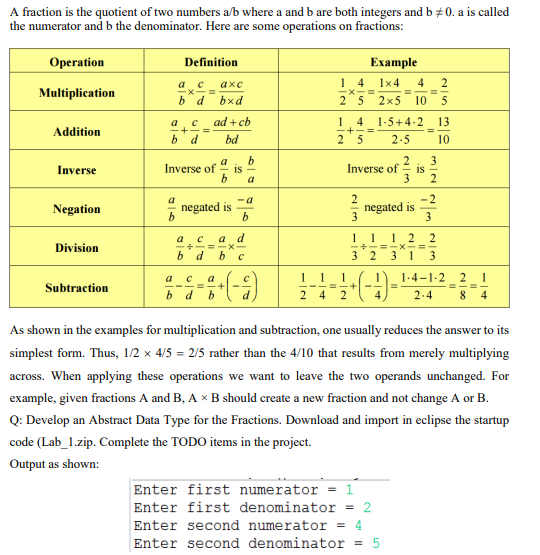
A fraction is the quotient of two numbers a/b where a and b are both integers and b=0. a is called the numerator and b the denominator. Here are some operations on fractions: As shown in the examples for multiplication and subtraction, one usually reduces the answer to its simplest form. Thus, 1/24/5=2/5 rather than the 4/10 that results from merely multiplying across. When applying these operations we want to leave the two operands unchanged. For example, given fractions A and B,AB should create a new fraction and not change A or B. Q: Develop an Abstract Data Type for the Fractions. Download and import in eclipse the startup code (Lab_1.zip. Complete the TODO items in the project. Welcome to Eraction Application Press 1 to diaplay fraction addition Press 2 to display fraction subtraction Press 3 to display fraction multiplication Press 4 to display fraction division Press 0 to exit Option > If Result of Rddition =13/10 Thank you! Welcome to Eraction Application Press 1 to display fraction addition Press 2 to display fraction subtraction Press 3 to diaplay fraction multiplication Press 4 to display fraction division Press 0 to exit Option >2 Result of subtraction =3/10 Thank you! Welcome to Eraction Application Press 1 to display fraction addition Press 2 to display fraction subtraction Press 3 to diaplay fraction multiplication Press 4 to display fraction division Press 0 to exit Option >3 Result of Multiplication =4/10 Thank you! Welcome to Eraction Application Press 1 to display fraction addition Press 2 to display fraction subtraction press 3 to diaplay fraction multiplication Press 4 to display fraction division Press 0 to exit Option >4 Result of Division =5/8 Thank you! Welcome to Eraction Application Press 1 to display fraction addition Press 2 to display fraction subtraction Press 3 to display fraction multiplication Press 4 to display fraction diviaion Press 0 to exit Option > 8 Error! Thank you! Welcome to Eraction Application Press 1 to display fraction addition Press 2 to display fraction subtraction Press 3 to display fraction multiplication Press 4 to display fraction division Press 0 to exit Option > 0 Thank you
Step by Step Solution
There are 3 Steps involved in it

Get step-by-step solutions from verified subject matter experts
 Study Help