



Question: Complete the following steps using Ubuntu's terminal with screenshots for a thumbs up Step 1. Step 2. Step 3. Step 4. Step 5. Step 6.
Complete the following steps using Ubuntu's terminal with screenshots for a thumbs up 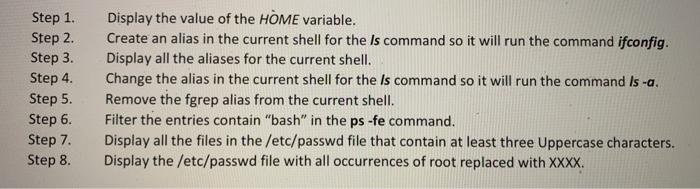
Step 1. Step 2. Step 3. Step 4. Step 5. Step 6. Step 7. Step 8. Display the value of the HOME variable. Create an alias in the current shell for the Is command so it will run the command ifconfig. Display all the aliases for the current shell. Change the alias in the current shell for the Is command so it will run the command Is-a. Remove the fgrep alias from the current shell. Filter the entries contain "bash" in the ps -fe command. Display all the files the /etc/passwd file that contain at least three Uppercase characters. Display the /etc/passwd file with all occurrences of root replaced with XXXX
Step by Step Solution
There are 3 Steps involved in it
1 Expert Approved Answer
Step: 1 Unlock

Question Has Been Solved by an Expert!
Get step-by-step solutions from verified subject matter experts
Step: 2 Unlock
Step: 3 Unlock