







Question: Complete the following table: PCConfiguration IP Subnet mask Default Gateway PC A1 PC B2 PC C1 PC D2 Write proper commands to configure static routes
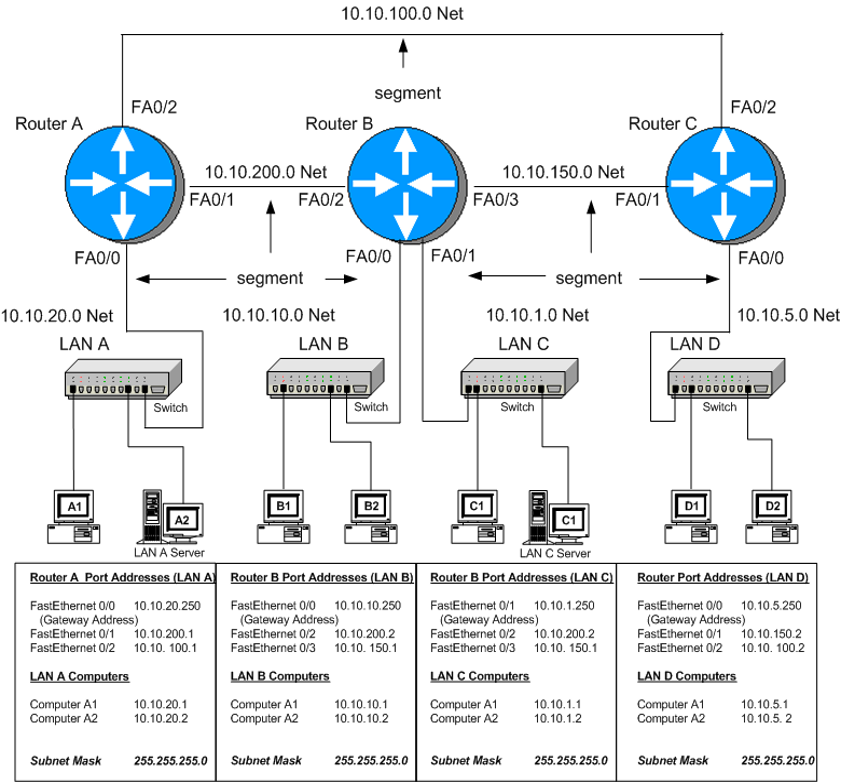
- Complete the following table:
| PC\Configuration | IP | Subnet mask | Default Gateway |
| PC A1 |
|
|
|
| PC B2 |
|
|
|
| PC C1 |
|
|
|
| PC D2 |
|
|
|
- Write proper commands to configure static routes for the following cases:
- Static route from Router B to LAN D (using Router C)
Command:
------------------------------------------------------------------------------------------------
- Default route (Gate way of last resort) for Router A to Router C
Command:
------------------------------------------------------------------------------------------------
- Backup route from Router B to LAN D using Router A)
Command:
------------------------------------------------------------------------------------------------
10.10.100.0 Net FA0/2 segment Router B FA0/2 Router A Router C 10.10.200.0 Net FA0/1 FA0/2 10.10.150.0 Net FA0/3 FAO/1 FA0/0 FA0/0 FA0/1 FA0/0 segment segment 10.10.5.0 Net 10.10.20.0 Net LANA 10.10.10.0 Net LAN B 10.10.1.0 Net LANC LAND 100000D Switch Switch Switch Switch A1 B1 B2 D2 A2 C1 LAN A Server LAN C Server Router A Port Addresses (LAN A Router B Port Addresses (LAN B) Router B Port Addresses (LANC) FastEthernet 0/0 10.10.20.250 FastEthernet 0/0 10.10.10.250 FastEthernet 0/1 10.10.1.250 (Gateway Address) (Gateway Address) (Gateway Address) FastEthernet 0/1 10.10.200.1 FastEthernet0/2 10.10.200.2 FastEthernet0/2 10.10.200.2 FastEthernet0/2 10.10.100.1 FastEthernet 0/3 10.10.150.1 FastEthernet 0/3 10.10. 150.1 LAN A Computers LAN B Computers LANC Computers Computer A1 10.10.20.1 Computer A1 10.10.10.1 Computer A1 10.10.1.1 Computer A2 10.10.20.2 Computer A2 10.10.10.2 Computer A2 10.10.1.2 Router Port Addresses (LAND) FastEthernet0/0 10.10.5.250 (Gateway Address) FastEthernet 0/1 10.10.150.2 FastEthernet 0/2 10.10.1002 LAN D Computers Computer A1 10.10.5.1 Computer A2 10.10.5.2 Subnet Mask 255.255.255.0 Subnet Mask 255.255.255.0 Subnet Mask 255.255.255.0 Subnet Mask 255.255.255.0
Step by Step Solution
There are 3 Steps involved in it

Get step-by-step solutions from verified subject matter experts
 Study Help