







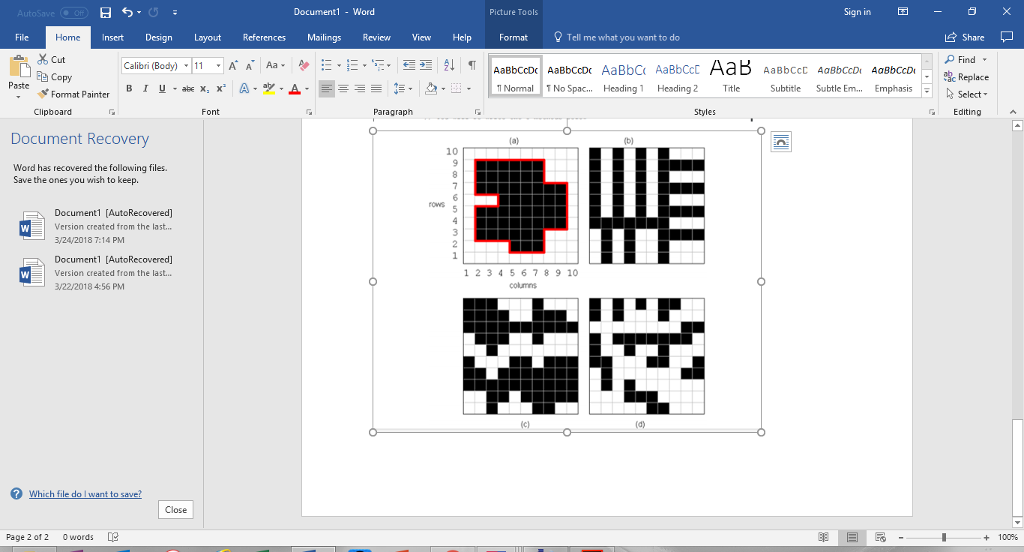
Question: Complete the method called perimeterOf(int r, int c) which should return an integer representing the perimeter of the part which starts at the given (r,c)
Complete the method called perimeterOf(int r, int c) which should return an integer representing the perimeter of the part which starts at the given (r,c) point. The method MUST be done recursively without loops, otherwise you will receive 0 marks for this part. For example, in the image (A) shown above, the perimeter is 36 (which is the red border length, not the number of black cells on the border) and in image (B) it is 106. As for the other two images, it depends where you started expanding from. (hints: You will need to mark pixels as being visited (perhaps use another 2D array). Make sure not to re-visit these pixels. Also, make sure to handle borders correctly. A black pixel on a the top/left border corner, for example, will add 2 to the perimeter count for the top and the left.)
Document1 - Word Picture Tools Sign in -0 Insert Design Layout References Mailings Review View Help Format Tell me what you want to do Share File Cut Copy Fonmat Painter OFind IAaBbCcDReplace Paste Normal T No Spac.. Heading1 Heading 2 Title Subtitle Subtle Em.... Emphasis Clipboard Font Paragraph Editing Document Recovery 10 Word has recovered the following files Save the ones you wish to keep. Document1 [AutoRecovered] Version created from the last... 3/24/2018 7:14 PM Documentl [AutoRecovered] Version created from the last... 3/22/20184:56 PM 1 2 3 4567 8 9 10 Close Page 2 of 2 0 words + 100% Document1 - Word Picture Tools Sign in -0 Insert Design Layout References Mailings Review View Help Format Tell me what you want to do Share File Cut Copy Fonmat Painter OFind IAaBbCcDReplace Paste Normal T No Spac.. Heading1 Heading 2 Title Subtitle Subtle Em.... Emphasis Clipboard Font Paragraph Editing Document Recovery 10 Word has recovered the following files Save the ones you wish to keep. Document1 [AutoRecovered] Version created from the last... 3/24/2018 7:14 PM Documentl [AutoRecovered] Version created from the last... 3/22/20184:56 PM 1 2 3 4567 8 9 10 Close Page 2 of 2 0 words + 100%
Step by Step Solution
There are 3 Steps involved in it

Get step-by-step solutions from verified subject matter experts
 Study Help