







Question: Complete the steps below using cell references to given data or previous calculations. In some cases, a simple cell reference is all you need. To
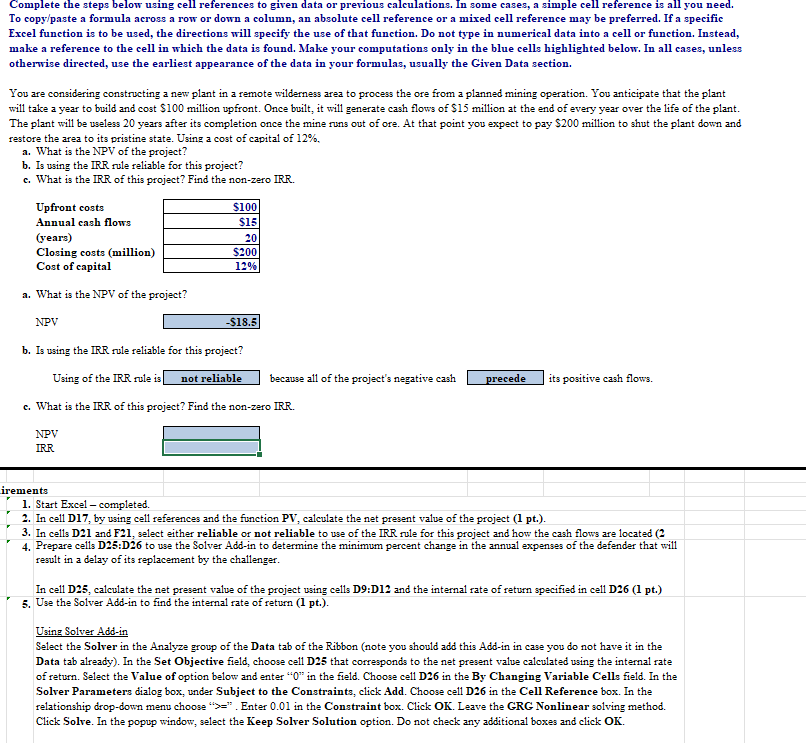
Complete the steps below using cell references to given data or previous calculations. In some cases, a simple cell reference is all you need. To copy/paste a formula across a row or down a column, an absolute cell reference or a mixed cell reference may be preferred. If a specific Excel function is to be used, the directions will specify the use of that function. Do not type in numerical data into a cell or function. Instead, make a reference to the cell in which the data is found. Make your computations only in the blue cell: highlighted below. In all cases, unless otherwise directed, use the earliest appearance of the data in your formulas, usually the Giren Data section. You are considering constructing a new plant in a remote wilderness area to process the ore from a planned mining operation. You anticipate that the plant will take a year to build and cost $100 million upfront. Once built, it will generate cash flows of $15 million at the end of every year over the life of the plant. The plant will be useless 20 years after its completion once the mine runs out of ore. At that point you expect to pay $200 million to shut the plant down and restore the area to its pristine state. Using a cost of capital of 12%. a. What is the NPV of the project? b. Is using the IRR rule reliable for this project? c. What is the IRR of this project? Find the non-zero IRR. Upfront costs $100 Annual cash flows $15 (years) 20 Closing costs (million) Cost of capital 12% a. What is the NPV of the project? $200 NPV $18.5 b. Is using the IRR rule reliable for this project? Using of the IRR rule is not reliable because all of the project's negative cash c. What is the IRR of this project? Find the non-zero IRR. precede its positive cash flows. NPV IRR irements 1. Start Excel - completed. 2. In cell D17, by using cell references and the function PV, calculate the net present value of the project (1 pt.). 3. In cells D21 and F21, select either reliable or not reliable to use of the IRR rule for this project and how the cash flows are located (2 4. Prepare cells D25:D26 to use the Solver Add-in to determine the minimum percent change in the annual expenses of the defender that will result in a delay of its replacement by the challenger. In cell D25, calculate the net present value of the project using cells D9:D12 and the internal rate of return specified in cell D26 (1 pt.) 5. Use the Solver Add-in to find the internal rate of return (1 pt.). Using Solver Add-in Select the Solver in the Analyze group of the Data tab of the Ribbon (note you should add this Add-in in case you do not have it in the Data tab already). In the Set Objective field, choose cell D25 that corresponds to the net present value calculated using the internal rate of return. Select the Value of option below and enter "O" in the field. Choose cell D26 in the By Changing Variable Cells field. In the Solver Parameters dialog box, under Subject to the Constraints, click Add. Choose cell D26 in the Cell Reference box. In the relationship drop-down menu choose ">>". Enter 0.01 in the Constraint box. Click OK. Leave the GRG Nonlinear solving method. Click Solve. In the popup window, select the Keep Solver Solution option. Do not check any additional boxes and click OK
Step by Step Solution
There are 3 Steps involved in it

Get step-by-step solutions from verified subject matter experts
 Study Help