







Question: Complete the steps below using cell references to given data or previous calculations. In some cases, a simple cell reference is all you need. To
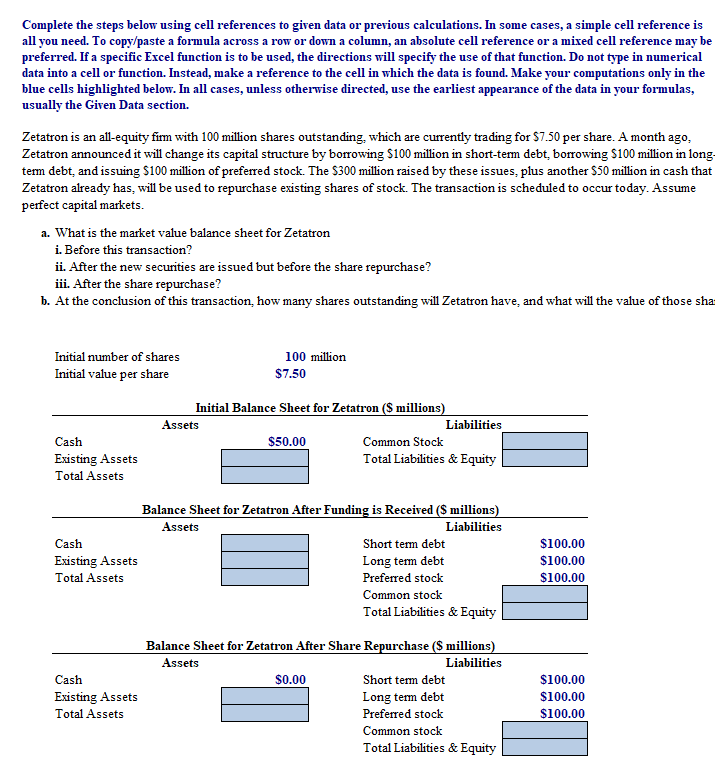
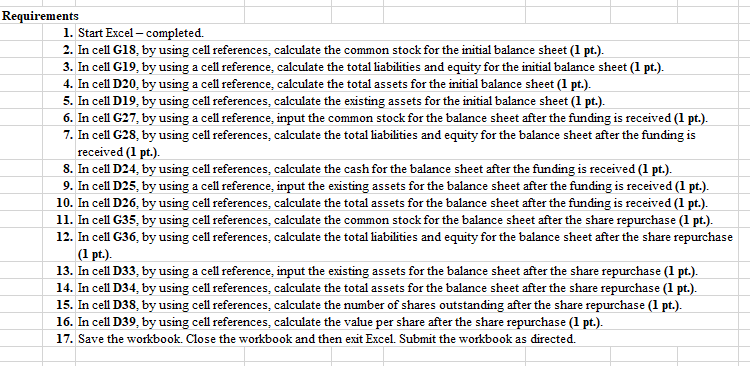
Complete the steps below using cell references to given data or previous calculations. In some cases, a simple cell reference is all you need. To copy/paste a formula across a row or down a column, an absolute cell reference or a mixed cell reference may be preferred. If a specific Excel function is to be used, the directions will specify the use of that function. Do not type in numerical data into a cell or function. Instead, make a reference to the cell in which the data is found. Make your computations only in the blue cells highlighted below. In all cases, unless otherwise directed, use the earliest appearance of the data in your formulas, usually the Given Data section. Zetatron is an all-equity firm with 100 million shares outstanding, which are currently trading for $7.50 per share. A month ago, Zetatron announced it will change its capital structure by borrowing $100 million in short-term debt, borrowing S100 million in long. term debt and issuing S100 million of preferred stock. The $300 million raised by these issues, plus another $50 million in cash that Zetatron already has, will be used to repurchase existing shares of stock. The transaction is scheduled to occur today. Assume perfect capital markets. a. What is the market value balance sheet for Zetatron i. Before this transaction? ii. After the new securities are issued but before the share repurchase? iii. After the share repurchase? b. At the conclusion of this transaction, how many shares outstanding will Zetatron have, and what will the value of those sha: Initial number of shares Initial value per share 100 million $7.50 Cash Existing Assets Total Assets Initial Balance Sheet for Zetatron ($ millions) Assets Liabilities $50.00 Common Stock Total Liabilities & Equity Cash Existing Assets Total Assets Balance Sheet for Zetatron After Funding is Received (millions) Assets Liabilities Short term debt Long term debt Preferred stock Common stock Total Liabilities & Equity $100.00 $100.00 $100.00 Cash Existing Assets Total Assets Balance Sheet for Zetatron After Share Repurchase (S millions) Assets Liabilities $0.00 Short term debt Long term debt Preferred stock Common stock Total Liabilities & Equity $100.00 $100.00 $100.00 Requirements 1. Start Excel - completed. 2. In cell G18, by using cell references, calculate the common stock for the initial balance sheet (1 pt.). 3. In cell G19, by using a cell reference calculate the total liabilities and equity for the initial balance sheet (1 pt.). 4. In cell D20, by using a cell reference calculate the total assets for the initial balance sheet (1 pt.). 5. In cell D19, by using cell references, calculate the existing assets for the initial balance sheet (1 pt.). 6. In cell G27, by using a cell reference input the common stock for the balance sheet after the funding is received (I pt.). 7. In cell G28, by using cell references, calculate the total liabilities and equity for the balance sheet after the funding is received (1 pt.). 8. In cell D24, by using cell references, calculate the cash for the balance sheet after the funding is received (1 pt.). 9. In cell D25, by using a cell reference input the existing assets for the balance sheet after the funding is received (1 pt.). 10. In cell D26, by using cell references, calculate the total assets for the balance sheet after the funding is received (1 pt.). 11. In cell G35, by using cell references, calculate the common stock for the balance sheet after the share repurchase (1 pt.). 12. In cell G36, by using cell references, calculate the total liabilities and equity for the balance sheet after the share repurchase (1 pt.) 13. In cell D33, by using a cell reference input the existing assets for the balance sheet after the share repurchase (1 pt.). 14. In cell D34, by using cell references, calculate the total assets for the balance sheet after the share repurchase (1 pt.). 15. In cell D38, by using cell references, calculate the number of shares outstanding after the share repurchase (1 pt.). 16. In cell D39, by using cell references, calculate the value per share after the share repurchase (1 pt.). 17. Save the workbook. Close the workbook and then exit Excel. Submit the workbook as directed
Step by Step Solution
There are 3 Steps involved in it

Get step-by-step solutions from verified subject matter experts
 Study Help