







Question: Complete the steps below using cell references to given data or previous calculations. In some cases, a simple cell reference is all you need. To
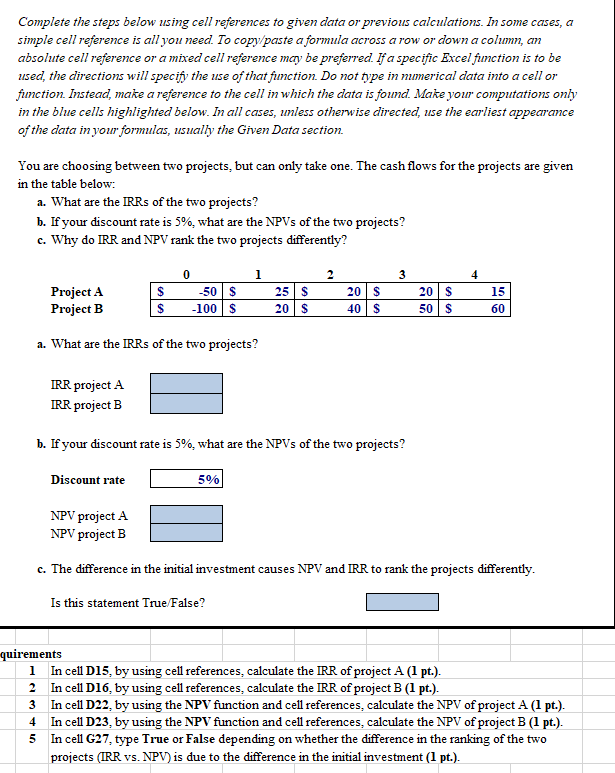
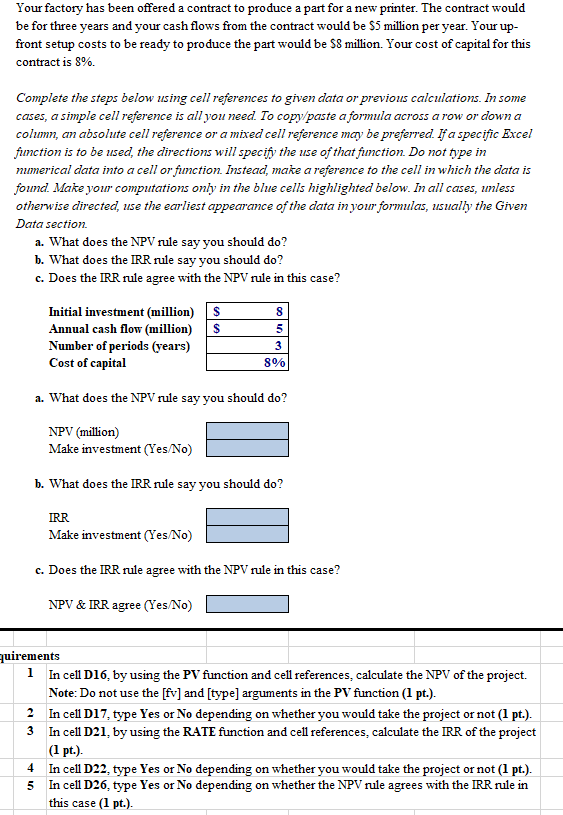
Complete the steps below using cell references to given data or previous calculations. In some cases, a simple cell reference is all you need. To copy/paste a formula across a row or down a column, an absolute cell reference or a mixed cell reference may be preferred. If a specific Excel function is to be used, the directions will specify the use of that function. Do not type in numerical data into a cell or function. Instead, make a reference to the cell in which the data is found. Make your computations only in the blue cells highlighted below. In all cases, unless otherwise directed, use the earliest appearance of the data in your formulas, usually the Given Data section. You are choosing between two projects, but can only take one. The cash flows for the projects are given in the table below: a. What are the IRRs of the two projects? b. If your discount rate is 5%, what are the NPVs of the two projects? c. Why do IRR and NPV rank the two projects differently? 1 3 4 Project A Project B $ $ 0 -50 $ -100 $ 25 20$ 20$ 40$ 20$ 50 $ 15 60 a. What are the IRRs of the two projects? IRR project A IRR project B b. If your discount rate is 5%, what are the NPVs of the two projects? Discount rate 5% NPV project A NPV project B c. The difference in the initial investment causes NPV and IRR to rank the projects differently. Is this statement True/False? quirements 1 In cell D15, by using cell references, calculate the IRR of project A (1 pt.). 2 In cell D16, by using cell references, calculate the IRR of project B (1 pt.). 3 In cel D22, by using the NPV function and cell references, calculate the NPV of project A (1 pt.). 4 In cell D23, by using the NPV function and cell references, calculate the NPV of project B (1 pt.). In cell G27 type True or False depending on whether the difference in the ranking of the two projects (IRR vs. NPV) is due to the difference in the initial investment (1 pt.). 5 Your factory has been offered a contract to produce a part for a new printer. The contract would be for three years and your cash flows from the contract would be $5 million per year. Your up- front setup costs to be ready to produce the part would be 58 million. Your cost of capital for this contract is 8%. Complete the steps below using cell references to given data or previous calculations. In some cases, a simple cell reference is all you need. To copy/paste a formula across a row or down a column, an absolute cell reference or a mixed cell reference may be preferred. If a specific Excel function is to be used, the directions will specify the use of that function. Do not type in mumerical data into a cell or function. Instead, make a reference to the cell in which the data is found Make your computations only in the blue cells highlighted below. In all cases, unless otherwise directed, use the earliest appearance of the data in your formulas, usually the Given Data section a. What does the NPV rule say you should do? b. What does the IRR rule say you should do? c. Does the IRR rule agree with the NPV rule in this case? Initial investment (million) $ Annual cash flow (million) S Number of periods (years) Cost of capital 8 5 3 8% a. What does the NPV rule say you should do? NPV (million) Make investment (Yes/No) b. What does the IRR rule say you should do? IRR Make investment (Yes/No) c. Does the IRR rule agree with the NPV rule in this case? NPV & IRR agree (Yes/No) quirements 1 In cell D16, by using the PV function and cell references, calculate the NPV of the project. Note: Do not use the [fv] and [type] arguments in the PV function (1 pt.). 2 In cell D17, type Yes or No depending on whether you would take the project or not (1 pt.). 3 In cell D21, by using the RATE function and cell references, calculate the IRR of the project (1 pt.). In cell D22, type Yes or No depending on whether you would take the project or not (1 pt.). In cell D26, type Yes or No depending on whether the NPV rule agrees with the IRR rule in this case (1 pt.). 4 5
Step by Step Solution
There are 3 Steps involved in it

Get step-by-step solutions from verified subject matter experts
 Study Help