







Question: Complete the steps below using cell references to given data or previous calculations. In some cases, a simple cell reference is all you need. To
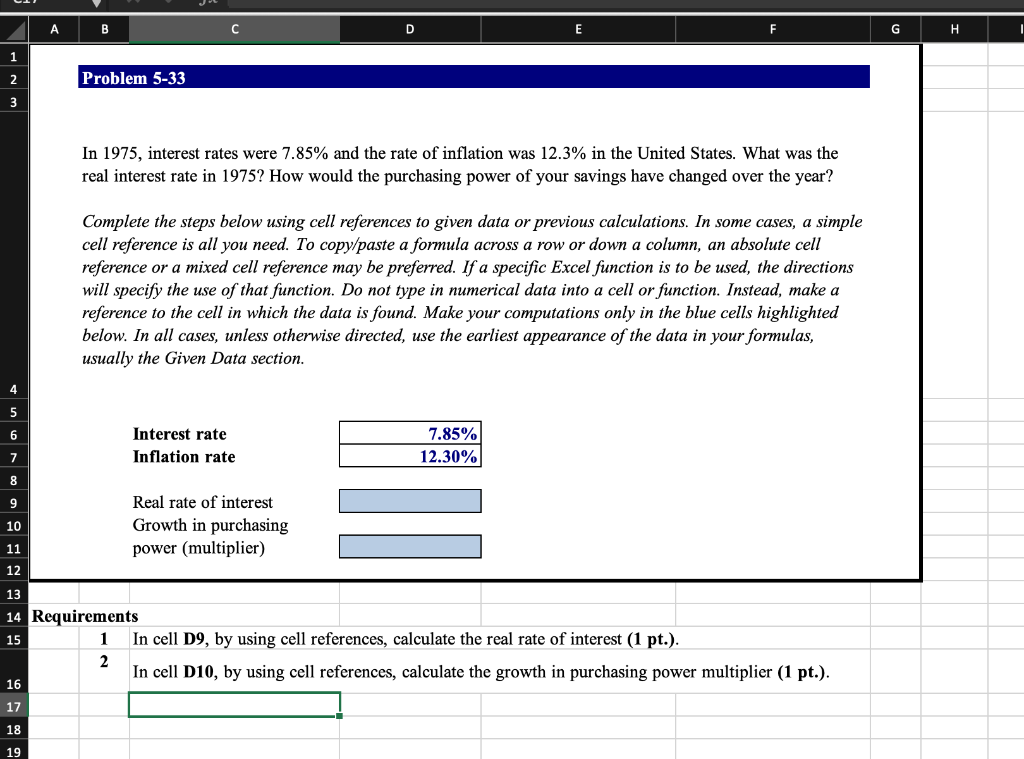
| Complete the steps below using cell references to given data or previous calculations. In some cases, a simple cell reference is all you need. To copy/paste a formula across a row or down a column, an absolute cell reference or a mixed cell reference may be preferred. If a specific Excel function is to be used, the directions will specify the use of that function. Do not type in numerical data into a cell or function. Instead, make a reference to the cell in which the data is found. Make your computations only in the blue cells highlighted below. In all cases, unless otherwise directed, use the earliest appearance of the data in your formulas, usually the Given Data section. In cell D9, by using cell references, calculate the real rate of interest.
In cell D12, by using cell references, calculate the monthly payment of the loan. Note: The output of the expression or function you typed in this cell is expected as a positive number. |
A B C D E G H I 1 2 Problem 5-33 3 In 1975, interest rates were 7.85% and the rate of inflation was 12.3% in the United States. What was the real interest rate in 1975? How would the purchasing power of your savings have changed over the year? Complete the steps below using cell references to given data or previous calculations. In some cases, a simple cell reference is all you need. To copy/paste a formula across a row or down a column, an absolute cell reference or a mixed cell reference may be preferred. If a specific Excel function is to be used, the directions will specify the use of that function. Do not type in numerical data into a cell or function. Instead, make a reference to the cell in which the data is found. Make your computations only in the blue cells highlighted below. In all cases, unless otherwise directed, use the earliest appearance of the data in your formulas, usually the Given Data section. 4 5 6 Interest rate Inflation rate 7.85% 12.30% 7 8 9 10 11 Real rate of interest Growth in purchasing power (multiplier) 12 13 15 14 Requirements 1 In cell D9, by using cell references, calculate the real rate of interest (1 pt.). 2 In cell D10, by using cell references, calculate the growth in purchasing power multiplier (1 pt.). 16 17 18 19
Step by Step Solution
There are 3 Steps involved in it

Get step-by-step solutions from verified subject matter experts
 Study Help