







Question: Complete the steps below using cell references to given data or previous calculations. In some cases, a simple cell reference is all you need. To
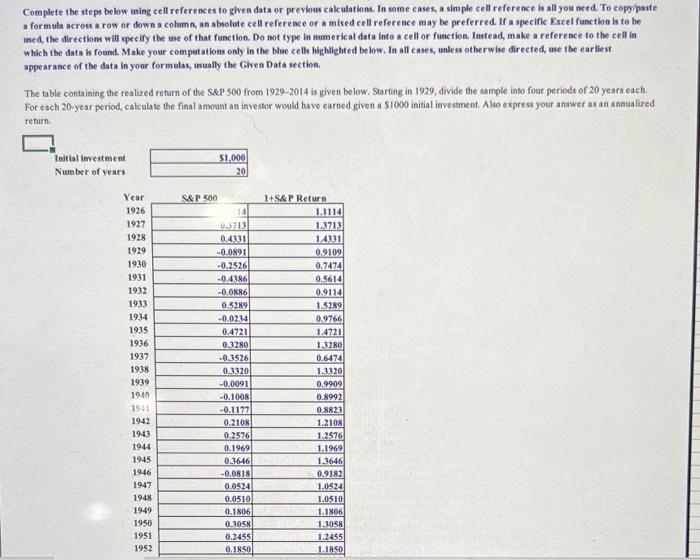
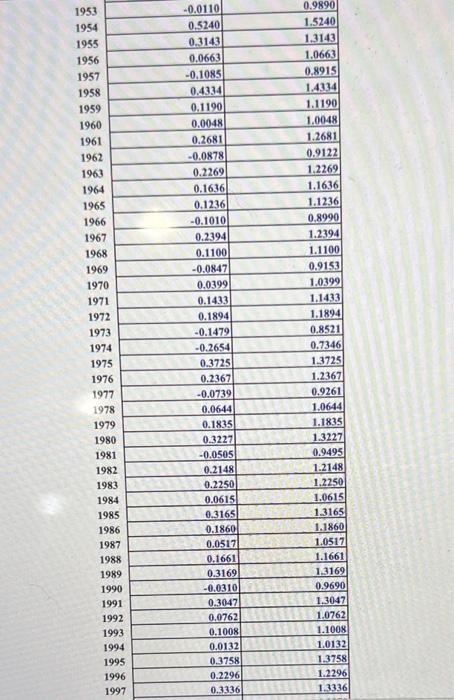
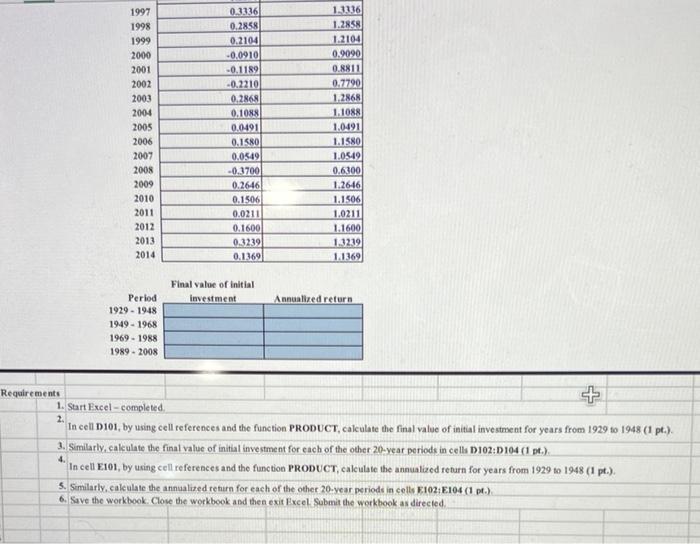
Complete the steps below using cell references to given data or previous calculations. In some cases, a simple cell reference is all you need. To copyipaste a formula across a row or down a colamn, an abolute cell refereace or a mixed cell reference may be preferred. If a specific Excel function is to be used, the directions will specify the we of that function. Do bot type in mamerical data inte a cell or function. Instead, make a reference to the cell in which the data is found. Make your computations only in the blue cells highilghted below. In all cases, unless otherwise directed, use the earlieut appearasce of the data in your formulas, wasully the Given Data section. The table containing the realized return of the S\&P 500 from 19292014 is given below. Starting in 1929 , divide the sample into four periods of 20 yeart each. For cach 20-year period, calculave the final amount an inventor would have carned given a $1000 initial investment, Also express your answer as an annualized return 1. Start Excel - completed. 2. In cell D101, by using cell references and the function PRODUCT, calculate the final value of initial investment for years from 1929 to 1948 (1 pt.). 3. Similarly, caleulate the final value of initial investment for each of the other 20-year periods in cella D 102:D 104 (1 pt.). 4. In cell E101, by using cell references and the function PRODUCT, calculate the annualized return for years from 1929 to 1948 (1 pt.). 5. Semilarly, caleulate the annualized return for each of the other 20 -year periods in cells E102+E104(1pt. ). 6. Save the workbook. Clove the workbook a bd then exit Ixcel. Submit the workbook as directed
Step by Step Solution
There are 3 Steps involved in it

Get step-by-step solutions from verified subject matter experts
 Study Help