





Question: Concepts: Java Collections (Linked Lists and Queues), integrating with an existing codebase Concerts are back, and new concert tickets are available! You need to enter
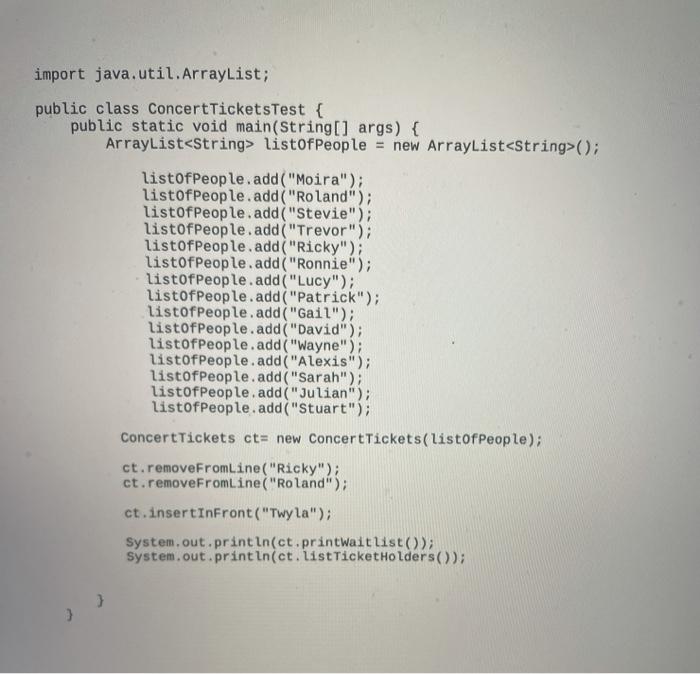
Concepts: Java Collections (Linked Lists and Queues), integrating with an existing codebase Concerts are back, and new concert tickets are available! You need to enter the names of the people waiting to buy tickets in order to form a line. However, you will later find out that a couple of people are not eligible to buy tickets because they are scalpers rather than actual concert goers. You will have to remove those people from the line. Additionally, a special raffle will be held and the winner of the raffle will be inserted at the front of the line. You will have to issue tickets to the first 10 people in line, but there are 15 people total in line. Anyone not in the top ten will be put on a waiting list for the next available ticket. Implementation requirements: Create a new class. Use a LinkedList to create the main line and a Queue to create the waitlist. Use this test harness to guide the creation of your class. In other words, examine the test harness - it will inform your design decisions as you create your class; your class has to work when the test harness runs! Don't change the test harness
 Concepts: Java Collections (Linked Lists and Queues), integrating with an existing

import java.util.ArrayList; public class Concert TicketsTest { public static void main(String[] args) { ArrayList listof People = new ArrayList(); listofPeople.add("Moira"); listofPeople.add("Roland"); listofPeople.add("Stevie"); listofPeople.add("Trevor"); listofPeople.add("Ricky"); listofPeople.add("Ronnie"); listofPeople.add("Lucy"); listofPeople.add("Patrick"); listofPeople.add("Gail"); listofPeople.add("David"); listofPeople.add("Wayne"); listofPeople.add("Alexis"); listofPeople.add("Sarah"); listofPeople.add("Julian"); listofPeople.add("Stuart"); Concert Tickets ct= new Concert Tickets(listofPeople); ct.removeFromLine("Ricky"); ct.removeFromline("Roland"); ct.insertinFront("Twyla"); System.out.println(ct.printWaitlist(); System.out.println(ct. listTicket Holders()

Step by Step Solution

There are 3 Steps involved in it

1 Expert Approved Answer
Step: 1 Unlock blur-text-image
Question Has Been Solved by an Expert!

Get step-by-step solutions from verified subject matter experts

Step: 2 Unlock
Step: 3 Unlock

Students Have Also Explored These Related Databases Questions!