







Question: Conditional Functions - Application Exercise Download this file to complete the application exercise: The data provided for this exercise contains sales transactions from a retail
Conditional Functions Application Exercise
Download this file to complete the application exercise:
The data provided for this exercise contains sales transactions from a retail store that sells furniture and office supplies. With the provided exercise data, use skills from the video to perform the following:
To encourage higher sales volumes on each order, this business would like to offer free shipping on orders that
total over $ in total sales. Create a new column called "Final Shipping Cost" that calculates the shipping cost
for each row as either $ if the Sales column is over $ or the already calculated Shipping Cost otherwise.
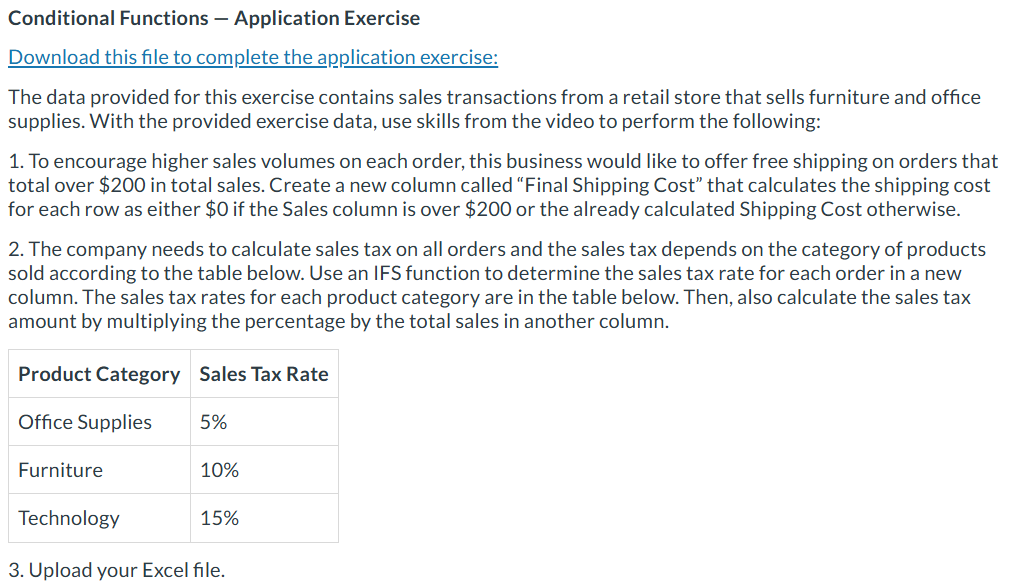
The company needs to calculate sales tax on all orders and the sales tax depends on the category of products
sold according to the table below. Use an IFS function to determine the sales tax rate for each order in a new
column. The sales tax rates for each product category are in the table below. Then, also calculate the sales tax
amount by multiplying the percentage by the total sales in another column.
Upload your Excel file.
Step by Step Solution
There are 3 Steps involved in it
1 Expert Approved Answer
Step: 1 Unlock

Question Has Been Solved by an Expert!
Get step-by-step solutions from verified subject matter experts
Step: 2 Unlock
Step: 3 Unlock
 Study Help