







Question: Configuring GLBP Please find the attached Switching Lab assignment template. You can use 10.1.1.x/24, 20.1.1.x/24 sub-nets. Provide a screenshot possible Interface IP Address Configuration :
Configuring GLBP
Please find the attached Switching Lab assignment template. You can use 10.1.1.x/24, 20.1.1.x/24 sub-nets. Provide a screenshot possible
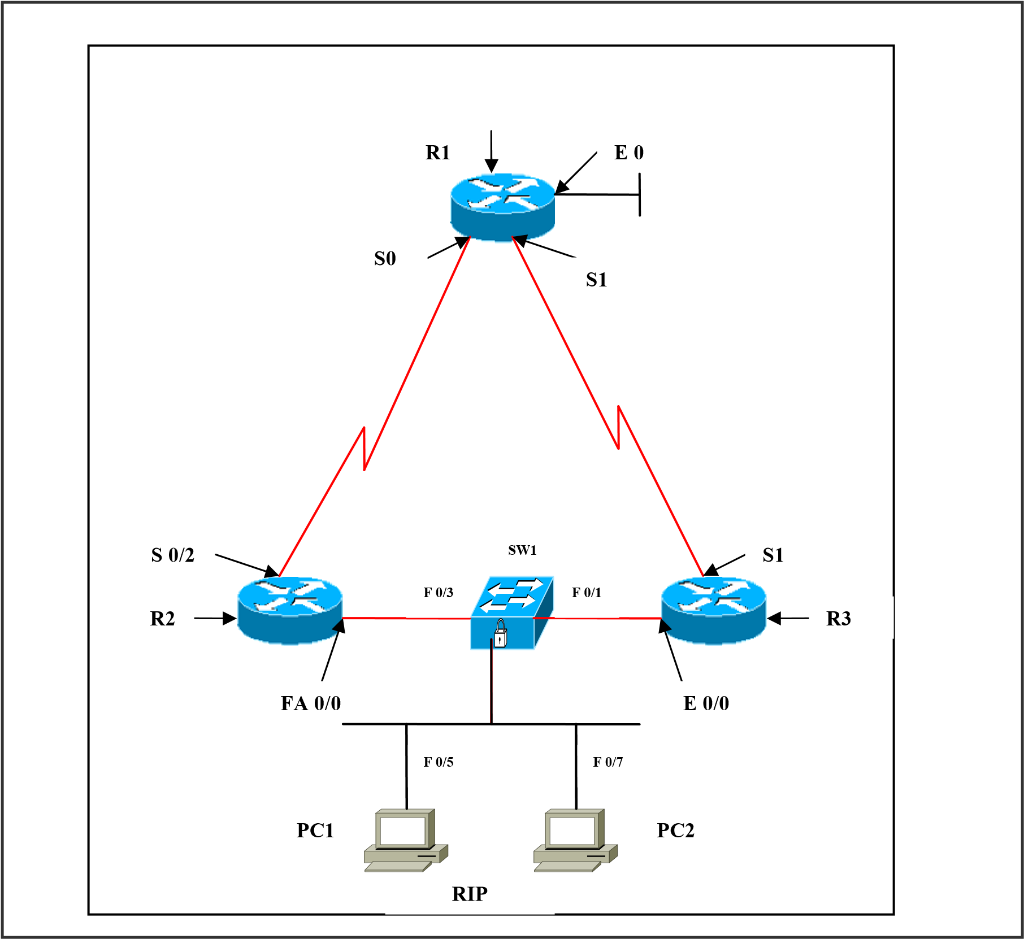
Interface IP Address Configuration :
R1
| Interface | IP Address | Subnet Mask |
| S 0 | 3.3.3.2 | 255.0.0.0 |
| S 1 | 2.2.2.2 | 255.0.0.0 |
| E 0 | 20.1.1.1 | 255.0.0.0 |
R2
| Interface | IP Address | Subnet Mask |
| S 0/2 | 3.3.3.1 | 255.0.0.0 |
| FA 0/0 | 10.1.1.1 | 255.0.0.0 |
R3
| Interface | IP Address | Subnet Mask |
| S 1 | 2.2.2.1 | 255.0.0.0 |
| E 0/0 | 10.1.1.2 | 255.0.0.0 |
SW1
| Ports | VLAN Assigned | Connected To |
| FA 0/1 | VLAN 1 | R3 (10.1.1.2) |
| FA 0/3 | VLAN 1 | R2 (10.1.1.1) |
| FA 0/5 | VLAN 1 | PC 1 (10.1.1.3) |
| FA 0/7 | VLAN 1 | PC 2 (10.1.1.4) |
Task 1
Configure routing protocol (RIP) on R1, R2, and R3.
Configure ports fa0/3, fa0/1, fa0/5 and fa0/7 as access ports on SW1 Configure GLBP.
| R2
Int fa 0/0 Glbp 1 ip 10.1.1.10 Glbp 1 priority 200 Glbp 1 timers msec 250 msec 750 Glbp 1 preempt
| R3
Int e 0/0 Glbp 1 ip 10.1.1.10 Glbp 1 priority 100 Glbp 1 timers msec 250 msec 750
|
R1 SO S1 S 0/2 SW1 SI F 0/3 F01 R3 FA 0/0 E 0/0 F0/5 PC1 PC2 RIP R1 SO S1 S 0/2 SW1 SI F 0/3 F01 R3 FA 0/0 E 0/0 F0/5 PC1 PC2 RIP
Step by Step Solution
There are 3 Steps involved in it

Get step-by-step solutions from verified subject matter experts
 Study Help