







Question: CONNECTEDE EDITING xAssignment Create a new Python 3 Jupyter Notebook. At the top,be sure to name your notebook as'assignment 3,07- Your Name Here. pymb' (obvioualy
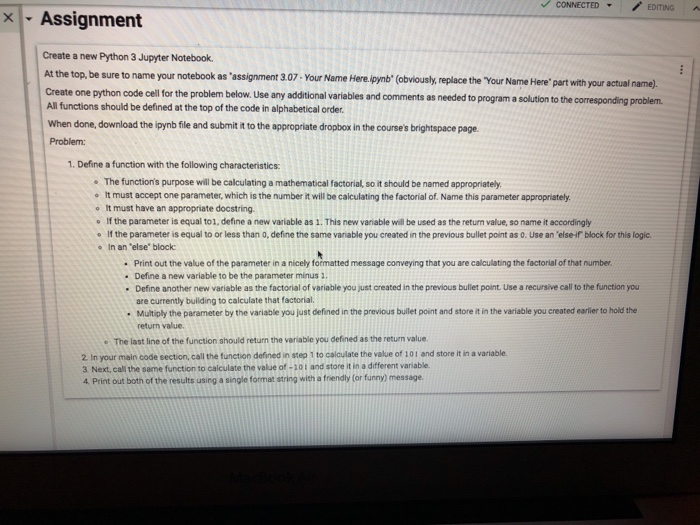
CONNECTEDE EDITING xAssignment Create a new Python 3 Jupyter Notebook. At the top,be sure to name your notebook as'assignment 3,07- Your Name Here. pymb' (obvioualy replace the "Your Name Here'part with your setual name) Create one python code cell for the problem below. Use any additional variables and All functions should be defined at the top of the code in alphabetical order When done, download the ipynb file and submit it to the appropriate dropbox in the course's brightspace page. Problem: comments as needed to program a solution to the corresponding problem. 1. Define a function with the following characteristics The function's purpose will be calculating a mathematical factorial, so it should be named appropriately. o t must accept one parameter, which is the number it will be calculating the factorial of. Name this parameter appropriately o It must have an appropriate docstring. lf the parameter is equal to 1, define a new variable as 1 . This new vanable will be used as the return value, so narme it accordingly If the parameter is equal to or less than 0, define the same vanable you created in the previous bullet pont as 0. Use an 'elser block for this logic. In an 'else" block Print out the value of the parameter in a nicely formatted message conveying that you are calculating the factorial of that number . Define a new variable to be the parameter minus . Define another new variable as the factorial of variable you just created in the previous bullet point Use a recursive call to the function you are currently building to calculate that factorial. Multiply the parameter by the variable you just defined in the previous builet point and store it in the variable you created earlier to hold the return value. e The last line of the function should return the veriable you defined as the return value. 2 In your main code section, call the function defined in step 1 to calculate the value of 101 and store it in a variable. 3 Next, call the same function to calculate the value of -10t and store it in a different variable 4 Print out both of the results using a single format string with a friendly (or funny) message
Step by Step Solution
There are 3 Steps involved in it

Get step-by-step solutions from verified subject matter experts
 Study Help