







Question: Consider a Python GUI program that produces a window with the following widgets: text box to display the value of one element of a given
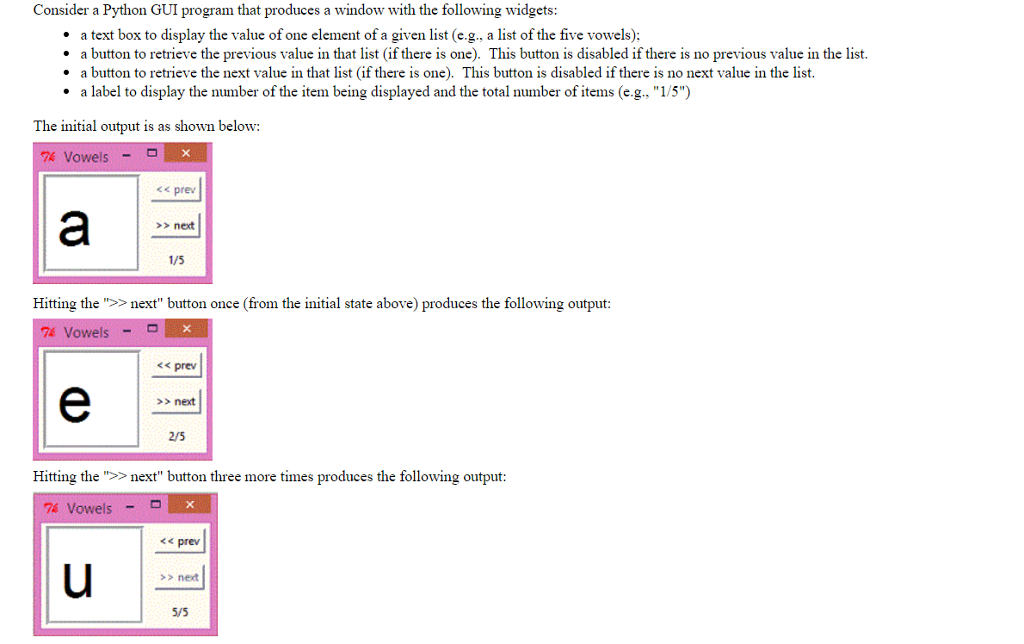
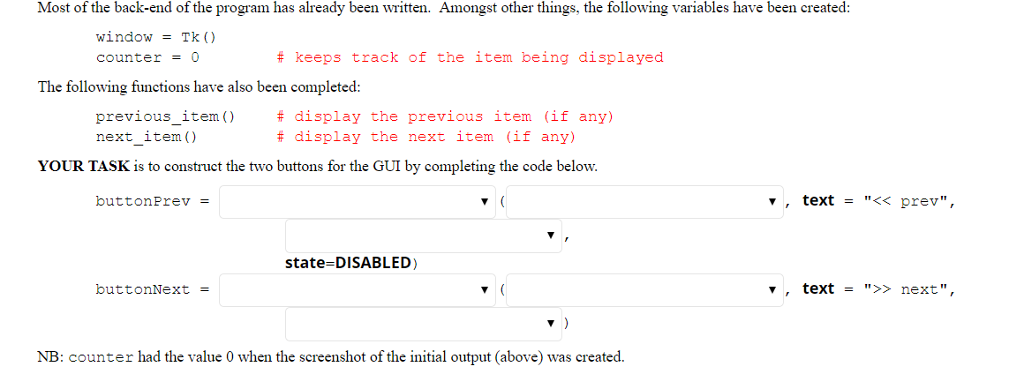
Consider a Python GUI program that produces a window with the following widgets: text box to display the value of one element of a given list (e.g., a list of the five vowels): a button to retrieve the previous value in that list (if there is one). This button is disabled if there is no previous value in the list. button to retrieve the next value in that list (if there is one). This button is disabled if there is no next value in the list. label to display the number of the item being displayed and the total number of items (e.g. "1/5") a a a The initial output is as shown belo: prev >>next 1/5 Hitting the"ext" button once (from the initial state above) produces the following output: 74 Vowels -D s prev >> next 2/5 Hitting the ">> next" button three more times produces the following output: 74 VowelsD prev >> next 5/5
Step by Step Solution
There are 3 Steps involved in it

Get step-by-step solutions from verified subject matter experts
 Study Help